

WhatsApp not working? How to fix it on iPhone and Android
First find out if WhatsApp is down for everyone or just you. If it is just you, the fix is usually the connection, an update or storage.
Is WhatsApp down or is it your phone?
If WhatsApp stops working for lots of people at once, it is an outage and nothing on your phone will fix it. Check Downdetector or search for news of an outage. If others are fine, work through the fixes below.
A quick way to tell: ask a friend whether their WhatsApp works, or open WhatsApp Web on a computer. If WhatsApp works everywhere except your phone, the problem is on your phone, and one of the fixes below will solve it.
What your symptom points to
- Stuck on Connecting: a network problem. Check your data, VPN and date and time first.
- App closes or crashes on opening: an outdated app, full storage or a corrupted cache. Update, free space and clear the cache on Android.
- Messages only arrive when you open the app: background limits or notification settings. See the battery and Background App Refresh steps, and our notifications guide.
- Photos and videos will not download: storage or media auto-download settings.
- “This version of WhatsApp has expired” or not supported: update the app, or your phone’s software.
The fix
9 fixes to get WhatsApp working again
- 1
Restart your phone.
This clears most app and connection glitches, and it is the quickest fix to try. On iPhone, also close WhatsApp from the app switcher before reopening it.
- 2
Check your connection.
Open a website or another app. Switch between Wi-Fi and mobile data. Turn Airplane mode on and off to reset the connection.
- 3
Update WhatsApp.
Old versions stop working. Update it from the App Store (iPhone) or Google Play Store (Android). Turning on automatic app updates stops this happening again.
- 4
Set the date and time automatically.
A wrong date stops WhatsApp from connecting securely. On iPhone: Settings › General › Date & Time. On Android: Settings › General management (Samsung) or System › Date & time.
- 5
Free up storage.
WhatsApp needs space to save messages and media. Keep at least 1 GB free. Inside WhatsApp, Settings › Storage and Data › Manage storage lists the largest chats and files so you can clear forwarded videos quickly.
- 6
Allow background data and battery use (Android).
Go to Settings › Apps › WhatsApp. Tap Mobile data and turn on Allow background data usage. Then tap Battery and choose Unrestricted.
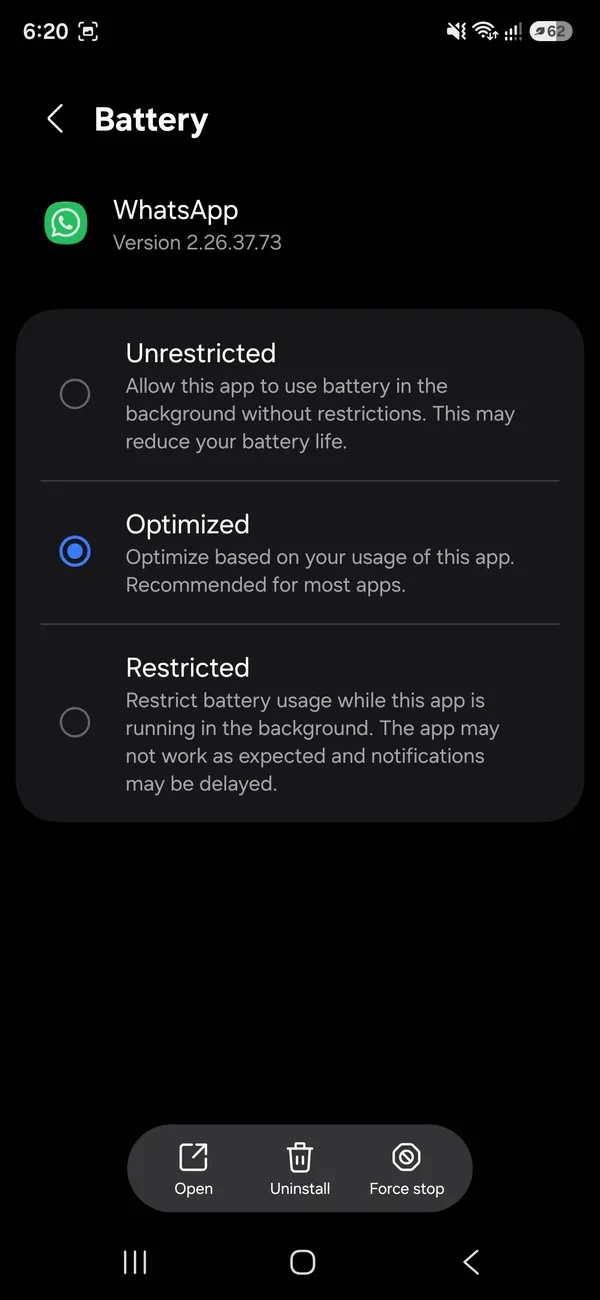
Choose Unrestricted so Android does not pause WhatsApp in the background. - 7
Allow mobile data and Background App Refresh (iPhone).
Go to Settings › Apps › WhatsApp and turn on Cellular Data and Background App Refresh.
- 8
Clear the cache (Android).
Go to Settings › Apps › WhatsApp › Storage and tap Clear cache. Do not tap Clear data.
- 9
Back up, then reinstall.
In WhatsApp go to Settings › Chats › Chat backup and back up. Then delete and reinstall WhatsApp, verify your number and restore the backup.
Is your phone still supported?
WhatsApp drops old phone software every year or two. From September 8, 2026, it supports only Android 6.0 and newer. On iPhone, iOS 15.1 is supported until November 30, 2026, after which iOS 15.5 or newer is required. Check your version in Settings › About phone › Software information (Samsung), Settings › About phone (other Android), or Settings › General › About (iPhone), and install any update available. If your phone cannot update, WhatsApp will stop working on it, and a newer phone is the only fix. Back up your chats before that happens.
Not getting the verification code?
- Enter your number in full international format, with the correct country code (+1 for the US).
- Wait for the timer to finish, then choose Call me to get the code by voice call.
- Make sure the SIM for that number is in the phone and has signal. The code is sent by text or call to the number, not over Wi-Fi.
- If you requested codes many times, WhatsApp makes you wait before the next one. Wait out the timer instead of retrying.
- Never share the six-digit code with anyone. WhatsApp will never ask you for it, and scammers use it to steal accounts.
WhatsApp Web or Desktop not working?
Linked devices work even when your phone is off, but they depend on it staying active. If you do not use WhatsApp on your phone for more than 14 days, all linked computers are logged out. To reconnect, open WhatsApp on the phone, go to Settings › Linked Devices (on iPhone) or tap the three dots › Linked devices (on Android), and scan the QR code again. If the code will not scan, refresh the page, clean the phone camera and make the browser window larger. Office and school networks often block WhatsApp Web; try a different network.
Photos and videos will not download
Check storage first: WhatsApp cannot save media without free space. Then open WhatsApp › Settings › Storage and Data and look at Media auto-download. If it is set to Wi-Fi only, media waits until you are on Wi-Fi. If you see a message that the media cannot be downloaded, it may no longer be stored on WhatsApp’s servers; ask the sender to send it again.
Works on mobile data but not Wi-Fi?
The Wi-Fi network is blocking or slowing WhatsApp. This is common on school, office, hotel and airport networks, and with some router parental controls. Restart your router at home, and if you manage it, check that WhatsApp is not blocked in its filtering or parental control settings. On public Wi-Fi, open a browser first in case there is a sign-in page you have not completed.
“Your phone date is inaccurate”
WhatsApp shows this when your phone’s clock does not match the real time, which breaks the encrypted connection. Turn on automatic date and time as in step 4. If the date is still wrong afterward, check that the time zone is set automatically too, restart the phone, and make sure no app that changes the date, such as a game cheat tool, is installed.
Account banned or temporarily banned
If WhatsApp says your account is banned, the app itself is working, but WhatsApp has blocked your number. Temporary bans often follow using an unofficial app such as GB WhatsApp or WhatsApp Plus, or sending many messages to people who do not have your number saved. Uninstall any unofficial app, install the official WhatsApp, and wait for the timer to end. If you think a permanent ban is a mistake, use the Request a review option in the app. Third-party services that promise to unban accounts are scams.
Messages stuck on one tick?
One gray tick means your message left your phone but has not reached the other person. Usually their phone is off, has no internet, or WhatsApp there is closed and restricted in the background. If your messages to everyone show two ticks, your WhatsApp is fine. If one person stays on one tick for days, they may have changed number or blocked you.
Messages work but calls do not?
- Allow WhatsApp to use the Microphone and Camera in your phone’s settings.
- Turn off Use Less Data for Calls in WhatsApp › Settings › Storage and Data if calls keep dropping.
- Some countries and networks block WhatsApp calls. Test on another Wi-Fi network.
- Close other apps using the microphone, such as a screen recorder or another call.
Frequently asked questions
How do I know if WhatsApp is down?
Check an outage site such as Downdetector or search “WhatsApp down” on X or news sites. If many people report problems at the same time, it is an outage and you can only wait.
Will reinstalling WhatsApp delete my chats?
Only if you have no backup. Back up first in WhatsApp › Settings › Chats › Chat backup, then reinstall and restore when asked.
Why does WhatsApp say my phone is not supported?
WhatsApp regularly drops support for old software. Since September 8, 2026 it needs Android 6.0 or newer, and after November 30, 2026 it needs iOS 15.5 or newer. Update your phone, or WhatsApp will stop working on it.
Why do my WhatsApp messages show only one tick?
The other person’s phone is offline or has WhatsApp restricted. The message delivers when they reconnect.
Why is WhatsApp not working on my phone?
The usual causes are a weak connection, an outdated app, full storage or a WhatsApp outage. Check your connection and Down Detector first, then update the app and restart the phone.
What to try next
People also ask
Why do I only get WhatsApp messages when I open the app?
Your phone is stopping WhatsApp from running in the background, usually to save battery. On Android, set WhatsApp's battery usage to Unrestricted. On iPhone, turn on Background App Refresh for WhatsApp.
Read the full guide: WhatsApp notifications not workingDoes RCS use data?
Yes, it uses Wi-Fi or mobile data like a chat app. Without data, the phone falls back to SMS.
Read the full guide: What is RCS messagingWhy does Wi-Fi drop only when the screen is off?
Battery saving turns Wi-Fi down while the phone sleeps. Turn off battery saver or Low Power Mode to test.
Read the full guide: Phone Wi-Fi keeps droppingI cannot see the Archived row. Where is it?
Scroll to the very top of Chats. On iPhone, pull the list down. If you have no archived chats, the row does not show.
Read the full guide: Unarchive a WhatsApp chatRelated guides
WhatsApp notifications not working
Not getting WhatsApp notifications until you open the app? Fix the settings in WhatsApp and on your phone that block alerts, on both Android and iPhone.
What is RCS messaging
RCS is the modern replacement for SMS, with typing indicators, read receipts and full quality photos between iPhone and Android, and how to turn it on.
Phone Wi-Fi keeps dropping
Phone keeps disconnecting from Wi-Fi? Find out if it is the router or the phone, then restart, forget the network and turn off smart Wi-Fi switching.

Unarchive a WhatsApp chat
Find your archived chats in WhatsApp and move them back to the main list on iPhone, Android or WhatsApp Web. Plus why archived chats come back on their own.
More guides you may need

Netflix app not working
Netflix app not working, stuck loading or showing an error? Check for an outage, sign out and back in, clear the app data and try 6 more fixes on your phone.

Remove a TikTok repost
Remove a repost on TikTok from the video’s Share menu or your Reposts tab in two taps. Plus what to know before using tools that delete all reposts at once.