

What is RCS messaging? How it works on iPhone and Android
RCS brings chat app features to normal texting, and now works between iPhones and Android phones.
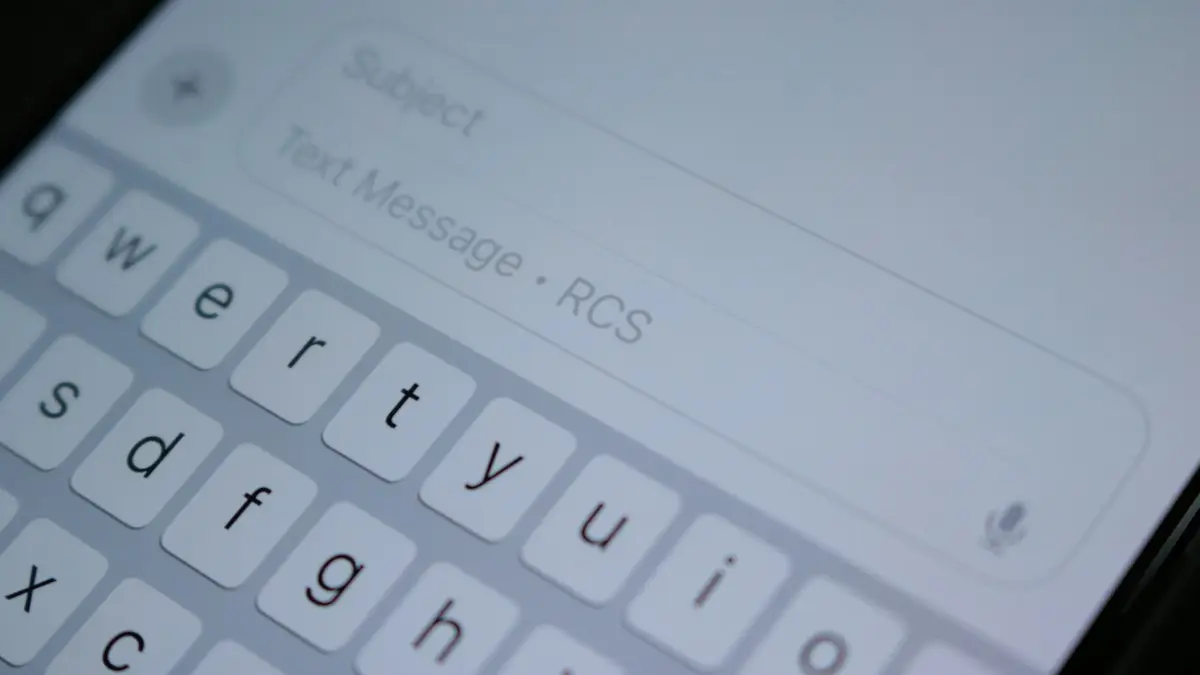
Photo by Samuel Angor on Unsplash
The fix
Turn on RCS
- 1
Android: Google Messages › profile picture › Messages settings › RCS chats.
- 2
iPhone: Settings › Apps › Messages › RCS Messaging.
How RCS is different from regular texting
Old style texts (SMS) were built in the 1990s. They carry 160 characters at a time, and pictures go as MMS, which squeezes photos down to a blurry file and often fails in group chats. RCS replaces both. It sends messages over your internet connection, the same way WhatsApp or iMessage does, but it still lives in your phone's built-in messaging app and still uses your phone number. You do not sign up for anything or install a new app.
For you, the change shows up as small things that make texting feel modern: you see when the other person is typing, you can see when they read your message, you can react to a message with an emoji, and you can send a photo or video at near full quality. Group chats work better too. You can name the group, add and remove people, and leave a group without everyone getting broken messages.
RCS vs SMS vs iMessage
- SMS and MMS: work on every phone with signal, need no data, but have no typing indicators, low quality media and weak group chats.
- RCS: works between Android phones and iPhones that support it, uses data, adds typing indicators, read receipts, reactions and high quality media.
- iMessage: Apple only. Blue bubbles, end-to-end encrypted, works over data, and stays the default between two iPhones.
On an iPhone, a chat with another iPhone still uses iMessage. RCS only kicks in when you text an Android phone, and those bubbles stay green. If you want to know more about the colors, read why some texts are green and some are blue.
How to turn on RCS on Android
- Open Google Messages. Samsung phones now use Google Messages by default; if you still use Samsung Messages, switch the default app in Settings › Apps › Choose default apps › SMS app.
- Tap your profile picture or initial at the top right.
- Tap Messages settings, then RCS chats.
- Turn on Turn on RCS chats. The status should change from Setting up to Connected within a few minutes.
If the status stays on Setting up for more than a day, check that Carrier services and Google Messages are both up to date in the Play Store, turn on mobile data even if you are on Wi-Fi, and restart the phone. Some MVNOs (smaller carriers that use a big network) took longer to support RCS, so your carrier can also be the reason.
How to turn on RCS on iPhone
- Make sure the iPhone runs iOS 18 or later in Settings › General › Software Update.
- Open Settings › Apps › Messages.
- Tap RCS Messaging and turn it on. On some carriers you will see it under Settings › Apps › Messages › Text Messaging.
If the switch is missing, your carrier has not turned RCS on for your plan yet, or your carrier settings are old. Go to Settings › General › About and wait a few seconds; if a carrier update is waiting, a pop-up asks you to install it. Verizon, AT&T and T-Mobile all support RCS on iPhone, and most of their prepaid brands followed.
How to tell if a chat is using RCS
On Android, the text box says RCS message, or shows a small lock if the chat is encrypted. On iPhone, the text box says Text Message • RCS. If it says Text Message or SMS, the other phone or carrier does not support RCS, or one side has it turned off, and the chat falls back to plain SMS.
Is RCS secure?
Chats between two Android phones using Google Messages are end-to-end encrypted, which means only the two phones can read them. Chats between iPhone and Android over RCS were not end-to-end encrypted at launch. The industry group behind RCS added encryption to the standard, and Apple and Google said they would support it, but rollout depends on software updates on both sides. Until you see the lock icon, treat an iPhone to Android RCS chat like a regular text: fine for daily talk, not for passwords or bank codes. For private chats across platforms, an app like Signal or WhatsApp is the safer choice today.
Does RCS cost money?
RCS itself is free. It uses a small amount of data, so on an unlimited plan you will not notice. On a capped plan, sending lots of videos uses data the same way any chat app does. When you have no data at all, the phone falls back to SMS, which counts against your texting allowance if your plan has one. Most US plans have unlimited texting, so this rarely matters. See how much data you really need if you are choosing a plan.
Common RCS problems and fixes
- Messages send as SMS: the other phone has RCS off or no data. Ask them to check their settings.
- Stuck on Setting up: update Carrier services and Google Messages, turn on mobile data and restart.
- Texts not arriving after switching phones: turn RCS off on your old phone before you move the SIM, or the messages may keep going there.
- iPhone switch is gray: install the latest iOS and carrier settings update.
If texts from iPhones stopped arriving on your Android phone, our guide to Android not getting texts from iPhone walks through the deregistration step that fixes most cases.
Why did my texts change after an update?
Many people first notice RCS when typing bubbles or reactions suddenly show up in chats with Android friends. That happened because iOS 18 and recent Google Messages updates turned RCS on by default for many carriers. Nothing is wrong with your phone. If you prefer plain texts, you can turn RCS off in the same settings, and your chats go back to SMS and MMS.
RCS in group chats with iPhone and Android
Mixed groups used to be the worst part of texting. With MMS, photos came through blurry, replies split into separate threads and people could not leave. With RCS on every phone in the group, you can name the chat, see reactions and share high quality media. If even one person has RCS off or no data, the group may fall back to MMS for everyone, so ask the person whose bubbles look different to check their settings.
Should you turn RCS off?
For most people, no. Leave it on. Turn it off if you are on a plan with very little data and you send many photos, if you are about to switch phones and want to avoid messages going to the old device, or if a carrier bug is stopping texts from arriving. Turning it off does not delete any messages.
What about texting businesses?
Brands can also use RCS to send messages with logos, buttons and carousels, for example for delivery updates or flight check-in. These show a verified badge. Scammers use texts too, so the same caution applies: do not tap links in messages you did not expect. Our guide on how to spot scam texts explains the warning signs, and you can also block spam texts on iPhone.
Bottom line
RCS is simply better texting that both Android and iPhone now share. Turn it on, keep your apps and carrier settings updated, and use an encrypted app for anything sensitive until cross-platform encryption is fully live.
Does RCS use data?
Yes. RCS sends messages over Wi-Fi or mobile data, like iMessage. Text messages use very little data, but photos and videos use more. If data is off, your phone falls back to SMS.
Frequently asked questions
Does RCS use data?
Yes, it uses Wi-Fi or mobile data like a chat app. Without data, the phone falls back to SMS.
Are RCS messages blue on iPhone?
No. RCS chats with Android users stay green, but show an RCS label in the text box.
Does RCS use data?
Yes. RCS messages travel over Wi-Fi or cellular data, not the SMS channel. A text uses almost nothing, while photos and videos use more, much like any chat app.
Is RCS encrypted between iPhone and Android?
Not fully yet. Chats between two Google Messages users can be end-to-end encrypted, but chats between iPhone and Android rely on a newer standard that carriers and phone makers are still rolling out, so check the lock icon in the conversation.
Sources
Official pages these steps are based on. Menus can differ by software version.
People also ask
What does it mean when Google Messages says the recipient is offline?
Your message went out as an RCS chat, which needs data or Wi-Fi on both phones, and the other phone is not reachable right now. It stays queued until they reconnect, unless you resend it as a text.
Read the full guide: Google Messages recipient is offlineWhat does waiting to connect mean in Google Messages?
The app is trying to turn on RCS chat features and has not finished. Until it does, your messages send as regular SMS or MMS.
Read the full guide: Google Messages waiting to connectWhy did an iPhone contact turn green?
One of you has no data, iMessage is off, or they switched to Android. It can also happen when iMessage is briefly down.
Read the full guide: Green vs blue messagesWhy do texts to Android phones fail?
The iPhone may be trying iMessage to a number that left iPhone. Turn on Send as Text Message and RCS Messaging, or ask them to deregister their number from iMessage.
Read the full guide: iPhone texts not sendingRelated guides
Google Messages recipient is offline
Google Messages recipient is offline but they are not? Turn on resend as text, verify your number, check data and RCS, and test with SMS. 6 fixes for Android.
Google Messages waiting to connect
Google Messages waiting to connect or stuck on setting up chat features? Check data, your number and the RCS switch, then clear the app data. 7 fixes that work.
Green vs blue messages
Blue bubbles are iMessages, green ones are SMS or RCS texts. Why a message turns green, what you lose, and how to get blue bubbles back with an iPhone contact.
iPhone texts not sending
iPhone text messages not sending or showing a red exclamation mark? Tap Try Again, turn on Send as Text Message and RCS, check signal and try 5 more fixes.
More guides you may need
Google Photos vs iCloud
Google Photos vs iCloud compared on price, free storage, quality, sharing and privacy. See which fits your iPhone or Android and how to switch safely.
How long iPhones last
How long do iPhones last? Most last five to seven years if the battery and updates hold. Learn the signs to upgrade and how to make yours last longer.