

Android storage full? How to free up space on Samsung and other phones
A full phone gets slow, stops taking photos and fails to install updates. These steps clear space safely, starting with the files you will never miss.
Photo by Alexander London on Unsplash
What happens when Android storage is full
- The camera refuses to take photos or record video.
- App and system updates fail to install.
- Apps crash, and the phone becomes slow and laggy.
- Messages and WhatsApp media stop downloading.
- Backups can fail because there is no room for temporary files.
Storage fills faster than most people expect. Android and the preinstalled apps take a large share before you add anything, 4K video uses a lot of space per minute, and messaging apps quietly save every photo, video and voice note you receive. App caches, offline downloads and a Trash folder you never empty finish the job.
Step 1: find out what is using space
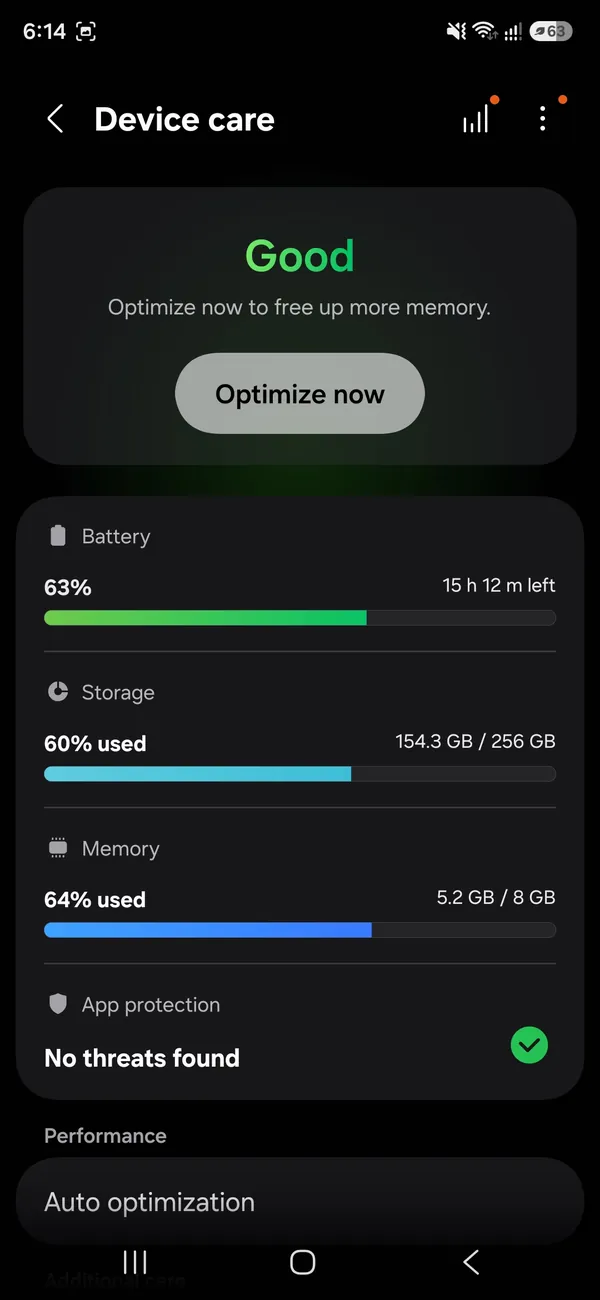
The storage screen breaks your space into images, videos, apps, audio and more. Tap any category to see the largest items in it. On most phones, videos and WhatsApp media are the biggest surprise. Write down the three biggest categories before you start, so you know where your effort will pay off and can see how much you freed at the end.
Step 2: clear space safely
The fix
The biggest wins
- 1
Empty the Trash or Recycle bin.
In Samsung Gallery tap ☰ › Recycle bin › Empty. In Google Photos go to Collections (or Library) › Bin. Deleted items stay there, taking space, for up to 30 or 60 days.
- 2
Clean up WhatsApp.
Open WhatsApp › Settings › Storage and data › Manage storage. Review “Larger than 5 MB” and “Forwarded many times” first.
- 3
Empty the Downloads folder.
Open the Files or My Files app, go to Downloads and sort by size. Old PDFs, APKs and videos add up quickly.
- 4
Use the built-in cleaner.
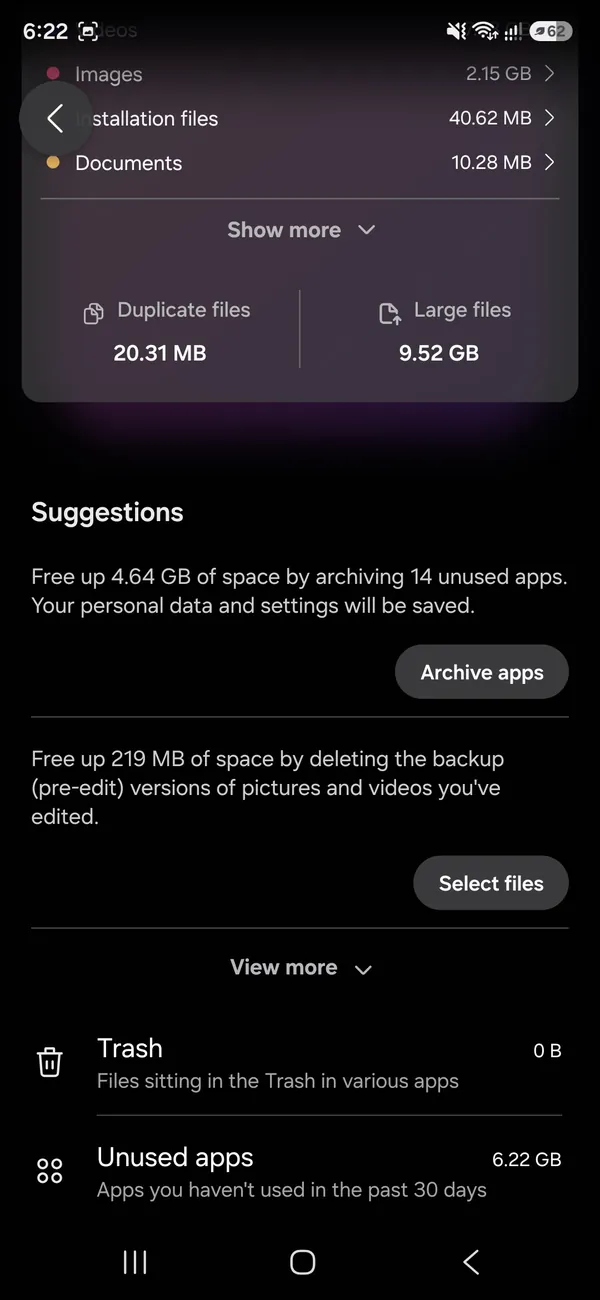
On Samsung, Device care › Storage shows duplicate files, large files and unused apps. On other phones, the free Files by Google app has a Clean tab that does the same.
- 5
Uninstall apps you do not use.
Games are often more than 1 GB each. You can reinstall them from the Play Store later.
More places space hides
- App caches: social apps and browsers can build caches of several gigabytes. Clear them in Settings › Apps › [app] › Storage › Clear cache. See how to clear app cache on Android.
- Offline downloads: Netflix, Spotify, YouTube and Google Maps offline areas are easy to forget. Remove old downloads in each app’s settings.
- Messages: Google Messages and Samsung Messages keep every photo and video in long group chats. Delete old threads with heavy media, or the media alone.
- Screen recordings and screenshots: check their albums in Gallery; recordings are often large.
Stop WhatsApp filling your phone
- Turn off auto-download: in WhatsApp › Settings › Storage and data › Media auto-download, set photos, audio, videos and documents to download only on Wi-Fi, or never.
- Turn off media visibility: in Settings › Chats, turn off Media visibility so received media does not also clutter your Gallery.
- Use disappearing messages: in busy groups, media disappears on its own after the time you choose.
Why is System so big?
The System category holds Android itself, preinstalled apps and space reserved for updates. It is normal for it to take a noticeable share of storage, and it can grow a little after major updates. You cannot shrink it safely, and apps that claim to “clean system files” cannot either. Focus on the categories you control instead.
Let Android archive apps you rarely use
The Play Store can archive apps you have not used for a while. Archiving removes most of the app but keeps your data and its icon, and tapping the icon reinstalls it. Turn it on in the Play Store under your profile picture › Settings › General › Automatically archive apps, if your phone offers it. On Samsung, Device care › Storage also lists unused apps you can remove in one go.
Step 3: move photos and videos off the phone
- Google Photos: turn on Backup, then use Free up space to remove the device copies of items that are already safely backed up.
- SD card: if your phone has a card slot, set the Camera app to save to the SD card and move existing videos there with My Files.
- Computer: connect the phone with a USB cable, choose File transfer on the phone, and copy the DCIM folder to your PC.
Camera settings that save space
In the Samsung Camera app, open settings and turn on High efficiency pictures, and under Advanced video options choose HEVC for videos. Both keep quality close to the same while using noticeably less space. Recording in 1080p instead of 4K, unless you need 4K, also saves a lot. Pixel phones use efficient formats by default, and you can pick the video resolution in the Camera app settings.
Move files to an SD card on Samsung
- 1
Open My Files and tap Images, Videos or Internal storage › DCIM.
- 2
Touch and hold a file or folder, then select everything you want to move.
- 3
Tap Move, choose SD card, open a folder and tap Move here.
- 4
Set the camera to save new photos to the card.
Open Camera › Settings › Storage location and choose SD card, if your phone offers it.
SD cards can fail, so keep important photos backed up to the cloud or a computer too. Buy a card from a known brand, since fake high-capacity cards sold online often lose files.
“Not enough storage” with space free?
If the Play Store says there is not enough space when there clearly is, restart the phone first. Then clear the cache of Google Play Store and Google Play services in Settings › Apps. Large app updates need free space for the download and the install at the same time, so an update of 1 GB may need about twice that free.
Keep storage from filling up again
- Leave Google Photos backup on and use Free up space once a month.
- Empty the Gallery Recycle bin and the Downloads folder when you do.
- Review WhatsApp’s Manage storage screen every few weeks.
- Delete offline movies and playlists after you watch or listen.
- Check Device care › Storage for large files and unused apps.
A few minutes a month keeps the phone well clear of the full warning. If you still hit it every few weeks even with these habits, your phone is simply too small for how you use it, and more cloud space or a bigger phone is the real fix. A phone that is always full also tends to feel slow, so see why an Android phone gets slow once you have space again.
Cloud storage, SD card or a bigger phone?
Google gives 15 GB free, shared between Gmail, Drive and Google Photos. If that fills up, Google One plans add more and can be shared with family. Many Galaxy A phones still take a microSD card, which is a cheap way to add space for photos, videos and music, though recent Galaxy S phones do not have a card slot. If your phone has 64 GB or less and you are always full, the lasting fix is a phone with more storage. Before you switch, see how to back up an Android phone.
Try to keep at least 10% of your storage free. Android needs spare room for app updates, system updates and temporary files, and a completely full phone slows down noticeably.
Frequently asked questions
Why is my storage full when I have deleted everything?
Deleted photos usually sit in a Trash or Recycle bin for 30 days. WhatsApp media, app caches and the Downloads folder also take space that does not show up as photos.
Is it safe to delete the “Other” or “System” category?
You cannot delete the system files that run Android. The “Other” category often includes app caches and downloads, which you can clear with the steps in this guide.
Does clearing cache delete my data?
No. Clearing an app’s cache removes temporary files only. Clear storage (or Clear data) is different: it resets the app and deletes its data, so avoid it unless you mean to.
How much storage does an Android phone need?
For most people, 128 GB is the practical minimum today, and 256 GB if you shoot a lot of video or keep offline music and games. Android itself uses a sizable chunk before you add anything.
What to try next
People also ask
What is “System Data” and can I delete it?
System Data holds caches, logs and temporary files. You cannot delete it directly, but it usually shrinks after a restart, after clearing Safari data, or once iOS finishes an update.
Read the full guide: Free up iPhone storageWhere do Samsung screen recordings go?
In the Gallery app, in the Screen recordings album. The files are stored in Internal storage › DCIM › Screen recordings.
Read the full guide: Screen record on SamsungIs Other storage the same as System Data?
Yes. Apple used the label Other for years, and recent iOS versions call it System Data. It covers the files that do not fit into categories such as Apps, Photos and Messages.
Read the full guide: Other storage on iPhoneWhy does Google Photos say waiting for Wi-Fi?
Backup is set to Wi-Fi only. Connect to Wi-Fi, or allow mobile data in Photos settings › Backup › Mobile data usage.
Read the full guide: Google Photos not backing upRelated guides
Free up iPhone storage
iPhone storage full? Here is how to find what is using the space and clear several gigabytes without losing a single photo or message you care about.
Screen record on Samsung
Screen record on your Samsung Galaxy with the built-in Screen recorder. Record sound or your voice, add a selfie video and find your recording in Gallery.
Other storage on iPhone
What is Other storage on iPhone, now called System Data, and why it gets huge. Learn what it holds and 8 ways to shrink it, from restarting to a backup restore.
Google Photos not backing up
Google Photos not backing up or stuck on Preparing backup? Check your storage, Wi-Fi and battery saver, pick the right folders and give it full photo access.
More guides you may need
Android notifications not showing
Android notifications not showing on the lock screen or late? Check app permission, Do Not Disturb, battery limits and sleeping apps on Samsung and Pixel.
Android voicemail not working
Android voicemail not working or no voicemail alerts? Test by holding 1, check the voicemail number, clear the visual voicemail app and try 5 more fixes.