

How to block a number on Android (Samsung and Pixel)
A block in the Phone app stops both calls and texts from that number on most Android phones.
Photo by Alexey Demidov on Unsplash
The fix
Samsung Galaxy
- 1
Open Phone and tap Recents.
- 2
Tap the number, then the info button.
- 3
Tap Block and confirm.
The fix
Pixel and most other phones
- 1
Open Phone and tap Recents.
- 2
Touch and hold the number.
- 3
Tap Block/report spam, then Block.
The fix
Block any number by hand
- 1
Open Phone › three dots › Settings.
- 2
Tap Block numbers or Blocked numbers.
On a Samsung phone this screen is called Call settings and Block numbers is near the top.
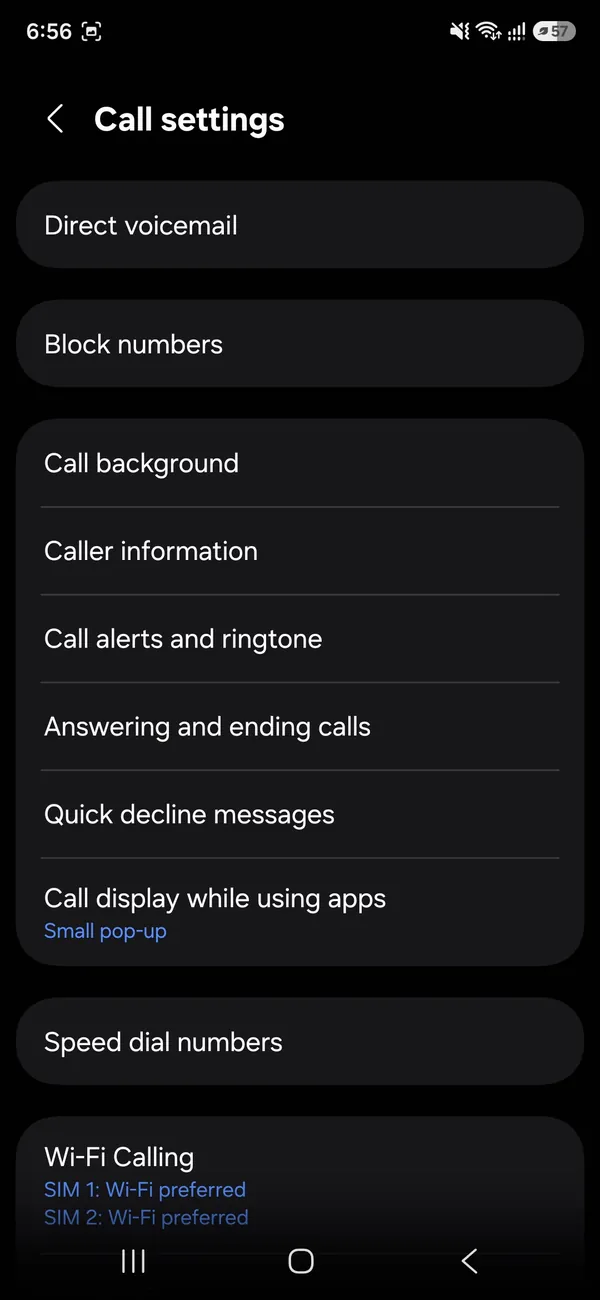
- 3
Type the number and tap Add.
What blocking a number does on Android
Blocking tells your phone to reject calls and texts from that number. Calls end before your phone rings and texts are hidden or deleted. The other person is not told. Blocking works on the phone itself, so it only covers the number you block. A caller using a different number, an app like WhatsApp, or a hidden number will still reach you unless you block those too.
Block texts in Google Messages
- Open Google Messages and touch and hold the conversation.
- Tap the three dots, then Block.
- Leave Report spam checked if it is junk, then tap OK.
Blocked texts move to Spam & blocked in the menu, so you can still read them if you need proof later.
Block texts in Samsung Messages
Open the conversation, tap the three dots › Block contact or Block number. Blocked messages appear under Messages settings › Block numbers and spam › Blocked messages. Samsung also lets you block messages that contain certain words or phrases, which helps with spam that keeps changing numbers.
Block unknown and private numbers
On Samsung, open Phone › three dots › Settings › Block numbers and turn on Block calls from unknown numbers. On Pixel, open Phone › Settings › Blocked numbers › Unknown. This blocks callers who hide their caller ID. It does not block numbers you have not saved; for that, use call screening or filters. See blocking spam calls on Android for the stronger options.
Block a number in WhatsApp and other apps
Phone app blocks do not cover apps. In WhatsApp, open the chat, tap the name and choose Block. Instagram, Facebook Messenger and Snapchat each have their own block option in the person's profile. If you are blocking someone who is harassing you, block them everywhere they can reach you.
Block a number through your carrier
Carriers offer blocking that works before calls reach the phone. Verizon Call Filter, AT&T ActiveArmor and T-Mobile Scam Shield have free versions that block spam and paid ones with more control. Verizon's Smart Family and Block Calls & Messages features let you block specific numbers on the network for a set time. Carrier blocks also stop voicemails that phone blocks may miss.
How to unblock a number on Android
Open Phone › three dots › Settings › Block numbers (Samsung) or Blocked numbers (Pixel). Tap the minus or X next to the number. In Google Messages, open Spam & blocked, tap the conversation and choose Unblock. Messages sent while the number was blocked are not delivered later.
What the blocked caller hears
Most callers hear one ring or none before the call goes to voicemail, or hear a message that the person is unavailable. Texts appear to send normally on their side, though RCS messages will not show Delivered. They get no notice saying they are blocked.
Blocking not working?
- Calls still ring: the person uses another number or a hidden ID. Block unknown callers too.
- Texts still arrive: you blocked in a different messaging app. Block in the one you use as default.
- Blocks disappeared: after switching phones, blocked lists may not transfer. Re-add them.
- Spoofed numbers: scammers fake a new number every call. Use spam filters, not one-by-one blocks.
If someone is harassing you
Keep a record before deleting anything. Screenshots of texts and a list of call times help if you need to report it. Your carrier can change your number, and police can request records if threats are involved. If you think someone might be tracking your phone, read how to check if your phone is tracked.
Block a number on Pixel from the Phone app
On a Pixel, you can also block from a contact. Open Contacts, tap the person, then the three dots › Block numbers. For numbers that are not saved, Recents is quickest. Pixel phones also have Call Screen, which answers unknown callers for you and asks why they are calling, and a spam filter under Phone › Settings › Caller ID & spam.
Block a number on Motorola, OnePlus and others
Most brands use the Google Phone app, so the Pixel steps apply. If your phone uses its own dialer, look in its settings for Blocked numbers or Blocklist. Xiaomi phones use the Security app › Blocklist for both calls and texts.
Block a number on Samsung from Contacts
Open Contacts, tap the person, then More › Block contact. All numbers saved for that contact are blocked together, which is handy when someone has a work and home line.
Block all calls except contacts
If you get many unwanted calls, use Do Not Disturb with exceptions. On Samsung, open Settings › Notifications › Do not disturb › Calls and messages and allow only contacts or favorites. On Pixel, open Settings › Modes › Do Not Disturb › People. Unknown callers go straight to voicemail while the mode is on, and nobody is blocked for good.
Blocking and your kids' phones
On a child's Android phone, Google Family Link does not block single numbers, but you can block numbers on their phone directly and lock the settings. Carrier parental tools such as Verizon Smart Family can block contacts from the network. See Android parental controls for the rest of the setup.
Should you block or report?
For a single unwanted person, block. For scams and robocalls, report as spam too, which helps Google and your carrier warn other people. You can also report to the FTC at reportfraud.ftc.gov and add your number to the National Do Not Call Registry, which stops legal telemarketers but not scammers.
Block hidden, private and No Caller ID calls
Some callers hide their number on purpose. These show up as Private, Unknown or No Caller ID. You cannot block them one by one because there is no number to block. Turn on the unknown caller block described above instead. Your carrier can also trace or block repeated hidden calls if you report harassment.
Does blocking a number delete old messages?
No. Earlier calls and texts stay in your history. Delete them yourself if you want them gone, or keep them as a record. Blocking only affects new calls and texts from that point on.
Blocked numbers after a factory reset
On Samsung, the blocked list is part of your Samsung account backup and Phone app data. On Pixel, blocked numbers sync through your Google account on recent Android versions. After a reset or a new phone, open the block list to check it came back, and add any missing numbers by hand.
In short: block in the Phone app for one person, use spam filters for robocalls, and add carrier tools if unwanted calls keep coming from new numbers. Keep records if the contact turns into harassment.
Blocking is free, quick to undo and private. The other person never gets a notice, so there is no harm in blocking someone now and unblocking them later if things change.
Check your block list every few months and remove numbers you no longer need there.
Frequently asked questions
What does a blocked caller hear?
Usually the call goes to voicemail or ends after one ring. They are not told they are blocked.
How do I unblock a number?
Phone app › ⋮ › Settings › Block numbers (or Blocked numbers), then tap the minus or X next to the number.
Does blocking a number on Android block texts too?
On Samsung and Pixel, yes. A block in the Phone app also blocks SMS and RCS from that number in Google Messages and Samsung Messages.
Can a blocked number leave a voicemail?
Often yes, because voicemail is handled by your carrier. Many phones file those in a blocked folder or hide them, and carrier blocking can stop them fully.
People also ask
Will I miss real calls from unknown numbers?
Blocking all unknown numbers can stop doctors or delivery drivers. Spam filters or Call Screen are safer since they only stop suspected spam.
Read the full guide: Block spam calls on AndroidDoes the person know I blocked them?
They are not notified. Their calls go to voicemail and their iMessages never show Delivered on their side.
Read the full guide: Block a number on iPhoneWhy does my Samsung not ring when I am using an app?
Incoming calls may be set to show as a small pop-up while you use apps, and the ringtone can be quieter or muted by the app. Check Phone app › Settings › Call display while using apps, and raise the ringtone volume.
Read the full guide: Android phone not ringingWhat does IMEI stand for?
IMEI means International Mobile Equipment Identity. It is a unique 15-digit number that identifies one phone on mobile networks.
Read the full guide: Find your IMEI numberRelated guides
Block spam calls on Android
Block spam calls on Android with Samsung Caller ID and spam protection or the Google Phone spam filter and Call Screen, plus free carrier tools that help.
Block a number on iPhone
Block a number on iPhone from Recents, Messages or Settings, see what happens to their calls and texts, and how to find blocked voicemails or unblock later.
Android phone not ringing
Android phone not ringing for incoming calls? Check sound mode, Do not disturb, Mute all sounds and call forwarding with 10 fixes for Samsung and Pixel.
Find your IMEI number
How to find IMEI number on any phone: dial *#06#, check Settings, the SIM tray, the box or your account. Includes dual SIM, eSIM and dead phone methods.
More guides you may need
How to tell if an iPhone is fake
Check if an iPhone is genuine before you buy. Use the serial number on Apple's Check Coverage page, match the IMEI, and review Parts and Service History.
How to use an iPhone
How to use an iPhone for the first time: buttons, gestures, Home Screen, Control Center, calls, texts, camera, apps and safety. Simple steps for beginners.