

How to block spam calls on Android (Samsung and Pixel)
Both Samsung and Google phones have a free spam filter built in. Turning it on stops most robocalls.
Americans receive billions of robocalls every month, and most Android phones already have the tools to stop the bulk of them. The catch is that the settings are switched off by default or hidden in the Phone app. Below are the steps for Samsung Galaxy and Pixel, the free carrier tools that add another layer, and what to do about the scam calls that still get through.
How to block spam calls on a Samsung Galaxy
The fix
Samsung Galaxy
- 1
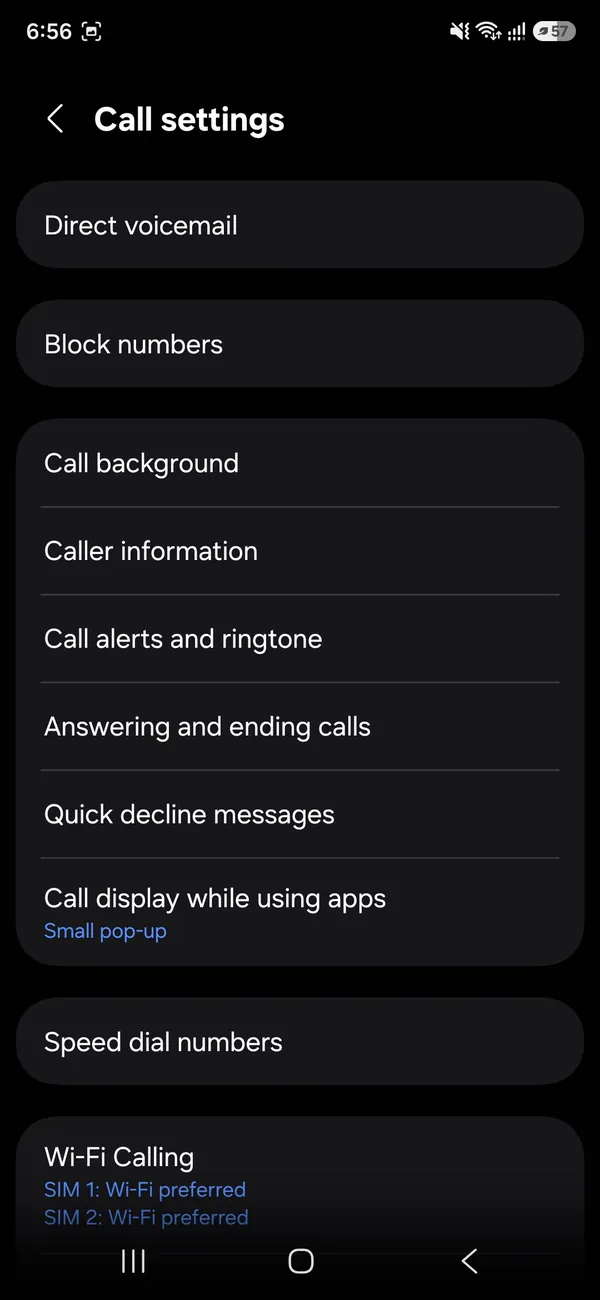
Open Phone › three dots › Settings.
This opens Call settings on a Samsung phone.
- 2
Tap Caller ID and spam protection and turn it on.
This option is not offered in every country or by every carrier. If it is missing, tap Block numbers and turn on Block unknown/private numbers instead.
- 3
Turn on Block spam and scam calls and choose a level.
In the US, Samsung’s spam protection uses caller data from Hiya. With it on, suspected spam shows a red warning on the incoming call screen, and calls above the level you choose are blocked and listed in your call log so you can check nothing important was caught.
Pixel and other phones with the Google Phone app
The fix
Pixel and phones with Google Phone
- 1
Open Phone › three dots › Settings › Spam and Call Screen.
- 2
Turn on See caller and spam ID and Filter spam calls.
- 3
Turn on Call Screen to have Google answer unknown callers.
On Pixel phones in the US, Call Screen can answer calls from unknown numbers automatically, ask who is calling and why, and only ring you if it looks legitimate. You can set how it treats spam, suspicious and unknown callers separately. Robocallers usually hang up, while real callers such as a pharmacy or delivery driver state their reason, and you see a live transcript to decide whether to pick up.
Add your carrier’s free spam blocker
- T-Mobile and Metro: Scam Shield blocks scam likely calls on the network. Manage it in the T-Life or Scam Shield app.
- Verizon: Call Filter has a free version with spam detection and blocking. The paid Plus version adds caller ID for unknown numbers.
- AT&T and Cricket: ActiveArmor blocks fraud calls and labels suspected spam. The basic protection is free in the ActiveArmor app.
Carrier blocking works before the call reaches your phone, so it complements the phone’s own filter. Paid tiers mainly add features you may not need.
Block all unknown or private numbers
For the most aggressive filtering, block calls from numbers not in your contacts. On Samsung, go to Phone › three dots › Settings › Block numbers and turn on Block calls from unknown numbers. On Pixel, open Phone › Settings › Blocked numbers and turn on Unknown. These calls go straight to voicemail. Use this carefully: you may miss doctors’ offices, schools, delivery drivers and job callbacks. Checking voicemail regularly helps, and Call Screen is often the better balance.
Check blocked calls now and then
Filters sometimes catch a real call, such as a new doctor’s office or a delivery driver using a work phone. Once a week or so, take a minute to look through blocked and spam calls in your call log. On Samsung, open Phone › three dots › Settings › Block numbers or the call log filter for blocked calls. On Pixel, blocked and spam calls show in Recents with a label. If a real number was caught, save it as a contact so it rings through next time, and mark it as not spam if the option appears.
Voicemail is your safety net. Keep it set up and check it, because legitimate callers usually leave a message while robocalls rarely do.
Report spam numbers
When a spam call gets through, report it from your call log. On Samsung, tap the number, then Block or Report. On Pixel, touch and hold the call and choose Block/report spam. Reports help the spam filters catch the number for everyone. You can also report unwanted calls to the FTC at reportfraud.ftc.gov, which helps with enforcement.
Why some spam calls still get through
Scammers change numbers constantly and often spoof real ones, including numbers that share your area code and first digits, known as neighbor spoofing. A brand-new or spoofed number has no spam reports yet, so filters may let it ring. That is why it helps to combine a phone filter, a carrier blocker and Call Screen or voicemail for unknown numbers. No setting stops every call, but together they catch most of them.
Motorola, OnePlus and other Android phones
Many Android phones use the Google Phone app, so the Pixel steps above apply, although Call Screen may not be available on every model. If your phone uses its own dialer and has no spam setting, you can install Google’s Phone app from the Play Store on supported phones, or rely on your carrier’s app, which works whatever phone you have.
Spam texts on Android
Spam calls and spam texts often come together. In Google Messages, turn on spam protection in Settings › Spam protection, and in Samsung Messages use Block numbers and spam. Forward scam texts to 7726 (SPAM) so your carrier can block the sender, then delete them. Never tap links in unexpected delivery, bank or toll texts.
Set this up for older relatives
Older parents and grandparents are the main target of phone scams. Next time you visit, turn on the spam filter and carrier blocker on their phone, save their doctors and pharmacy as contacts so those calls ring through, and agree on a simple rule: never give codes or payment details to anyone who calls them.
Common scam calls to hang up on
- Someone claiming to be from your bank’s fraud department asking you to confirm a code or move money.
- The IRS, Social Security or Medicare threatening arrest or benefits loss.
- Car warranty, student loan forgiveness or free vacation offers.
- A package delivery problem that needs a payment.
- Tech support saying your phone or computer is infected.
Real banks and agencies do not ask for codes, gift cards, crypto or payment apps over the phone. Hang up and call the number on the back of your card or on the official website. Also avoid calling back unknown international numbers that ring once and hang up, which can lead to expensive charges.
What about apps like Truecaller or RoboKiller?
Third-party apps can add caller ID and bigger block lists, and some people find them helpful. Read the permissions carefully: some ask to upload your contacts to identify callers, and the best features are often paid. Try the free built-in and carrier tools first. For many people, those plus Call Screen are enough. If you do install a third-party blocker, pick one with a clear privacy policy and good reviews, and turn off the built-in filter only if the new app replaces it, so two apps are not fighting over the same calls.
Answered a scam call and shared information?
- Call your bank or card issuer right away using the number on your card, and ask them to block the card or account.
- Change the password of any account you mentioned, and turn on two-factor authentication.
- If you gave your Social Security number, visit identitytheft.gov for a recovery plan and consider a credit freeze.
- Report it at reportfraud.ftc.gov.
Frequently asked questions
Will I miss real calls from unknown numbers?
Blocking all unknown numbers can stop doctors or delivery drivers. Spam filters or Call Screen are safer since they only stop suspected spam.
Do carrier apps help?
Yes. T-Mobile Scam Shield, Verizon Call Filter and AT&T ActiveArmor all have free spam blocking.
Why am I suddenly getting so many spam calls?
Your number may have appeared in a data breach or on a marketing list, or robocallers may simply be dialing numbers at random. Answering or pressing keys confirms the number is active, which can bring more calls.
Should I answer spam calls to make them stop?
No. Let unknown calls go to voicemail. Answering, pressing 1 or asking to be removed usually confirms your number works and leads to more calls, not fewer.
What to try next
People also ask
Will silencing unknown callers block important calls?
Calls from numbers you have not saved go to voicemail, which can include doctors or delivery drivers. On iOS 26, Ask Reason for Calling is a better middle ground, because real callers can say who they are.
Read the full guide: Block spam calls on iPhoneWhat does a blocked caller hear?
Usually the call goes to voicemail or ends after one ring. They are not told they are blocked.
Read the full guide: Block a number on AndroidWhy does my Samsung not ring when I am using an app?
Incoming calls may be set to show as a small pop-up while you use apps, and the ringtone can be quieter or muted by the app. Check Phone app › Settings › Call display while using apps, and raise the ringtone volume.
Read the full guide: Android phone not ringingDoes the person know I blocked them?
They are not notified. Their calls go to voicemail and their iMessages never show Delivered on their side.
Read the full guide: Block a number on iPhoneRelated guides
Block spam calls on iPhone
Stop spam and robocalls on your iPhone. Use Screen Unknown Callers in iOS 26, block numbers, turn on your carrier’s free spam filter and 3 more methods.
Block a number on Android
Block a number on your Android phone from Recents or Phone settings on Samsung and Pixel. Also how to block texts, add a number by hand and unblock later.
Android phone not ringing
Android phone not ringing for incoming calls? Check sound mode, Do not disturb, Mute all sounds and call forwarding with 10 fixes for Samsung and Pixel.
Block a number on iPhone
Block a number on iPhone from Recents, Messages or Settings, see what happens to their calls and texts, and how to find blocked voicemails or unblock later.
More guides you may need
Recover data from a dead phone
How to recover data from a dead phone, starting with free options. Check cloud backups, try a charge and force restart, and know when a lab is worth paying.
See recently deleted apps on iPhone
Find apps you deleted from your iPhone. There is no Recently Deleted folder for apps, but the App Store keeps a list you can reinstall from in seconds.