

How to change the keyboard on Android (Samsung and Pixel)
Install the keyboard you want, then set it as default in Settings. You can switch any time from the keyboard icon.
Photo by Fahim Muntashir on Unsplash
The fix
Samsung Galaxy
- 1
Install the new keyboard from the Play Store.
- 2
Open Settings › General management › Keyboard.
Older One UI versions call it Keyboard list and default.
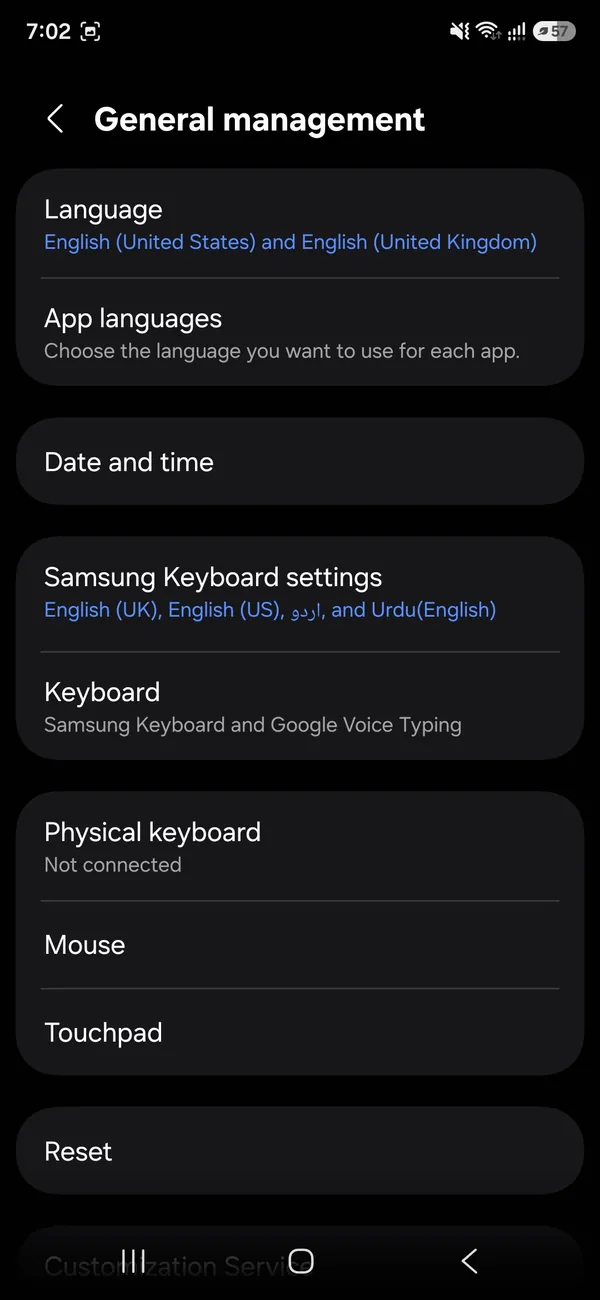
- 3
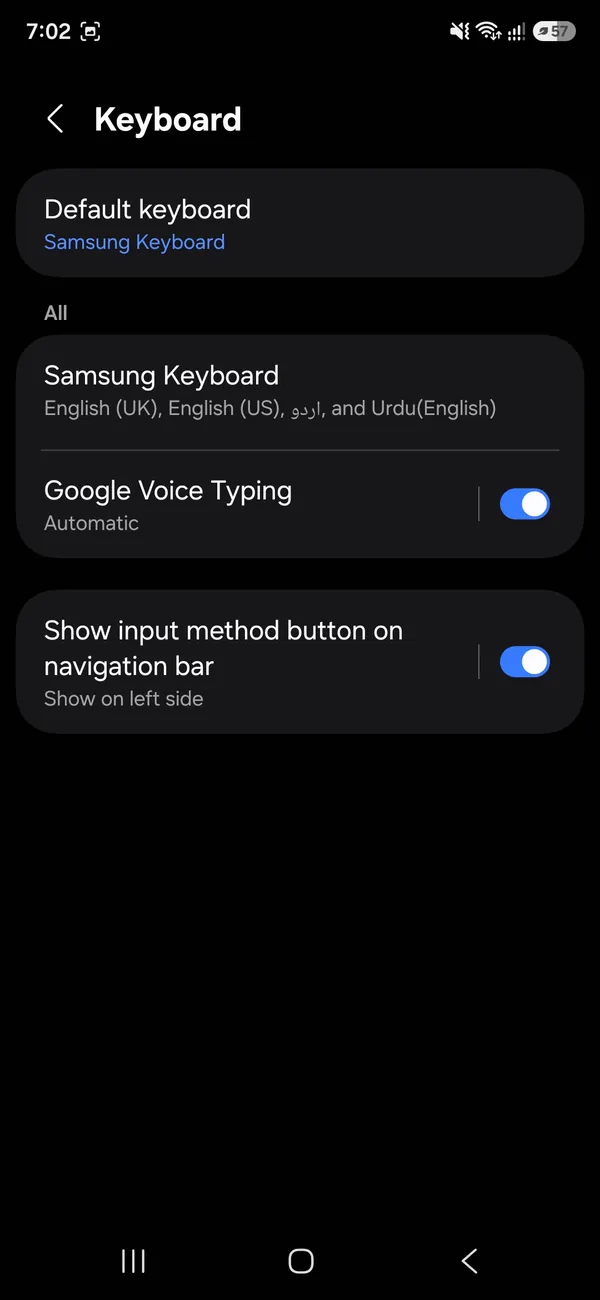
Turn the new keyboard on, then tap Default keyboard and pick it.
A Choose input method list opens. Tap the keyboard you want.
The fix
Pixel and most other phones
- 1
Open Settings › System › Keyboard.
- 2
Tap On-screen keyboard and turn on the one you want.
- 3
When typing, tap the keyboard icon at the bottom to switch.
Which keyboard should you use?
- Samsung Keyboard: comes on Galaxy phones, works offline and keeps learned words in Samsung Cloud.
- Gboard: Google's keyboard. Strong voice typing, Google Translate built in, many languages, and on Pixel it is the default.
- Microsoft SwiftKey: good word prediction and clipboard, syncs with a Microsoft account.
- Grammarly Keyboard: checks grammar as you type, useful for work email.
All are free. Most people choose between Samsung Keyboard and Gboard, and the right pick is whichever predicts your words better after a week of use.
How do you switch keyboards while typing?
Once two keyboards are turned on, you can switch without going to Settings. On most phones, a small keyboard icon appears at the bottom right of the screen while typing. Tap it and choose the keyboard. In Gboard you can also touch and hold the spacebar or the globe key. On Samsung, the keyboard switch button can be turned on under Settings › General management › Keyboard › Keyboard button on navigation bar.
How do you add a language?
In Gboard, open Settings › Languages › Add keyboard and choose a language and layout. Swipe the spacebar or tap the globe to switch. In Samsung Keyboard, open its settings › Languages and types › Manage input languages and turn on the ones you need. Multilingual typing in Gboard can predict words in two languages without switching.
How do you change the size and theme?
Gboard: Settings › Preferences › Keyboard height offers seven sizes, and Theme lets you choose colors, a photo background and key borders. Samsung Keyboard: open settings › Size and transparency and drag the handles. Its look follows the phone theme and dark mode, and Good Lock's Keys Cafe module adds more styles. Bigger keys help a lot if you make many typos.
How do you turn autocorrect, sounds and vibration on or off?
In Gboard, open Settings › Text correction for Auto-correction, Auto-capitalization and suggestions, and Preferences for Sound on keypress and Haptic feedback on keypress. In Samsung Keyboard, open Smart typing for predictive text and Auto replace, and Swipe, touch and feedback for sounds and vibration. Turning off keypress sound and vibration also saves a little battery.
How does voice typing work?
Tap the microphone on the keyboard to speak instead of type. Gboard uses Google voice typing and can add punctuation automatically. Samsung Keyboard can use Samsung voice input or Google voice typing; choose in its settings under Voice input. Say "period" or "comma" to add punctuation where it does not guess it.
What if the keyboard is missing or not switching?
- New keyboard not in the list: it is installed but not turned on. Turn it on in the keyboard list first.
- Keyboard does not appear when typing: restart the phone, then clear the keyboard app's cache (Settings › Apps › Gboard › Storage › Clear cache).
- Keeps switching back: battery saving may stop the new keyboard. Set its battery use to Unrestricted.
- Keyboard lags: turn off fancy themes and GIF suggestions, update the app and clear the keyboard's cache.
Is your keyboard private?
A keyboard sees what you type, including passwords in some apps. Android shows a warning when you turn on a new one for that reason. Stick to keyboards from companies you trust and from the Play Store. Turn off clipboard sync and personalized suggestions if you prefer, and use incognito mode in Gboard (it turns on automatically in private browser tabs) to stop it learning sensitive words.
How do you reset a keyboard that learned bad words?
In Samsung Keyboard, open settings › Reset to default settings › Erase personalized predictions. In Gboard, open Settings › Dictionary to remove words, or Privacy › Delete learned words and data to start over.
Can you change the keyboard on iPhone too?
iPhone handles keyboards differently, with settings under General › Keyboard. If you also use an iPhone, see iPhone keyboard and Messages settings for autocorrect, text replacement and extra keyboards.
How do you use a physical or Bluetooth keyboard?
You can pair a Bluetooth keyboard in Settings › Connected devices (Pixel) or Settings › Connections › Bluetooth (Samsung). Then open Settings › System › Keyboard › Physical keyboard to change its layout. Samsung DeX on tablets and some phones makes a keyboard and mouse feel like a computer. The on-screen keyboard hides itself while the physical one is connected; turn on Show on-screen keyboard if you want both.
Can you change the keyboard for one app only?
Android uses one default keyboard everywhere, but you can switch in any app with the keyboard icon. The phone remembers your choice until you switch again. Some banking and password apps use their own secure keyboard for PIN entry, which is normal.
How do you use emoji, GIFs and the clipboard?
Gboard puts emoji, stickers and GIFs behind the smiley key and the clipboard behind a small icon in the top row. Turn on Clipboard in its settings to keep recent copied text for an hour. Samsung Keyboard has emoji, stickers and a clipboard in its toolbar, which you can show by tapping the arrow at the top left.
One-handed and floating keyboards
On big phones, a one-handed layout makes typing easier. Gboard: tap the three dots in the toolbar › One-handed. Samsung Keyboard: open the toolbar › Modes › One-handed keyboard or Floating keyboard, which you can drag anywhere. Swipe typing (Glide typing in Gboard, Swipe to type on Samsung) is on by default and lets you draw words without lifting your finger.
Keyboard settings after a phone update
A system update sometimes resets the default keyboard to the phone's own. If Samsung Keyboard came back after an update, just set Gboard as default again. Your Gboard settings and learned words stay, because they are stored in the app and your Google account.
Keep your keyboard up to date
Keyboard apps update through the Play Store like other apps. Samsung Keyboard updates through the Galaxy Store. Updates fix lag, crashes and wrong suggestions, so install them when they appear.
Change keyboard language on Samsung quickly
Once two languages are added to Samsung Keyboard, swipe left or right on the spacebar to switch. A small label on the spacebar shows the current language. In Gboard, tap the globe key or touch and hold the spacebar to pick from a list.
Text replacement and shortcuts
Both keyboards can expand short codes into longer text. In Gboard, open Settings › Dictionary › Personal dictionary and add a word with a shortcut, such as "addr" for your street address. In Samsung Keyboard, open Smart typing › Text shortcuts. This saves time for email addresses and phrases you type often.
Which keyboard uses less battery?
The difference is small. The phone's own keyboard is usually the lightest, since it is built into the system. Features like GIF search, live themes and constant cloud sync use a bit more. If your battery drains fast, the keyboard is rarely the cause; see Android battery drain fixes.
If you are not sure which keyboard to keep, try Gboard for a week, then switch back if you prefer Samsung's. Nothing is lost when you switch, and both stay installed.
Small changes like key height, sound and autocorrect make more difference to typing comfort than which keyboard you pick, so try them first.
Changes take effect right away, with no restart needed.
Frequently asked questions
How do I make the keyboard bigger?
In Gboard, open Settings › Preferences › Keyboard height. On Samsung Keyboard, open its settings › Size and transparency.
How do I change the keyboard color?
In Gboard, tap the palette icon or Settings › Theme. Samsung Keyboard follows dark mode or has High contrast keyboard.
How do I switch back to Samsung Keyboard?
Open Settings › General management › Keyboard › Default keyboard and choose Samsung Keyboard. You can keep Gboard installed and switch any time.
Are third-party keyboards safe?
Ones from big companies, like Gboard and Microsoft SwiftKey, are generally trusted. Avoid unknown keyboard apps, because a keyboard can see everything you type.
People also ask
Why can't I name a group chat?
The group is SMS or MMS, usually because someone uses Android without RCS. Only iMessage and RCS groups can be named.
Read the full guide: iPhone keyboard settingsIs Scam Detection on by default on Pixel?
Google's Phone app page says call Scam Detection is off by default and you must opt in. Its Messages page says Message scams detection is on by default.
Read the full guide: Scam Detection on PixelIs there a clipboard app on iPhone?
No. iPhone holds one copied item at a time and has no built-in clipboard viewer. To see it, paste into Notes or use a Shortcuts action that shows the clipboard.
Read the full guide: Where is the clipboardWhat does a blocked caller hear?
Usually the call goes to voicemail or ends after one ring. They are not told they are blocked.
Read the full guide: Block a number on AndroidRelated guides

iPhone keyboard settings
Change iPhone keyboard settings fast: turn off autocorrect, add a keyboard, edit a contact, rename a group chat and hide or change your caller ID on any iOS.

Scam Detection on Pixel
Scam Detection on Pixel warns you about scam calls, texts and chat notifications. See the phones and countries listed, how to turn each part on, and limits.
Where is the clipboard
Where is the clipboard on my phone? iPhone has no clipboard app, but Android keyboards do. See how to view, paste, pin and clear what you copied on each.
Block a number on Android
Block a number on your Android phone from Recents or Phone settings on Samsung and Pixel. Also how to block texts, add a number by hand and unblock later.
More guides you may need
Change album cover
Change any album cover in the iPhone Photos app with Make Key Photo, plus which albums cannot be changed and what to do if the cover will not update.
Archive to Trash in Mail
Make iPhone Mail delete emails instead of archiving them for Gmail and other accounts, with one account setting. Plus the same fix in the Gmail app.