

How long does an iPhone transfer take? What is normal and what is stuck
Apple does not give a fixed time for an iPhone transfer. It depends on your data, your method and your connection. Here is what is normal, what makes it slower, and how to tell slow from stuck.

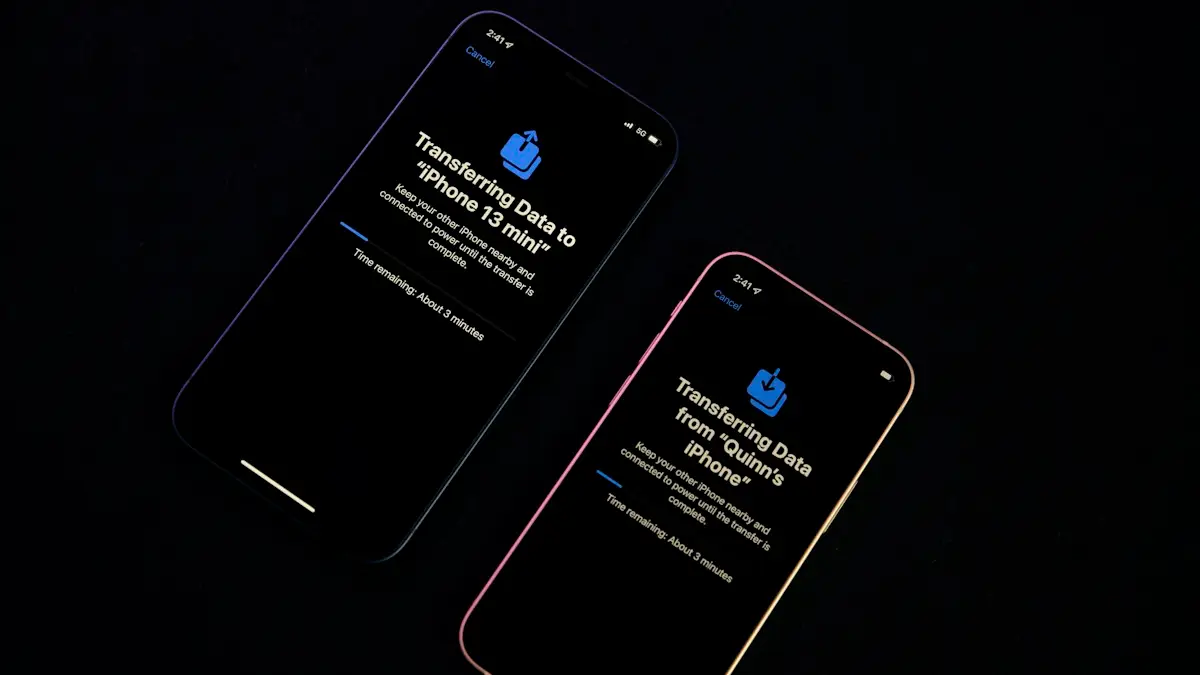
Photo by Chandan Chaurasia on Unsplash
You have started moving your data to a new iPhone and the screen says about 2 minutes remaining. Ten minutes later it still says 2 minutes. Or it shows hours, and you cannot tell if that is normal. People worry because the time on the screen is an estimate that changes, and because Apple does not publish a normal range. This guide gives you what Apple does say, what real users report, what changes the time, and how to tell a slow transfer from a stuck one, so you know whether to wait or to act.
How long does an iPhone transfer take?
Apple gives no fixed time. Its Quick Start page says only that transfer time depends on network conditions and the amount of data. That is true, and it is also not very helpful, so here is the broader picture from what people report.
- A direct iPhone to iPhone transfer: an Apple Support Community reply puts a direct transfer at roughly 5 to 10 minutes, but that figure is one moderator's estimate and not an Apple rule. Third party guides give much longer ranges, from about half an hour to a few hours, and they disagree with each other.
- An iCloud restore: Apple says the download runs in the background, so you can use the phone right away. A community reply says you can start using it after about 15 minutes. The rest of the apps and photos keep downloading, which can take hours on a big library.
- Very large libraries: one community user reported about 5 hours to bring back thousands of songs and hundreds of apps over a fast connection. Another reported a transfer running for hours past its estimate.
Treat all of these as reports, not promises. The honest answer is that a small phone with little data can finish in minutes, and a full 256 GB phone can take an hour or several.
What makes a transfer faster or slower?
- How much data you have. Photos, videos and apps are the bulk. A phone that is nearly full takes longer than one that is half empty.
- The method. Direct transfer, iCloud, a computer backup and a cable all behave differently (see the next section).
- Wi-Fi quality. A weak or crowded network slows wireless transfers and iCloud downloads. Sitting close to the router helps.
- The age of the old phone. An older iPhone reads and sends data more slowly.
- Battery and heat. A phone that is hot or low on charge may slow down. Keep both plugged in.
- Server and network load. iCloud can be slower at busy times, such as launch week for a new iPhone.
Direct transfer, iCloud, cable or computer: which is quickest?
| Method | What happens | Good to know |
|---|---|---|
| Quick Start, direct | Data moves from the old iPhone to the new one. | Apple says you wait for the transfer to finish on both devices. Keep them near and plugged in. |
| Quick Start, iCloud | Your backup downloads from iCloud. | Runs in the background, so you can start using the phone. Needs Wi-Fi and a recent backup. |
| Cable | A wired connection between the two phones. | Avoids Wi-Fi and Bluetooth limits. Apple has a wired transfer guide that lists the cables. |
| Computer backup | You restore a backup from a Mac or PC. | Depends on the computer and the cable. Useful when Wi-Fi is the problem. |
If you are in a hurry to use the phone, iCloud is the one that lets you start soonest. If you want everything there when you finish, a direct or wired transfer is more complete at the end of the wait. For the steps for each route, see our guide on how to transfer data to a new iPhone.
How do you tell a slow transfer from a stuck one?
The estimate on screen is not reliable. It can jump up and down, and a screen that says 2 minutes for 10 minutes is not automatically broken. Look at these signs instead.
- Slow, not stuck: the progress bar moves a little, the estimate changes, the phones stay warm, and nothing has an error message.
- Probably stuck: the bar has not moved at all, the estimate has not changed and the screen is the same after about an hour with both phones plugged in. That hour is our own rule of thumb, not an Apple figure.
- Definitely failed: an error such as Unable to Complete Data Transfer appears, or the phone restarts on its own.
If it looks stuck, restart both phones and start again, as Apple's Quick Start page suggests for a prompt that disappears. We cover the common stalls in our guides to Preparing to Transfer and Waiting for Other iPhone.
How can you make the transfer finish sooner?
Speed up an iPhone transfer
- 1
Update both iPhones first.
Apple recommends the latest iOS on both devices.
- 2
Back up the old iPhone to iCloud before you start.
A recent backup gives you a fallback if the direct transfer fails.
- 3
Free some space.
Delete apps and old videos you no longer need. Our guide on how to free up iPhone storage helps.
- 4
Plug in both phones and keep them together.
Apple's page says to keep them near and plugged in until migration finishes.
- 5
Use a strong Wi-Fi network, or a cable.
Move close to the router, and turn off a VPN.
- 6
Leave both phones alone.
Quick Start occupies both devices, so do not use them until it is done.
Why is the new iPhone still busy after setup says it is done?
When you choose iCloud, the phone opens quickly, but apps, photos and some data are still downloading in the background. Photos may appear as blurry thumbnails until their full versions arrive. The phone may also run warm and the battery may drain faster for a few hours as it indexes your data. This is normal. Leave the phone on Wi-Fi and plugged in overnight. If photos never finish, see our guide on photos stuck restoring from iCloud.
What if the transfer takes more than a day?
A transfer measured in days is not normal. It usually means a stalled download, a poor connection, or a very large iCloud library on a slow network. Check that the phone is on Wi-Fi and not low on storage, and make sure iCloud is not out of space. Restart the phone, and in Settings, tap your name, then iCloud, and check that nothing says paused. If it still does not move, contact Apple Support. Keep the old iPhone untouched until the new one has everything.
What happens if you interrupt a transfer?
If you stop a direct transfer partway, for example by turning off a phone or pulling a cable, the new iPhone may be left half set up. Often the safest fix is to restart both phones and begin again, and Apple's Quick Start page recommends that when a prompt disappears. Your old iPhone keeps all of its data, so nothing is lost. If the new phone refuses to restart setup cleanly, you can erase it and start again, because it has none of your data yet.
Can you use the old iPhone while the transfer runs?
Apple says Quick Start occupies both devices, so pick a time when you do not need the current one for several minutes. In practice you should leave both phones alone. Using the old phone, locking it or taking calls can slow the transfer or break it. With an iCloud restore the old phone is free once its backup is done, because the new phone downloads from iCloud and not from the old one.
Still not sure if it is working?
Check the progress bar, give it a fair amount of time and avoid restarting too early. If you see no movement for an hour, restart both phones and try again. If you get an error message, our guide on a transfer stuck on Reconnecting may match what you see.
Frequently asked questions
Is there an official time for a Quick Start transfer?
No. Apple says transfer time depends on network conditions and the amount of data, and it gives no fixed number.
How long should I wait before I call it stuck?
If the progress bar and time estimate have not moved at all for about an hour with both phones plugged in, restart both and try again. This is a rule of thumb, not an Apple figure.
Why is my new iPhone still slow after the transfer says done?
With iCloud, apps and photos keep downloading in the background, and the phone also re-indexes. It may be warm and slow for a few hours while that finishes.
Is a cable transfer faster than wireless?
Often, yes. A wired connection avoids Wi-Fi and Bluetooth limits, and Apple offers a wired transfer method with its own guide.
What to try next
People also ask
I already set up my new iPhone. Can I still transfer?
Yes, but you must erase it first. Go to Settings › General › Transfer or Reset iPhone › Erase All Content and Settings, then use Quick Start when setup starts again.
Read the full guide: Transfer data to a new iPhoneHow long does Preparing to Transfer take on an iPhone?
Anywhere from a few minutes to a few hours, depending on how much data you have and your Wi-Fi speed. If there is no change at all after about two hours, treat it as stuck.
Read the full guide: iPhone stuck on Preparing to TransferWhat does Reconnecting mean when I set up a new iPhone?
The new iPhone lost its connection to the old one or to the internet during setup and is trying to join again. A short pause is normal, but a screen that stays for many minutes means it is stuck.
Read the full guide: iPhone stuck on ReconnectingWhy does my iPhone say it is unable to complete the data transfer?
The link between your old and new iPhone dropped, or one of them has old software, a weak Wi-Fi connection or low battery. Restarting both phones and trying again fixes many cases.
Read the full guide: iPhone unable to complete data transferRelated guides
Transfer data to a new iPhone
Move everything to your new iPhone with Quick Start, an iCloud backup or a computer. Keeps apps, photos, messages and settings, plus your eSIM and WhatsApp.
iPhone stuck on Preparing to Transfer
iPhone stuck on preparing to transfer during setup? Learn how long to wait, what to check on both phones and how to use iCloud or a computer instead.
iPhone stuck on Reconnecting
iPhone stuck on reconnecting while setting up a new iPhone? Keep both phones close, check Wi-Fi and Bluetooth, restart, then use a cable or backup.
iPhone unable to complete data transfer
iPhone unable to complete data transfer in setup? Restart both phones, update, switch to a cable or iCloud, and fix an Apple logo stall. 7 fixes.
More guides you may need
Clean a SIM card on iPhone
Clean an iPhone SIM card and tray safely with a dry lint free cloth. Learn what to avoid, how to test the SIM, and when to replace it if you see No SIM.
Download and install WhatsApp on iPhone
How to download and install WhatsApp on iPhone from the App Store, verify your number and restore chats. Fixes if the code never comes or install fails.