

Does iPhone have an NFC reader? How to read NFC tags on iPhone
Every iPhone since the iPhone 6 has NFC. Newer models read tags on their own; a few older ones need a button in Control Center.
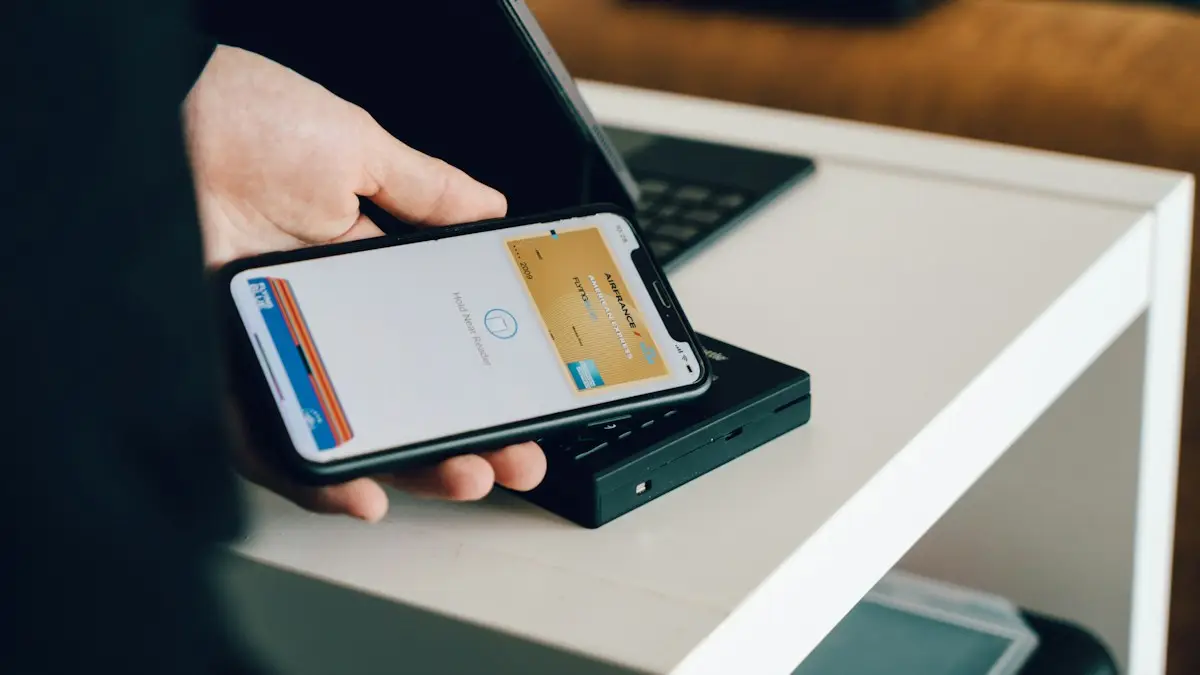
Photo by CardMapr.nl on Unsplash
NFC, short for near field communication, is a short-range wireless connection that works over an inch or two. There is no pairing and no password: you hold two NFC devices close together and they exchange a small amount of data. That short range is what makes it safe for payments, and it is why you have to hold the iPhone right against a tag.
Which iPhones can read NFC tags?
- iPhone XS, XR and later (including iPhone SE 2nd and 3rd gen): read tags automatically in the background.
- iPhone 7, 8 and X: read tags using the NFC Tag Reader in Control Center or an app.
- iPhone 6 and 6s: NFC is used for Apple Pay only; they cannot read tags.
Where to hold the tag
The NFC antenna sits at the top edge of the iPhone, near the camera. Hold the tag against the top back of the phone, not the middle. The screen must be on and the iPhone unlocked for most tags to be read.
The fix
How to read an NFC tag
- 1
Unlock your iPhone and keep the screen on.
Background reading pauses while the Camera or Wallet app is open, and while Apple Pay is in use.
- 2
Hold the top edge of the iPhone near the tag.
Touch or almost touch it and hold still for a second. Moving the phone around quickly makes it harder to read.
- 3
Tap the notification that appears to open the link or action.
The notification names the app or website the tag wants to open. Nothing happens unless you tap it.
The fix
iPhone 7, 8 or X: add the NFC Tag Reader button
These models do not read tags in the background, so you start a scan yourself.
- 1
Go to Settings › Control Center.
- 2
Add NFC Tag Reader.
Tap the green plus next to NFC Tag Reader. On newer iOS versions, open Control Center, tap the plus in the top corner, then Add a Control, and search for NFC.
- 3
Open Control Center and tap the NFC button.
- 4
Hold the top of the iPhone near the tag within a few seconds.
Why is there no NFC switch?
Android phones often have an NFC toggle, so iPhone owners go looking for one. On iPhone, NFC is always ready and managed by iOS. It only reads when the screen is on, only for a moment, and only acts when you tap the notification, so there is nothing to turn on and no battery to save by turning it off.
The fix
Run a Shortcut with an NFC tag
- 1
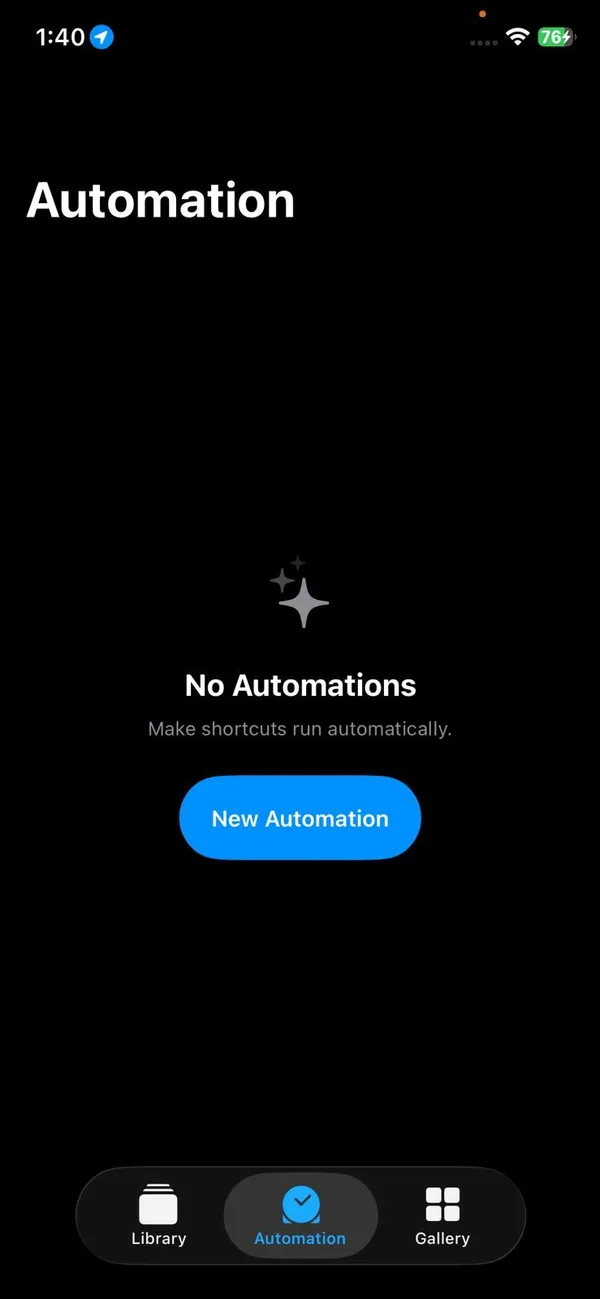
Open the Shortcuts app and tap Automation.
- 2
Tap New Automation and choose NFC.
- 3
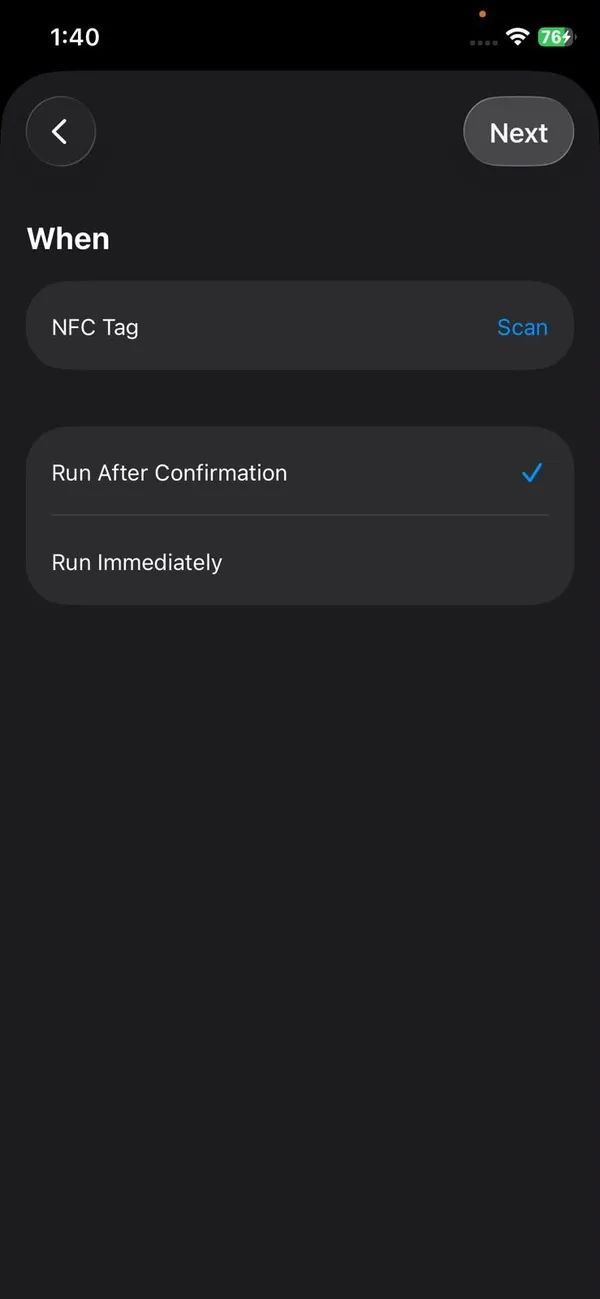
Tap Scan and hold your iPhone near the tag, then name it.
- 4
Choose what should happen, such as turning on a Focus or playing a playlist.
Then choose Run Immediately, so the action happens as soon as you tap the tag without asking first. You can reuse the same tag for a different automation at any time.
Handy things to do with NFC tags
- A tag by the front door that turns on Do Not Disturb and starts a playlist when you tap it.
- A tag on your nightstand that sets your alarm and turns on Sleep Focus.
- A tag in the car that opens Maps with directions home.
- A tag for guests that shares your Wi-Fi details, written with an NFC app.
- A tag on the washing machine that starts a 45-minute timer, so you remember to move the laundry.
- A tag at your desk that turns on the Work Focus, opens your calendar and starts a focus playlist.
- A tag on a pill box that logs a medication in the Health app, handy for older relatives.
Each tag is cheap, and Shortcuts can run the automation without asking once you choose Run Immediately, so a single tap does the whole job.
Buying NFC tags
- Look for NTAG213 (small, cheapest), NTAG215 or NTAG216 (more storage). All work well with iPhone.
- Stickers suit flat surfaces; key fobs and cards are easier to carry.
- Choose anti-metal tags if the tag will sit on a fridge, a laptop or another metal surface, since metal blocks ordinary tags.
- Packs of 10 to 50 are inexpensive online and at electronics stores.
Can an iPhone write NFC tags?
Yes. Since iOS 13, iPhone 7 and later can write tags with an app from the App Store, such as NFC Tools. Buy NTAG213, NTAG215 or NTAG216 stickers, which work well with iPhone. You can store a web link, contact card or Wi-Fi details, or leave the tag blank and use it to trigger a Shortcuts automation.
iPhone not reading an NFC tag?
- Remove a thick or metal case, MagSafe wallet or phone ring.
- Make sure the screen is on and not in the Camera or Wallet app.
- Close any app that is using NFC, then restart the iPhone.
- Try another tag. Damaged or unformatted tags do not respond to background reading at all.
NFC tag or QR code?
Both can open a link. A QR code works from a distance with the camera and costs nothing to print, which is why restaurants and posters use them. An NFC tag needs you to touch it, but it works in the dark, needs no camera app, and can trigger a Shortcuts automation, which a QR code cannot do on its own. For home automations, NFC is more convenient; for sharing a link with many people, QR is easier.
Found an AirTag? Use NFC to identify it
If you find an AirTag that is not yours, hold the top of your iPhone against the white side of the AirTag. A notification opens a web page with its serial number and, if the owner marked it as lost, a message and contact details. This works with any NFC-capable phone, including Android.
Tap to Pay on iPhone for small businesses
The NFC chip can also take payments. With Tap to Pay on iPhone, a small business can accept contactless cards, Apple Pay and other digital wallets on an iPhone XS or later, with no card reader. It works through payment apps such as Square, Stripe and Shopify, which charge their normal card fees. For a market stall, a tradesperson or a delivery business, it can replace a separate card terminal.
Keys, IDs and passes in Wallet
- Car keys: many recent BMW, Hyundai, Kia, Genesis and other models let you unlock and start the car with the iPhone.
- Home and hotel keys: supported smart locks and hotel chains put a key in Wallet that you tap on the lock.
- Student IDs and work badges: some universities and employers issue them in Wallet for doors and payments.
- Driver’s licenses and state IDs: in participating states, you can add your ID to Wallet and tap it at TSA checkpoints that support it.
- Transit: tap Apple Pay or an Express Transit card at the gate in cities such as New York, Chicago and Los Angeles.
Since iOS 18.1, Apple has also let banks and other apps in the US use the NFC chip for their own tap-to-pay and key features, so you may see NFC options appear in apps beyond Wallet.
Is NFC on iPhone safe?
Yes. The range is so short that someone would need to hold a reader against your phone. Apple Pay payments also need Face ID, Touch ID or your passcode, and they use a one-time code rather than your real card number. A tag can only suggest a link or action; the iPhone shows a notification and does nothing until you tap it. The main thing to watch for is a sticker placed over a real tag, for example on a parking meter, that opens a fake payment page. Check the website address before paying.
Frequently asked questions
How do I turn on NFC on my iPhone?
You do not need to. On iPhone XS, XR and later, NFC is always ready and reads tags when the screen is on. There is no on or off switch.
Can my iPhone write NFC tags?
Yes, iPhone 7 and later can write tags using a third-party app from the App Store, such as an NFC tools or tag writer app.
Can I use my iPhone NFC to copy a key card?
No. iPhone cannot copy or emulate access cards for security reasons. Some offices and hotels offer keys in Apple Wallet instead.
Does NFC drain the battery?
No. The reader only works in short bursts when the screen is on, so it has no noticeable effect on battery life.
People also ask
Why is Apple Pay not working today?
Check Apple’s System Status page for Apple Pay first. If it shows a problem, wait. If it is green, the cause is usually your card, the reader or Face ID, and the fixes below will find it.
Read the full guide: Apple Pay not workingDoes iPhone have a built in water eject?
No. Apple Watch has Water Lock, which ejects water from the speaker. iPhone does not, so people use a Shortcut or an app that plays a sound to shake water out of the speaker.
Read the full guide: iPhone water ejectCan I schedule a text to an Android phone?
Send Later works with iMessage only. For a green bubble text, use a Shortcuts personal automation that sends a message at a set time.
Read the full guide: Schedule a text on iPhoneCan you use Google Pay on an iPhone?
Only in limited ways. Where the app is offered you can sign in and pay online or send money, but you cannot tap your iPhone at a store terminal with Google Pay.
Read the full guide: Pay with Google Pay on iPhoneRelated guides
Apple Pay not working
Apple Pay not working at a store, online or on double click? Check the card, Face ID, the reader and iOS, then re-add the card. Eight fixes in order.

iPhone water eject
Water in your iPhone speaker? Learn if the Water Eject shortcut and speaker cleaner apps work, how to use them safely, and what to do if sound stays muffled.
Schedule a text on iPhone
Schedule a text on iPhone with Send Later in Messages, up to 14 days ahead. Plus how to edit or cancel it, and a Shortcuts trick for regular SMS texts.
Pay with Google Pay on iPhone
How to pay with Google Pay on iPhone: you can't tap to pay in stores, but Apple Pay can. See what Google Pay does on iPhone and how to set up Apple Pay instead.
More guides you may need
eSIM on a locked iPhone
A carrier locked iPhone only takes an eSIM from its own carrier. See how to check the lock in Settings, why a travel eSIM will not activate, and how to unlock.
Charging overnight
Charging your phone overnight is safe with a good charger, and built-in features limit battery wear. Heat is the real risk, so here is how to charge safely.