

Android "New Tag Scanned" Pop-Up: What It Means and How to Stop It
The message is harmless in almost every case. Your phone read an NFC chip it had no app for. Here is how to find the chip and make the pop-up stop.
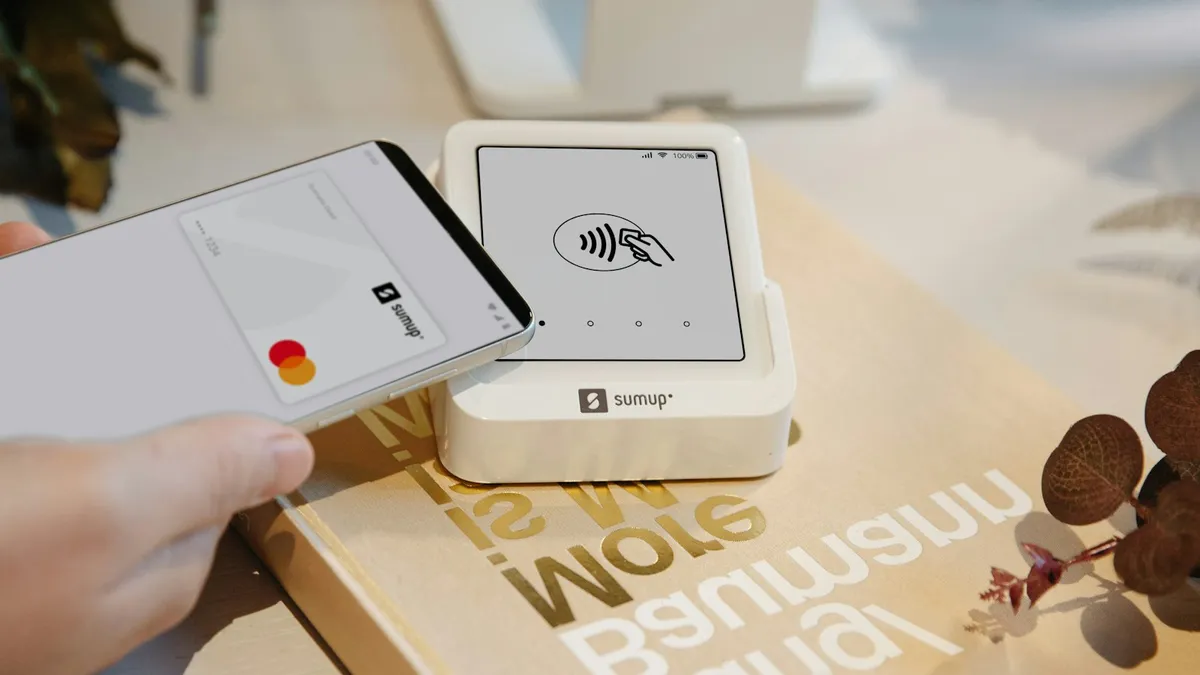
Photo by SumUp on Unsplash
A small message slides down at the top of the screen. "New tag scanned." Your phone beeps, or buzzes, and you were not doing anything. Then it happens again in ten minutes. If you think someone is poking at your phone, nobody is. The cause is almost always a small chip somewhere near it.
This guide explains what the message actually means, how to track down what sets it off, and how to stop it. It also covers the one thing most guides skip: how to keep Google Wallet or Samsung Wallet working while you do it.
What does "New tag scanned" mean on Android?
NFC stands for near field communication. It is the short range radio in your phone that lets you tap to pay, pair earbuds or read a smart sticker. An NFC "tag" is a tiny chip with a little data on it. It needs no battery. Your phone powers it for a moment when the two get within a few centimeters.
When the phone reads a tag and no app has asked to handle it, Android shows a message. On some phones the wording is "New tag scanned." On others you will see "New tag collected," "Unknown tag" or "No supported app for this tag." They all mean the same thing. Samsung says the unknown tag message appears when NFC is on and the phone touches an NFC compatible item, such as a card, and that it is usually harmless.
What is setting it off?
Anything with an NFC or contactless chip can trigger it. The trouble is that many everyday items carry one and you may not know. Look through this list before you change any setting.
- Contactless cards. Credit and debit cards with the wave symbol, plus transit passes, gym cards and office badges.
- Hotel key cards and building passes. These often stay in a wallet or phone case for weeks.
- A wallet case. If you keep cards in a case on the back of the phone, they sit on the NFC antenna all day.
- A smartwatch or another phone. A Galaxy Watch can set it off when the phone sits next to it, which Samsung Community members have reported.
- Smart stickers and labels. Some clothing tags, product packaging, posters and loyalty stickers contain a chip.
- Pet or luggage tags. Some keychain tags carry an NFC chip.
Fix 1: Look at the message first
The next time it appears, tap it. On most phones it opens the tag and shows what is on it, such as a web link, a text or an app. This takes five seconds and tells you a lot. A blank tag tells you it is probably a card or a watch. A link tells you it is a sticker or a poster.
Fix 2: Find the tag by process of elimination
- 1
Take the phone out of its case.
Remove any wallet case, card holder or stick-on pocket. If the message stops, a card in the case is the cause.
- 2
Put the phone on a table by itself.
Wait ten minutes. If nothing appears, the trigger is something you carry, not something at home.
- 3
Empty the pocket or bag the phone sits in.
Check keys, cards, passes and fobs. Move the phone away from them, one at a time.
- 4
Check your watch.
If you wear a Galaxy Watch or similar, take it off for an hour and see whether the message stops.
- 5
Note where it happens.
If it only appears at a certain desk, door or car, a tag on a mount, a lock or a sign is the cause.
If the message appears several times in a row, the chip is probably resting right against the phone, so it gets read again each time the screen wakes.
Fix 3: Turn NFC off in Quick Settings
This is the most reliable way to stop the message, and Samsung recommends it. With NFC off, the phone cannot read tags, so there is nothing to pop up.
- 1
Swipe down from the top with two fingers.
This opens the full Quick Settings panel.
- 2
Find the NFC tile and tap it.
Blue or highlighted means on. Grey means off. If you cannot see it, swipe left on the panel or tap the edit icon to add it.
- 3
Test for a day.
If the message stops, you have confirmed that a tag was the cause.
You can also use the Settings app. On a Samsung Galaxy phone, open Settings › Connections › NFC and contactless payments and switch NFC off. On a Pixel and most other phones, look under Settings › Connected devices › Connection preferences › NFC. Menu names change between Android versions, so use the search bar in Settings and type "NFC" if yours differs.
Fix 4: Keep tap to pay working
The catch with turning NFC off is that Google Wallet and Samsung Wallet need it to pay in a store. You have three sensible ways to live with that.
- Switch it on only when you pay. It takes two taps. Many people leave it off until they reach the register.
- Fix the cause instead. If a card in your case is the trigger, move that card to your wallet. Then NFC can stay on.
- Use a routine on Samsung. Modes and Routines can turn NFC off at night or at the office. Samsung Community members note that a routine cannot switch NFC on and then off again within the same routine.
Some people report on the Samsung Community that NFC turns itself back on. Samsung Wallet can switch NFC on when it opens, and it stays on until you turn it off again. If that happens to you, see our guide to Samsung Wallet popping up on its own.
Fix 5: If it happens only on a Galaxy Watch pairing
A Samsung Community reply explains that the message can appear when the phone sits near a Galaxy Watch, because the watch uses NFC for Samsung Wallet. Turn NFC off on the phone, the watch or both. It does not matter which one you pick, according to that reply. Check the watch's own Quick Settings if it has an NFC tile.
Fix 6: Restart and update
If the message appears with no chip anywhere near, the NFC system may be stuck. Restart the phone, which clears most stuck services. Then check for a system update under Settings › Software update. Phone makers fix NFC bugs in updates, and a restart plus an update solves the odd case where the reader keeps firing on its own. Our guide to updating an Android phone walks through it.
Fix 7: Rule out something worse
In rare cases the pop-up is only one of several odd things. If you also see ads on the lock screen, apps you did not install or a battery that drains fast, the cause may be an app, not a chip. NFC messages come from the system and do not carry ads.
- Run a scan with Google Play Protect. Open the Play Store, tap your profile picture, then Play Protect, then Scan.
- Look at recent installs in Settings › Apps, sorted by date.
- Read our guide to scanning an Android phone for malware if you find anything you did not add.
Why a phone in your pocket can still read tags
NFC works at about four centimeters, which is under two inches. That sounds tiny, but a phone in a back pocket with a wallet sitting against it is well inside that range. Add a wallet case and the card is a few millimeters away. The phone reads it every time the screen wakes, and it shows the message each time.
The reader also wakes when you take the phone out, unlock it or move it while it is unlocked. That is why people notice the message "out of nowhere" at the moment they pick up the phone. The tag was always there. The trigger was the screen waking up.
Is it safe to ignore it?
Yes, if you know the source and you never tap the message. A tag cannot do anything to your phone unless you open what it points to. Your phone does not run code from a tag by itself. The real risk is a link that a stranger wrote on a sticker, so stay careful about tapping it.
If you keep getting the message in public places, such as a train or a store, someone may have stuck a tag where phones tend to rest. Do not scan it on purpose, and tell the staff.
Which fix should you try first?
- It happens in your pocket or bag: take the phone out of its case, then move cards and passes away.
- It happens next to a smartwatch: turn NFC off on one of the two.
- It happens at one spot: look for a sticker or a tag on a mount, a desk or a sign.
- It happens for no clear reason: restart, update, then turn NFC off as a last step.
- You need tap to pay every day: move the card that triggers it and leave NFC on.
Frequently asked questions
Is the "New tag scanned" message a virus?
No. It is a normal NFC message. It appears when your phone reads an NFC chip and has no app set up to handle it. Nothing is installed by the message itself.
Why does my phone say new tag scanned when nothing is near it?
Something with an NFC chip is usually closer than you think. Check your wallet, phone case, keys, a smartwatch, a transit card or a hotel key card in the same pocket or bag.
Will turning off NFC stop the message?
Yes. With NFC off, your phone stops reading tags, so the pop-up and the beep stop. You must turn NFC back on before you use tap to pay.
Can I turn off the notification but keep NFC on?
Not cleanly on most phones. The prompt comes from the NFC reader itself. The practical choices are to remove the tag from the phone's reach or switch NFC off when you do not need it.
What to try next
People also ask
How do I unfreeze my phone right now?
Hold the Power and Volume Down buttons together for 10 to 20 seconds until the phone restarts. On some Samsung models, keep holding past the power menu.
Read the full guide: Android phone keeps freezingCan I put my phone in the fridge?
No. Fast temperature changes can cause condensation inside. Let it cool in the shade with the case off.
Read the full guide: Android phone overheatingIs it a virus?
Usually it is adware, an app that shows ads outside itself. It is annoying rather than dangerous, but remove it, since some also collect data.
Read the full guide: Pop up ads on AndroidDoes Samsung show battery health as a percentage?
Some newer Galaxy phones show a battery health or capacity figure in Settings. Many show only a status such as Good, so the exact number depends on your model and One UI version.
Read the full guide: Samsung battery healthRelated guides
Android phone keeps freezing
Android phone keeps freezing or not responding? Force restart it, free up storage, find the bad app in safe mode, update and try 5 more fixes, step by step.
Android phone overheating
Android phone overheating while charging, gaming or doing nothing? Cool it down safely, find the app working it hard and fix the settings behind the heat.
Pop up ads on Android
Android phone keeps popping up ads on the home screen? Find the app behind them, turn off Display over other apps, block Chrome notifications and remove adware.
Samsung battery health
How to check battery health on Samsung with Settings, the Samsung Members app or a dial code. Learn what the results mean and when to replace the battery.
More guides you may need
Google Messages recipient is offline
Google Messages recipient is offline but they are not? Turn on resend as text, verify your number, check data and RCS, and test with SMS. 6 fixes for Android.

Google Messages waiting to connect
Google Messages waiting to connect or stuck on setting up chat features? Check data, your number and the RCS switch, then clear the app data. 7 fixes that work.