

iCloud Photos not syncing? 9 fixes for paused uploads
Scroll to the bottom of your Library in Photos. The status line there tells you exactly why syncing stopped.

Photo by Jamie Street on Unsplash
iCloud Photos is designed to be careful with your battery and data, so it pauses itself far more often than people expect. Most of the time nothing is broken: the iPhone is waiting for Wi-Fi, a charger or a cooler moment. The status line in the Photos app tells you which, and the fixes below cover every cause, from quick settings to storage and account problems.
What the sync status means
- Syncing Paused, or Paused for Low Power Mode: Low Power Mode or a low battery stopped the upload. Charge the phone or tap Resume.
- Uploading or Syncing with a count: it is working. Large libraries take hours; leave the iPhone on Wi-Fi and a charger.
- Paused for cellular data: Photos is not allowed to use mobile data. Join Wi-Fi or allow cellular in settings.
- iCloud storage full: new photos cannot upload until you free space or upgrade your plan.
- Updated just now: everything on this iPhone is synced. If a photo is still missing on another device, the problem is on that device.
How to fix iCloud Photos not syncing
The fix
9 fixes, in order
- 1
Read the status at the bottom of Library in Photos.
Scroll all the way down in the Library view, past your newest photos. If there is a Resume button, tap it.
- 2
Turn off Low Power Mode.
Open Control Center and tap the battery icon, or go to Settings › Battery. Low Power Mode pauses iCloud Photos until you charge or turn it off.
- 3
Charge the iPhone and connect to Wi-Fi.
Big uploads mostly happen while the iPhone is charging, on Wi-Fi and locked. Overnight on the charger is the easiest way to finish a large sync.
- 4
Let a hot iPhone cool down.
The iPhone pauses background work when it is hot, which often happens while charging in a warm room. Take it out of the sun or a thick case and let it cool for 20 minutes.
- 5
Allow cellular data for Photos if you want sync away from Wi-Fi.
Go to Settings › Apps › Photos › Cellular Data. Turn on Unlimited Updates only if your plan has plenty of data.
- 6
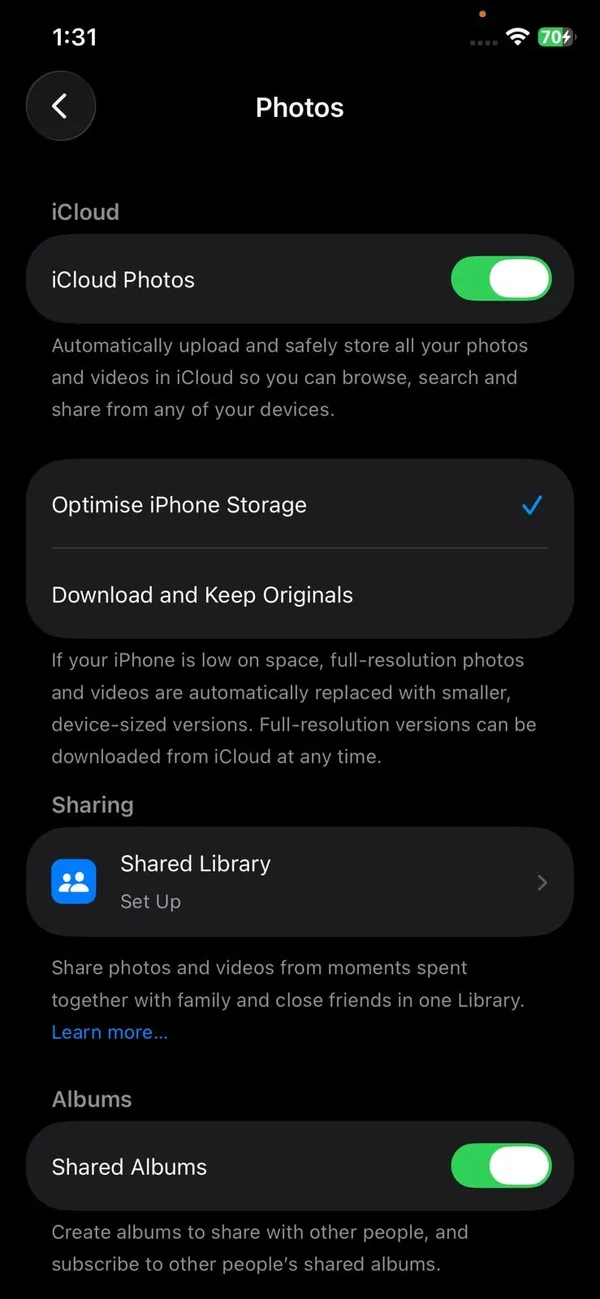
Check iCloud Photos is on.
Go to Settings › your name › iCloud › Photos and turn on Sync this iPhone. Check the email at the top of Settings matches the Apple Account on your other devices.
- 7
Free up iCloud or iPhone storage.
Check Settings › your name › iCloud. If storage is full, uploads stop. An iPhone with almost no free space can also stall syncing, since it needs room to prepare each upload.
- 8
Restart and update iOS.
A restart clears a stuck sync process. Install any update in Settings › General › Software Update, since Apple fixes Photos sync bugs in point releases.
- 9
Check Apple’s System Status page for an outage.
Visit apple.com/support/systemstatus and look at iCloud Photos. If it is not green, wait for Apple to fix it; syncing resumes on its own.
Still stuck? Turn iCloud Photos off and on carefully
If the status has not changed for a day, turning iCloud Photos off and on forces a fresh sync. Do it the safe way: first make sure Download and Keep Originals is selected, or that the photos you care about are already on the iPhone, because turning it off with Optimize iPhone Storage can remove full-size copies from the phone. Then turn Sync this iPhone off, choose Download Photos and Videos if asked, restart, and turn it back on. The iPhone checks every photo against iCloud again, which can take a while.
Only some photos or videos will not sync
- Long or 4K videos: large files wait for Wi-Fi and a charger, and can take much longer than photos. Leave the phone plugged in overnight.
- Photos from WhatsApp, Instagram or Safari: only pictures saved into the Photos app are uploaded. If they only live inside the other app, iCloud Photos never sees them.
- Hidden photos: they do sync, but show only in the Hidden album on other devices.
- Very old photos from a computer: photos synced to the iPhone from a computer with a cable, rather than taken on the phone, cannot be uploaded to iCloud Photos from the iPhone. Add them to iCloud Photos from the computer instead.
Optimize iPhone Storage vs Download and Keep Originals
In Settings › Apps › Photos you choose how photos are stored on the iPhone. Optimize iPhone Storage keeps smaller versions on the phone and full-size originals in iCloud, downloading them when you open a photo. It saves a lot of space, but it means you need an internet connection to see full-quality images, and a slow connection can look like a sync problem. Download and Keep Originals stores everything at full size on the phone, which needs much more space but works offline.
If a photo looks blurry and shows a small progress circle when you open it, it is still downloading the original from iCloud. That is normal with Optimize iPhone Storage and not a sign that syncing failed.
Photos not showing on Mac, iPad or PC
- Mac: open Photos › Settings › iCloud and check iCloud Photos is on. Keep Photos open with the Mac awake and online; the status at the bottom of the Library shows progress.
- iPad: the same settings as iPhone. Make sure it is signed in with the same Apple Account.
- Windows PC: open iCloud for Windows, check Photos is ticked, then look in File Explorer › iCloud Photos. New photos can take a few minutes to appear.
Signed out of iCloud by mistake?
If your Apple Account password changed, or iCloud keeps asking you to sign in again, syncing stops until you do. Look for a red badge on Settings or an Apple Account Suggestions banner at the top, and sign in. Once signed in, iCloud Photos resumes where it left off, so nothing needs to upload twice.
After an iOS update or on a new iPhone
After a major update such as iOS 27, the Photos app reindexes the library in the background, and syncing can look stuck for a day. On a new or restored iPhone, it downloads thumbnails for the whole library first, then full images as you view them. In both cases, leave the phone on Wi-Fi and a charger overnight before trying other fixes.
Using Google Photos as well?
iCloud Photos and Google Photos can both run on the same iPhone, and having both gives you a real second copy. They do not interfere with each other, but both upload in the background, so a large first backup takes longer and uses more battery. If Google Photos is also stuck, see our guide to Google Photos not backing up.
Two Apple Accounts in one family?
A common mix-up: a partner’s iPad is signed in to their own Apple Account, so it shows their photos, not yours. iCloud Photos never merges two accounts. To share photos between accounts, use a Shared Album or iCloud Shared Photo Library instead of signing both devices in to the same account.
Shared Library photos not syncing
With iCloud Shared Photo Library, photos only appear for everyone once the person who took them has uploaded them. If a family member’s photos are missing, the fix is on their iPhone: they should check their own sync status. Also check that the camera is set to save to the Shared Library if you expect new photos to appear there automatically.
Frequently asked questions
Why does it say Syncing Paused?
Low Power Mode is on, the battery is low, the phone is hot, or you are on cellular without permission. Charge on Wi-Fi and tap Resume.
Why do photos show on my iPhone but not my Mac?
Both must use the same Apple Account with iCloud Photos turned on, and the Mac needs Photos open, awake and online for a while to catch up.
How long does iCloud Photos take to upload everything?
A few hundred photos take minutes. A library of tens of thousands of photos and videos can take a day or more, and it only uploads while the iPhone is on Wi-Fi, charging and not busy.
Is iCloud Photos a backup?
No, it is a sync. If you delete a photo on one device, it is deleted everywhere after 30 days in Recently Deleted. Keep a second copy on a computer or another service for important photos.
What to try next
Sources
Official pages these steps are based on. Menus can differ by software version.
People also ask
What does syncing with iCloud paused mean in Messages?
Your iPhone has temporarily stopped uploading and downloading Messages through iCloud. Messages already on the phone stay, but new ones may not appear on your other devices until syncing resumes.
Read the full guide: Syncing with iCloud pausedHow long does Restoring from iCloud take in Photos?
From a few minutes to a few days. It depends on the size of your library, your Wi-Fi speed and whether the phone stays plugged in and awake.
Read the full guide: Photos stuck restoring from iCloudWill downloading remove photos from iCloud?
No. Downloading makes a copy. Your photos stay in iCloud until you delete them.
Read the full guide: Download photos from iCloudIs 5 GB of iCloud storage enough?
Rarely. 5 GB fills quickly with photos and device backups, so most people who keep iCloud Photos or back up their iPhone need at least the 50 GB plan.
Read the full guide: How much iCloud storageRelated guides
Syncing with iCloud paused
Messages says syncing with iCloud paused on your iPhone? Check power, Wi-Fi, iCloud storage and the Messages in iCloud switch, then restart to resume syncing.
Photos stuck restoring from iCloud
Photos stuck restoring from iCloud on your iPhone? Learn how long it takes, then fix it with Wi-Fi, power, Low Power Mode, cellular and iCloud Photos settings.
Download photos from iCloud
Download all your iCloud photos to a PC, Mac or iPhone. Use iCloud.com in batches of 1,000, iCloud for Windows, or request a full copy from Apple.

How much iCloud storage
How much iCloud storage do I need? Check your usage, add up photos and backups, then pick 5 GB, 50 GB, 200 GB or 2 TB. Includes family sharing tips.
More guides you may need

App Store refund
How to get a refund on the App Store in a few minutes. Use Report a Problem, pick the right reason, write a clear note and learn what to do if Apple says no.
Unpair Apple Watch without iPhone
Unpair Apple Watch without iPhone using the watch itself or iCloud.com. See what each method does to Activation Lock and your cellular plan before you sell it.