

iMessage not working? How to fix it on iPhone (iOS 27)
iMessage problems usually come from the connection, a setting that got switched off, or activation after a new phone or eSIM. Here is how to fix each one.
Photo by kuu akura on Unsplash
iMessage runs over the internet through Apple’s servers, separately from your carrier’s text messages. So it can fail while normal texts still work, or the other way round. The fixes below cover the connection, your settings and your Apple Account, in the order that solves most cases fastest.
Blue, green or RCS: what the colors mean
- Blue bubble: sent as iMessage, over the internet, to another Apple device.
- Green bubble: sent through your carrier as SMS, MMS or RCS. This happens when the other person uses Android, has iMessage off, or when iMessage is unavailable on either side.
- Green with RCS or Text Message in the box: a carrier message. RCS supports typing indicators and high-quality photos with Android users, but it is not iMessage.
If everyone suddenly shows as green, the problem is on your iPhone. If only one person does, it is probably on theirs.
How to fix iMessage on iPhone
The fix
Try these in order
- 1
Check your internet connection.
iMessage needs Wi-Fi or cellular data. Open a website in Safari to make sure it loads. On public Wi-Fi at hotels, airports or schools, you may need to sign in on a web page first, and some work networks block iMessage entirely, so try cellular data.
- 2
Check if iMessage is down.
Visit Apple’s System Status page. If iMessage is not green, wait for Apple to fix it. Outages are usually short.
- 3
Toggle Airplane Mode.
Turn it on, wait 10 seconds and turn it off. This forces the phone to reconnect to both the cellular network and Wi-Fi, which clears many short-lived connection problems in seconds.
- 4
Turn iMessage off and on.
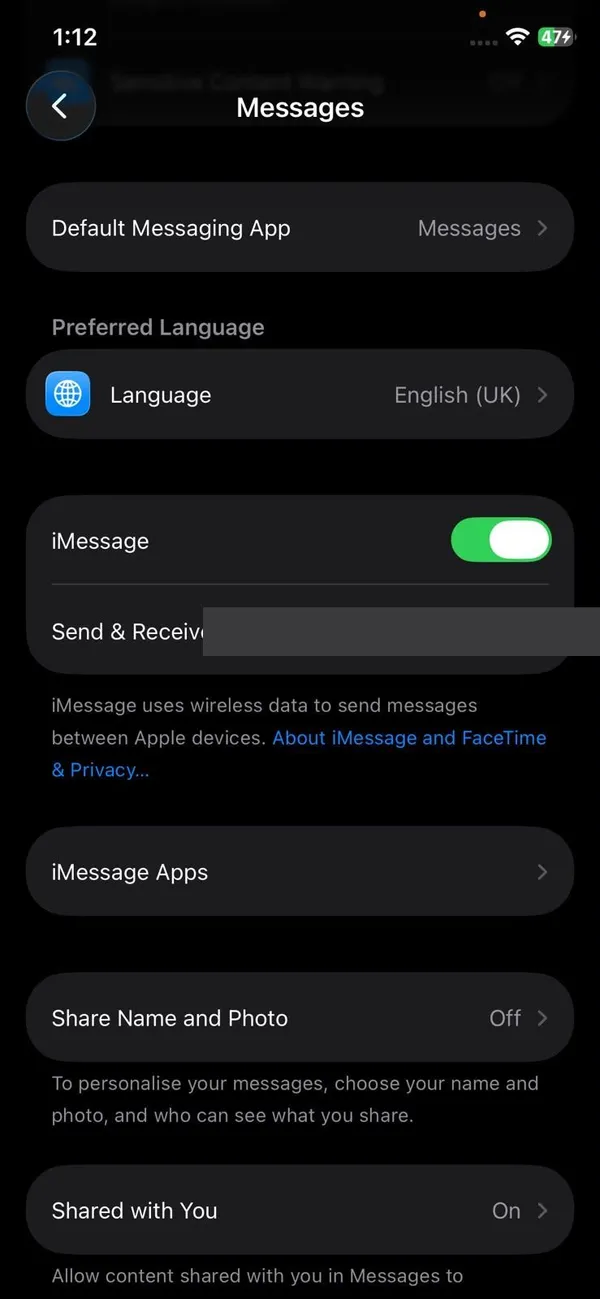
Go to Settings › Apps › Messages (Settings › Messages on older iOS), turn off iMessage, wait 30 seconds and turn it back on.
- 5
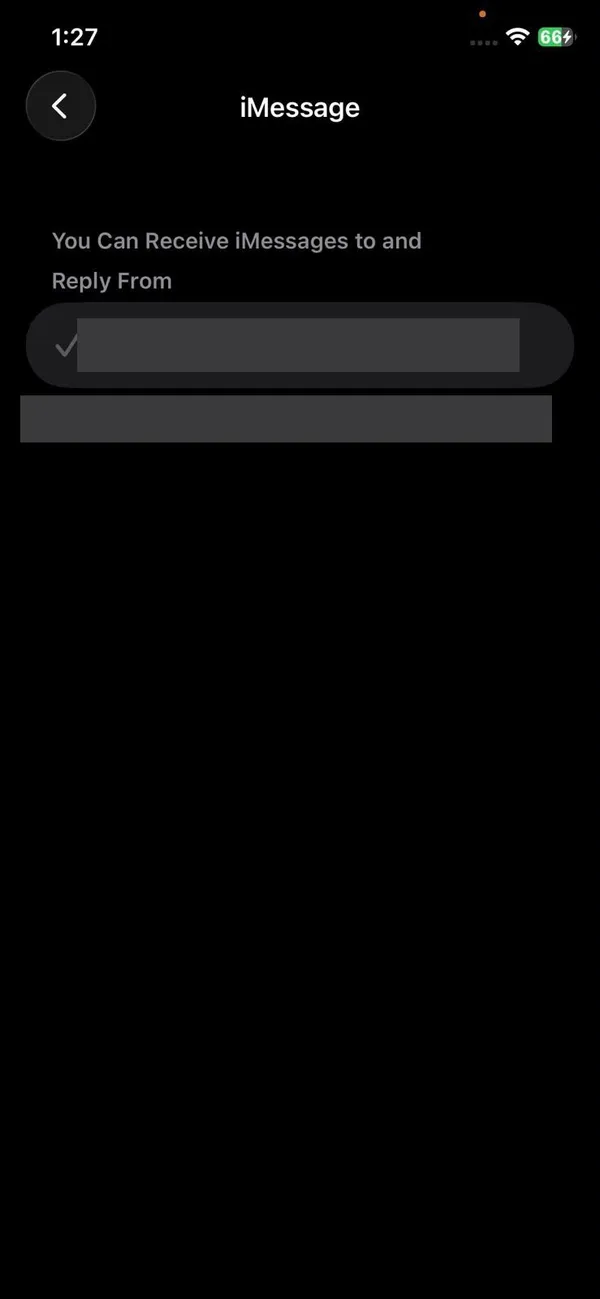
Check Send & Receive.
In the same menu tap Send & Receive. Make sure your phone number is ticked, and under Start New Conversations From, choose your number.
- 6
Set the date and time automatically.
Go to Settings › General › Date & Time and turn on Set Automatically. A wrong date or time makes Apple’s servers reject the secure connection iMessage uses. If the switch is greyed out, Screen Time restrictions may be locking it.
- 7
Restart the iPhone and update iOS.
Restart, then install any update in Settings › General › Software Update. Apple often fixes Messages bugs in point releases.
- 8
Sign out of your Apple Account in Messages.
In Send & Receive, tap your Apple Account at the top, choose Sign Out, then sign in again. Your message history stays on the phone, and if Messages in iCloud is on, it syncs back from iCloud too.
- 9
Reset network settings.
Go to Settings › General › Transfer or Reset iPhone › Reset › Reset Network Settings. You will need to enter Wi-Fi passwords again.
Red exclamation mark or Not Delivered?
Tap the red exclamation mark next to the message and choose Try Again. If it still fails, tap it again and choose Send as Text Message, which sends it through your carrier (normal texting rates may apply). To make this happen automatically when iMessage is down, turn on Send as Text Message in Settings › Apps › Messages. On iOS 27, failed messages also retry on their own in the background, so a message that failed on a weak signal often goes through once you reconnect.
Photos or videos will not send
- Check free storage in Settings › General › iPhone Storage. Messages needs space to prepare attachments.
- Turn on MMS Messaging in Settings › Apps › Messages for photos sent as green messages.
- On a weak connection, turn on Low Quality Image Mode in the same menu so photos are smaller.
- On iOS 26 and earlier, one stuck photo could block the texts after it. iOS 27 sends each item separately, so updating often fixes this.
iMessage stopped working after the iOS 27 update
Some people see “An error occurred during activation” after a major update. iMessage has to re-register your number with Apple, which can take up to 24 hours. Leave iMessage on, keep the phone connected, and avoid turning it off and on repeatedly, since each attempt can restart the wait. If it still fails after a day, sign out of your Apple Account in Send & Receive, restart, and sign in again.
Works on iPhone but not on Mac or iPad
On the other device, open Messages settings and check that it is signed in with the same Apple Account and that your phone number is ticked under Send & Receive (on a Mac: Messages › Settings › iMessage). If the number is missing, it is not linked to your Apple Account yet; sign in on the iPhone first. To get green texts on the Mac too, turn on Settings › Apps › Messages › Text Message Forwarding on the iPhone and choose the Mac.
Group messages not working
Open the group and scroll to the latest messages. If it says you left the conversation, someone needs to add you back. If one member switched to Android, the whole group may move to green messages; turn on Group Messaging and MMS Messaging in Messages settings. For anything else, starting a new group with the same people is often the quickest fix.
iMessage not working on a new iPhone
- 1
Check your phone line is on.
Go to Settings › Cellular. Your line should be turned on, and if you have two SIMs, the right one should be selected for iMessage.
- 2
Check your number is shown.
Settings › Apps › Phone shows My Number. If it is blank or wrong, contact your carrier, because iMessage uses this number to register.
- 3
Give it time.
Activation can take up to 24 hours on a new phone, a new number or a new eSIM. Keep the phone on Wi-Fi or cellular data during that time.
Messages arrive but you do not see them
- Filtered senders: if Filter Unknown Senders is on, messages from numbers not in your contacts go to a separate list. In Messages, tap Filters (or the back arrow) and open Unknown Senders.
- Blocked contact: check Settings › Apps › Messages › Blocked Contacts. You may have blocked someone by accident.
- Focus or muted conversation: a Focus or a muted chat hides the alert, but the message is still delivered. Check for a crossed-out bell next to the conversation.
Switched to Android? Turn iMessage off first
If you moved to an Android phone and iPhone users’ texts are not reaching you, your number is still registered with iMessage. If you still have the iPhone, turn off iMessage in Settings › Apps › Messages before removing the SIM. If you no longer have it, use Apple’s Deregister iMessage page at selfsolve.apple.com, where you enter your number and a confirmation code sent by text.
Is it only one person?
If iMessage works with everyone except one contact, the problem is probably on their side. They may have switched to Android, turned iMessage off, or changed their number. Delete the conversation and start a new one, or ask them to check their settings. Also open their contact card and make sure you are messaging the right number or email, since old contacts often hold an outdated number that still looks correct at a glance.
Frequently asked questions
Why are my messages green instead of blue?
Green means the message went as SMS, MMS or RCS instead of iMessage. It happens when the other person uses Android, has iMessage turned off, or when either of you has no internet connection.
Why did iMessage stop working after I switched to eSIM?
Adding an eSIM after setup may leave iMessage linked to the old number or only your email. Turn iMessage off, wait 30 seconds, and turn it back on so it picks up your phone number.
Why are my iMessages coming from my email address?
Your email is chosen under Start New Conversations From. Change it to your phone number in Settings › Apps › Messages › Send & Receive.
How do I know if someone blocked me on iMessage?
There is no notification. Messages to someone who blocked you stay blue but never show Delivered. Since that also happens when their phone is off, it is not proof on its own.
What to try next
Sources
Official pages these steps are based on. Menus can differ by software version.
People also ask
Does “Not Delivered” mean I am blocked?
Not usually. When someone blocks you, your iMessages often still appear to send normally but never show Delivered. A red Not Delivered error is almost always a connection or setting problem on your iPhone.
Read the full guide: iMessage not deliveredHow long does indexing take on iOS 27?
Apple says it can take from a few hours to a few days, depending on how much is on your iPhone. Phones with large photo and message libraries can take a week or more, especially if they are rarely left charging.
Read the full guide: iOS 27 indexing in progressWhat is the latest iOS version?
iOS 27.0.1, released on September 28, 2026, according to Apple's security releases page. It works on iPhone 11 and later.
Read the full guide: iOS and Android updates trackerDoes the message mean my battery is damaged?
No. The message reflects higher usage since the update. Battery damage shows in Settings, Battery, Battery Health & Charging as a lower Maximum Capacity or a Service label.
Read the full guide: iPhone used more than usual since upgradingRelated guides
iMessage not delivered
iMessage showing a red Not Delivered or never saying Delivered? Learn what each means, then fix it with 8 steps, from resending to turning iMessage off and on.
iOS 27 indexing in progress
Indexing in Progress on iOS 27 means your iPhone is rebuilding search. Most finish in hours to days. See how long yours takes and how to speed it up.
iOS and Android updates tracker
The latest iPhone and Android software updates in one place: iOS 27.0.1 fixes, Pixel update dates, who can update, and our guides for problems after an update.
iPhone used more than usual since upgrading
Your iPhone has been used more than usual since upgrading iOS and it may affect battery life? Here is what the message means, how long it lasts and 8 tips.
More guides you may need
AirDrop not working
AirDrop not working, stuck on Waiting or not finding the other device? Check AirDrop visibility, Bluetooth, Personal Hotspot and 7 more causes to fix it fast.
AirPods keep beeping
AirPods keep beeping in your ears or from the case? Check battery tones, Find My Play Sound, Announce Notifications and dirty contacts. 7 causes and easy fixes.