

iPhone 18 Pro aperture: how to change it and when to use each setting
The iPhone 18 Pro is the first iPhone with a variable aperture. Here is how it works, where to change it in the Camera app, what each setting is good for, and how to make the camera remember your choice.
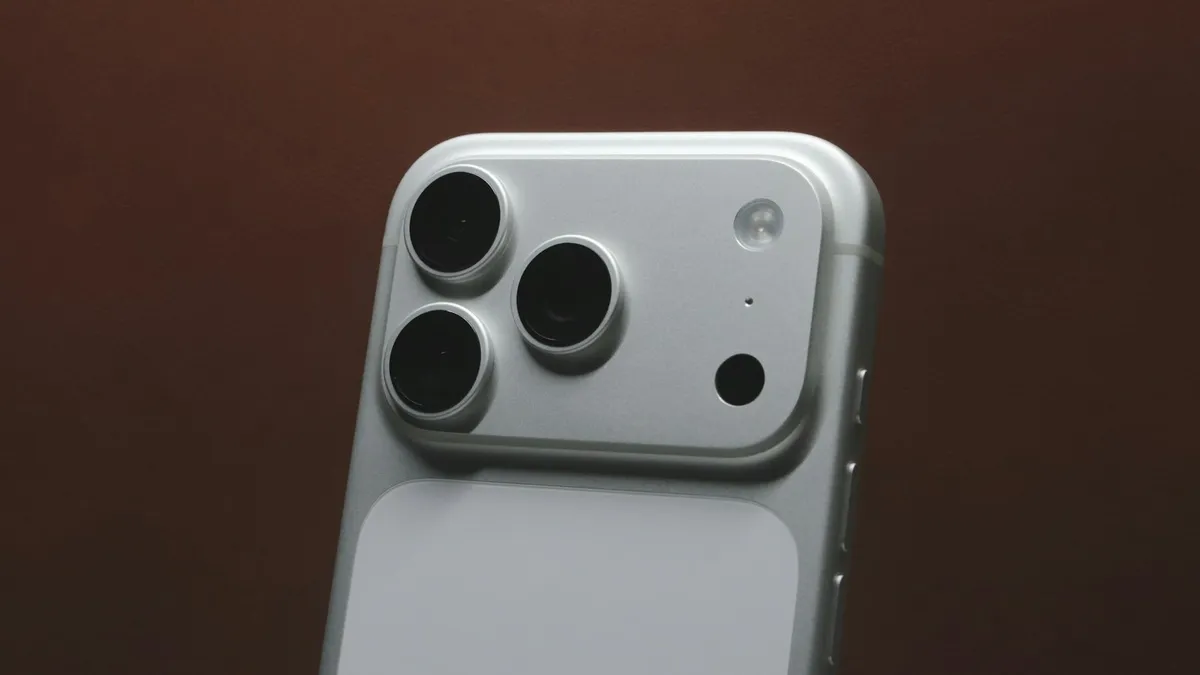
Photo by Samuel Angor on Unsplash
Every earlier iPhone camera had a fixed aperture. The lens opened to one size, and the phone made up for the rest with software. The iPhone 18 Pro changes that. Its main camera can change the size of its opening, which changes how much light reaches the sensor and how much of the picture stays in focus. It is the biggest change to the camera hardware in years, and many people cannot find where to control it. This guide explains how the variable aperture works, shows where to change it in the Camera app, and says when each setting is worth using. We use Apple's own words from its launch page and its iPhone User Guide.
What does a variable aperture do?
The aperture is the opening that lets light into the lens. A lower f-number, such as f/1.48, means a wider opening. It lets in more light, which helps in dim places, and it gives a shallower depth of field, so the background looks softer. A higher number, such as f/4, means a narrower opening. It lets in less light but keeps more of the scene in focus, from near to far.
Apple says the iPhone 18 Pro uses six laser-cut blades controlled by a new rotor mechanism. The variable aperture is on the new 48MP Fusion Main camera, which Apple names as the one that has it. The other cameras are not described that way.
What are the iPhone 18 Pro aperture settings?
| Setting | What Apple says it is for |
|---|---|
| f/1.48 | Low light. The camera can intelligently widen the aperture to f/1.48 for low-light shots. |
| f/1.8 | Portraits. A balance of light and depth of field. |
| f/4 | Group shots. Narrowing the aperture keeps more of the group in focus. |
| The fourth setting | Apple says there are four settings and names three on its launch page. News sites report f/2.8 as the fourth. |
Does the iPhone choose the aperture for me?
Yes, by default. Apple says the Main camera adjusts the aperture on its own by automatically adjusting for depth of field and lighting. Most photos need no action from you. You only need the manual control when you want a particular look, such as a very soft background or sharp focus across a group.
How to change the aperture on iPhone 18 Pro
Apple's launch page says you can manually adjust any of the four aperture settings in the Camera app, and that Pro controls let you adjust lens aperture, shutter speed and white balance, or use a histogram to check exposure. The steps below follow Apple's iPhone User Guide for iOS 27, as summarized for us, because the guide page itself would not load in full. Menu names can differ a little on your phone.
Set the lens aperture
- 1
Open the Camera app.
Choose a mode that supports it. Apple's guide lists Photo, Video, Cinematic, Slo-mo and Time-Lapse.
- 2
Open Camera Controls.
This is the control button for camera tools in the Camera app.
- 3
Choose Lens Aperture.
- 4
Pick a value from the list.
Take a test shot to see the effect.
- 5
Add Lens Aperture to the tools above the camera frame if you want faster access.
Apple's guide describes this option.
How to keep your aperture setting
The camera normally resets your choices when you close the app. Apple's guide says to turn on Lens Aperture in Settings, Camera, Preserve Settings if you want the camera to remember it. We cover Preserve Settings in our guide on camera settings that keep resetting, including the other switches and how to test them.
When should you use each setting?
- Dim restaurant or evening scenes: try f/1.48, which Apple says is for low light. The photo will be brighter, and the background will blur more.
- Portraits of one person: f/1.8 is Apple's pick, a balance of light and depth of field.
- Groups, landscapes and buildings: use f/4, which keeps more of the scene sharp.
- Moving subjects or video: leave the camera on automatic unless you have a reason, because a wide opening in a bright place can overexpose a scene.
These are starting points. Take two or three shots at different settings and look at them. Our guides on the shutter speed and on the aspect ratio cover the other controls you may use with aperture.
What does aperture not fix?
A wider aperture does not fix a shaky hand, a dirty lens or a moving subject. If your photos look blurry, clean the lens with a soft cloth and read our guide on blurry iPhone photos. Aperture also does not change the zoom or the field of view. It only changes light and depth of field.
How aperture works with shutter speed and brightness
Aperture is one of three things that decide how bright a photo is. The second is shutter speed, which is how long the sensor collects light. The third is how sensitive the sensor is, which a phone chooses on its own. If you open the aperture wider, the phone can use a faster shutter speed for the same brightness, and a faster shutter helps freeze motion. If you narrow it to f/4, the phone needs more light or a slower shutter, so it may blur moving subjects in dim places. That is why f/4 suits bright, still scenes, and why the automatic mode picks a wide opening when it gets dark.
What else do Pro controls let you adjust?
Apple's launch page says Pro controls are a customizable Camera app experience on the iPhone 18 Pro and Pro Max. You can adjust settings such as lens aperture, shutter speed and white balance, and you can use a histogram to check exposure. A histogram is a small graph of how light and dark your picture is. If the graph is bunched against the left side, the photo is too dark. If it is bunched against the right, it is too bright. It is a handy check when a bright screen makes the preview hard to judge.
Tips for better photos with a wide aperture
- Tap the subject to set focus before you shoot, because a wide aperture gives you less room for focus errors.
- Move closer to the subject if you want a stronger blur in the background.
- In dim light, hold the phone steady with both hands or rest it on something, since a wider opening still needs a steady hand.
- Check the result by zooming in on the photo, not only on the preview.
- Switch back to automatic when you are in a hurry, because it works well most of the time.
Do other iPhones have a variable aperture?
Apple's launch page describes it on the iPhone 18 Pro and iPhone 18 Pro Max. Its page on the iPhone Duo does not say whether the Duo has it. Earlier iPhones have a fixed aperture. If you buy a model, check Apple's current specifications for your exact phone.
Can apps use the variable aperture?
Apple says developers get an API for even more control across the aperture range in their apps. That means a third-party camera app may offer the same control. You do not need to do anything in the Camera app for that. Check each app's settings.
What do Apple's pages not say about the aperture?
- Which f-number is the fourth setting. Apple names three on its launch page, and news sites report f/2.8.
- Whether you can change the aperture after you take a photo. The pages we read do not say.
- Whether the Ultra Wide or the Telephoto camera has a variable aperture. Apple describes it on the Main camera only.
- Whether the iPhone Duo has the same control. Apple's Duo page does not say.
Still cannot find Lens Aperture?
Make sure you have an iPhone 18 Pro or Pro Max, that iOS 27 is installed and that you are using the Main camera in a supported mode. Update the software in Settings, General, Software Update. If the control is still missing, restart the iPhone, and check Apple's iPhone User Guide for your exact version, since menu names can change.
Frequently asked questions
Which iPhone 18 Pro camera has variable aperture?
Apple describes it on the new 48MP Fusion Main camera only. The Ultra Wide and Telephoto cameras do not have it in Apple's description.
What are the aperture settings?
Apple says there are four settings and names f/1.48 for low light, f/1.8 for portraits and f/4 for more depth of field in group shots. News sites report f/2.8 as the fourth.
Does the iPhone choose the aperture for me?
Yes. Apple says the Main camera adjusts aperture automatically for depth of field and lighting. You can also set it by hand in the Camera app.
How do I stop the camera from resetting my aperture?
Apple's guide says to turn on Lens Aperture in Settings, Camera, Preserve Settings. Our guide on camera settings that reset explains the other switches.
What to try next
Sources
Official pages these steps are based on. Menus can differ by software version.
People also ask
Is the iPhone 18 Pro Face ID problem hardware or software?
Apple fixed it with software in iOS 27.0.1, so for most people no repair or replacement should be needed. If Face ID still fails or the phone still restarts after installing the update, ask Apple to run diagnostics.
Read the full guide: iPhone 18 Pro Face ID bugHow much does the iPhone Duo cost?
Apple lists $1,999 as the U.S. starting price, or $83.29 a month for 24 months. Storage options are 256GB, 512GB, 1TB and 2TB, so higher storage costs more. Check Apple's store page for each tier.
Read the full guide: iPhone Duo price and release dateHow long should I wait before worrying?
Give it an hour or two. Reviews and new accounts can take longer, up to a day.
Read the full guide: TikTok stuck on 0 viewsWhat does iOS 27.0.1 fix?
Apple's notes list three fixes: unexpected restarts after a failed Face ID attempt on iPhone 18 Pro and Pro Max, a color artifact in some 2x photos on some iPhone 18 Pro models, and a touchscreen that could become unresponsive when Notification Center and Control Center were opened together.
Read the full guide: iOS 27.0.1 updateRelated guides
iPhone 18 Pro Face ID bug
iPhone 18 Pro or Pro Max freezing and restarting after Face ID fails? Here is what triggers the bug, a safe workaround, and the iOS 27.0.1 update that fixes it.
iPhone Duo price and release date
iPhone Duo price and release date from Apple's own pages: $1,999 start, October 23 availability, storage, colors, eSIM-only and trade-in credit explained.
TikTok stuck on 0 views
TikTok video stuck on 0 views? Check your account and video privacy, look for a review or violation in Account status, and fix posting habits that limit views.
iOS 27.0.1 update
iOS 27.0.1 is a bug-fix update. See the three fixes Apple lists, which iPhones they help, how to install it and whether you should update now.
More guides you may need
Face ID move iPhone lower
Face ID keeps saying move iPhone lower or higher? Clean the camera area, remove the screen protector, restart and reset Face ID, then know when it is hardware.
FaceTime sensitive content warning
FaceTime paused your call with a sensitive content warning? Learn what triggers it, how it works on your iPhone, and where to turn it off in Settings.