

How to scan Android for malware and remove it (free)
Every Android phone has a free scanner built into the Play Store, and Samsung adds its own. Here is how to run both.
Photo by Zulfugar Karimov on Unsplash
Signs something is wrong
- Ads popping up on the home screen or over other apps.
- Apps you did not install.
- Fast battery drain, heat or data use with no reason.
- Your browser opens pages on its own or redirects searches.
- Charges on your phone bill for premium texts or subscriptions you did not order.
- Friends receive strange messages or links from you.
- A new launcher, keyboard or app with no icon appeared.
One sign on its own is often something else, such as a normal app update draining battery for a day or a new app you forgot you installed. Several together are a good reason to scan now.
How malware gets onto Android phones
- Installing APK files from websites, links or messages instead of the Play Store, including “modded” or “free premium” versions of paid apps.
- Fake apps in the Play Store that copy a popular app’s name, such as flashlights, cleaners, PDF readers and VPNs from unknown developers.
- Links in texts about deliveries, tolls or bank alerts that lead to a download.
- Fake “your phone is infected” pages that push you to install a cleaner.
- An outdated phone that no longer receives security updates.
How to scan Android for malware with the built-in tools
The fix
Scan with Google Play Protect
- 1
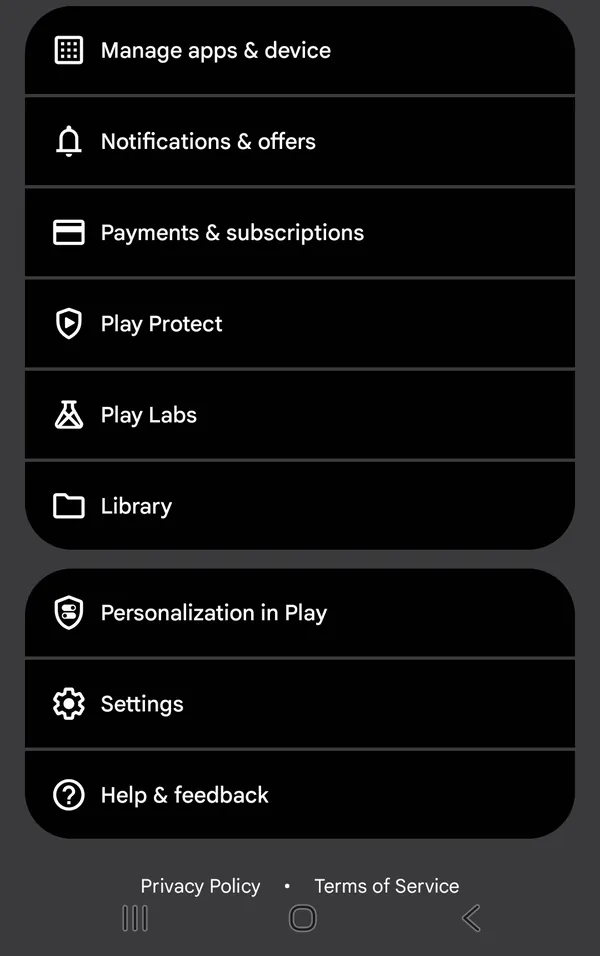
Open the Play Store and tap your profile picture.
- 2
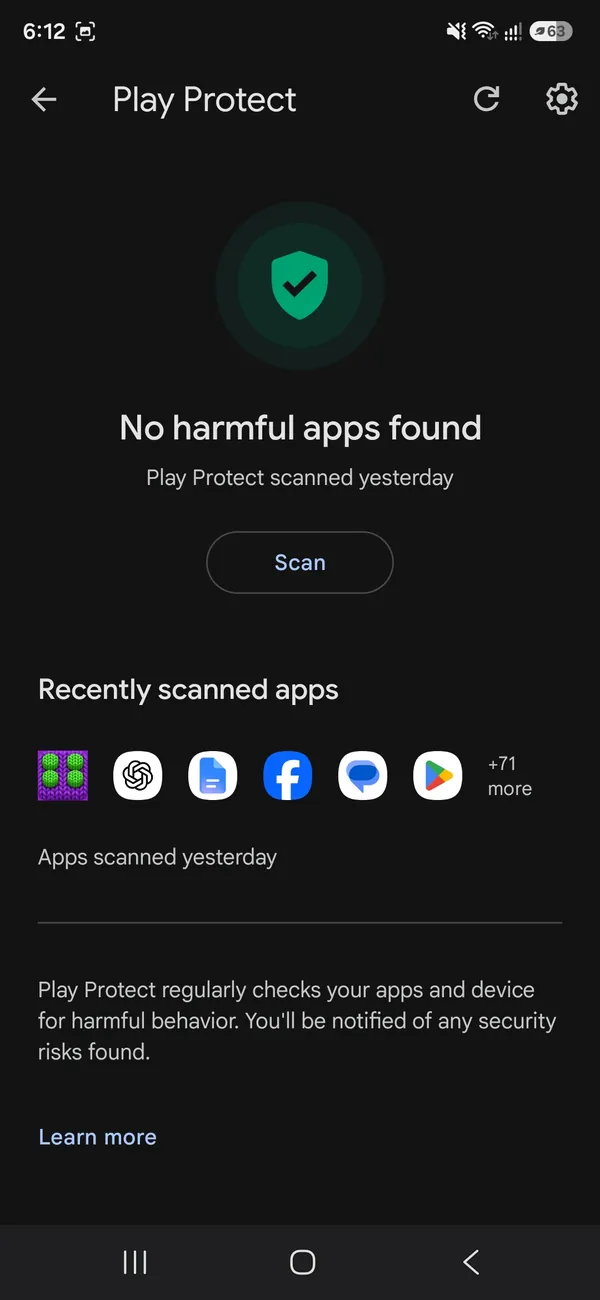
Tap Play Protect, then Scan.
- 3
Tap Uninstall on anything it flags.
The fix
Scan on Samsung
- 1
Open Settings › Device care (Battery and device care on older phones).
- 2
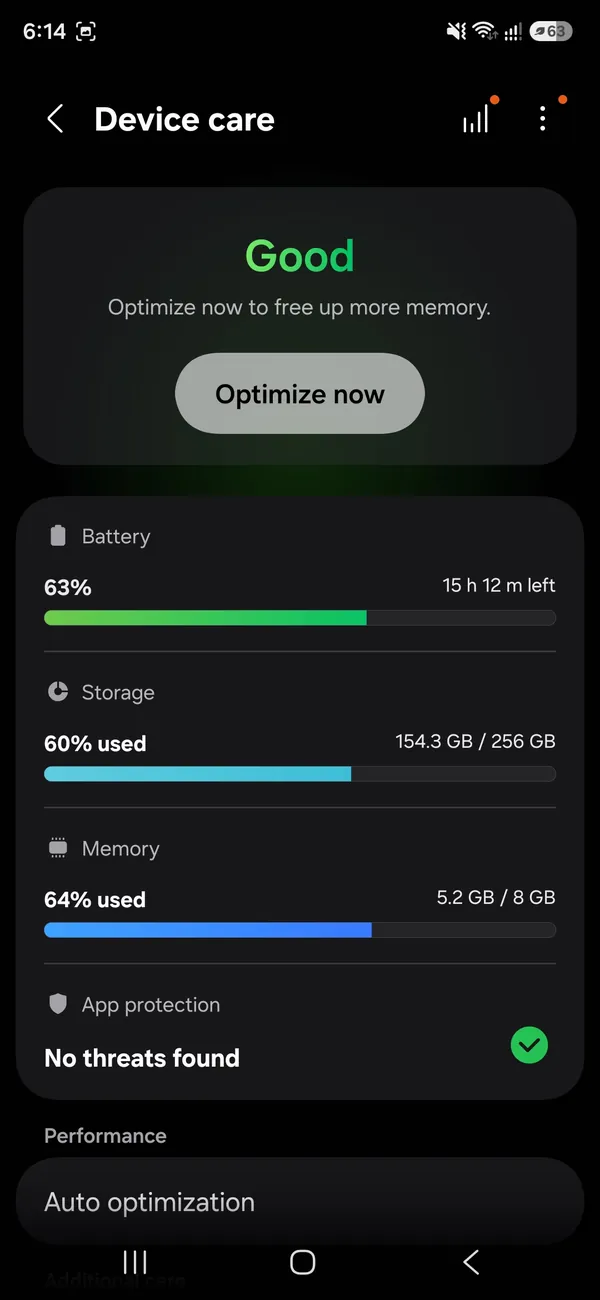
Check App protection.
On One UI 8.5 it shows at the bottom of Device care and says No threats found when the phone is clean. Older phones call it Device protection.
- 3
Tap App protection to see the details of the last check.
On a Pixel, you can also check Settings › Security & privacy › App security, which shows the Play Protect status. Make sure Scan apps with Play Protect is turned on in the Play Protect settings, reached through the gear icon on the Play Protect screen, so new apps are checked automatically.
Check the permissions malware abuses
- Accessibility: Settings › Accessibility › Installed apps. Accessibility lets an app read the screen and tap for you. Only trusted apps such as password managers or real accessibility tools should be here.
- Display over other apps: Settings › Apps › Special access (Special app access on Samsung). Apps allowed here can show pop-ups over everything.
- Install unknown apps: in the same Special access menu. Turn it off for browsers and messaging apps unless you have a specific reason.
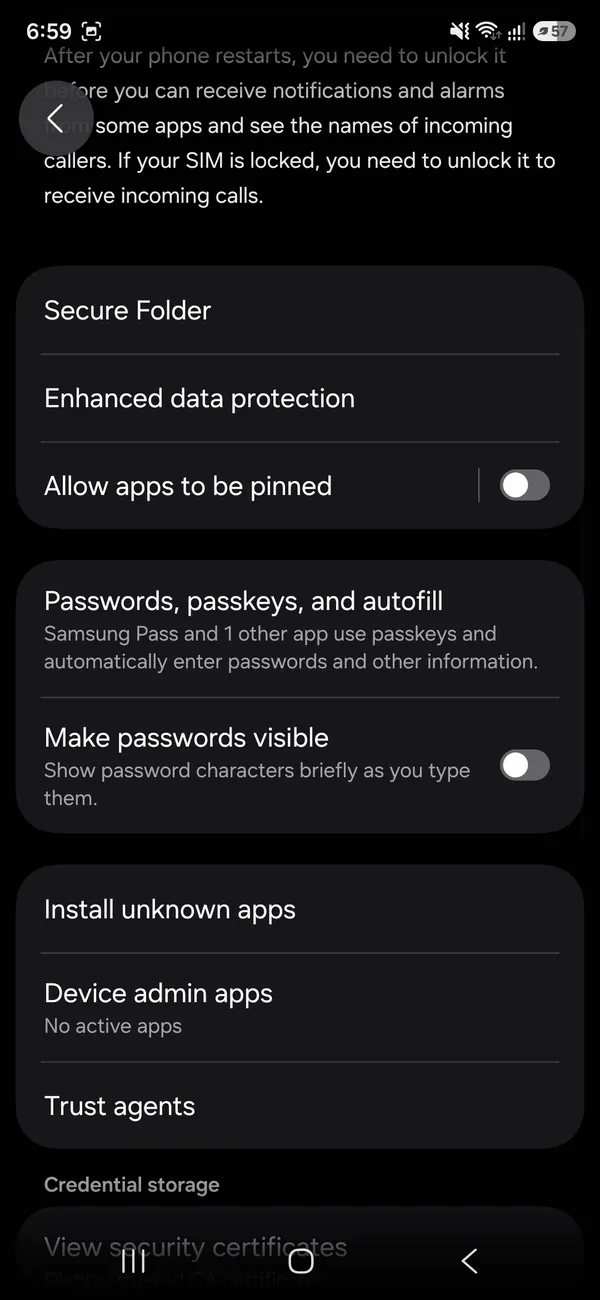
- Device admin apps: as shown below; apps here can block uninstalling.
Remove access from anything you do not recognize, then uninstall the app. If an app says it needs one of these permissions to work, such as a flashlight asking for accessibility, that alone is a strong reason to delete it.
The fix
Remove an app that fights back
- 1
Go to Settings › Security and privacy › More security settings › Device admin apps and turn it off for the app.
- 2
Start in safe mode by holding Power, then touching and holding Power off.
- 3
Uninstall the app in Settings › Apps, then restart.
Samsung Auto Blocker
Recent Galaxy phones include Auto Blocker in Settings › Security and privacy. It blocks app installs from unauthorized sources, blocks commands over a USB cable, and can check images in messaging apps for threats. Turning it on is one of the easiest ways to keep malware from getting on a Samsung phone in the first place. You can turn it off temporarily if you ever need to install an app from outside the Galaxy Store and Play Store.
After removing malware
- 1
Change your Google account password and run the Security Checkup at myaccount.google.com/security-checkup.
- 2
Change passwords for banking, email and social apps you used on the phone, from another device if possible.
- 3
Check your bank, card and phone bill for charges you do not recognize.
- 4
Update the phone in Settings › Software update, and update all apps.
- 5
Scan again with Play Protect a day later, and keep an eye out for the warning signs above over the next week.
Scan a family member’s phone
Children and older relatives are more likely to tap a fake download or a scary pop-up. Next time you have their phone in hand, run the Play Protect scan, check the three permission lists above, turn on Auto Blocker on Samsung, and remove apps they do not recognize. For children, Google Family Link lets a parent approve app installs, which stops most problems before they start. Explain one simple rule: real warnings never come from a website pop-up, and nobody legitimate asks them to install an app to fix a virus.
Unexpected charges on your phone bill
Some malicious apps sign you up for premium text services or carrier-billed subscriptions. Check your carrier bill and the Play Store’s Payments & subscriptions page for anything you did not order. Call your carrier to dispute the charges and ask them to block premium messaging and third-party billing on your line; Verizon, AT&T and T-Mobile all offer blocks. Cancel any Play Store subscriptions you did not start, and report the app to Google from its Play Store page.
How to spot a fake app before installing
- Check the developer name. Official apps come from the real company, such as Google LLC or Samsung Electronics.
- Look at the download count and read recent reviews, not just the star rating.
- Be suspicious of utility apps that ask for SMS, accessibility or admin access.
- Avoid apps that promise to boost, clean or cool your phone.
- Never install an app from a link in a text message, even if it looks like your bank or a delivery company.
Keep your phone safe going forward
Install system updates as soon as they arrive, since most attacks target known, already fixed bugs. Keep Play Protect and, on Samsung, Auto Blocker turned on. Stick to the Play Store and Galaxy Store, and review app permissions every few months, removing access for apps you no longer use. Set up a screen lock and Google’s two-step verification so that even a stolen password is not enough to get into your accounts. Scam calls and texts are often how attacks start; see how to block spam calls on Android.
Still infected? Factory reset
If ads, redirects or strange behavior come back after removing apps, a factory reset clears almost all Android malware. Back up photos and contacts first, but do not restore a full app backup afterwards, since that can bring the problem back. Reinstall apps one by one from the Play Store. See how to factory reset an Android phone.
Worried someone installed a tracking app?
Monitoring or stalkerware apps often hide their icon and use accessibility or device admin access. If you think someone who had your phone installed one, check the permission lists above. Be aware that removing it may alert the person who installed it. If your safety could be at risk, talk to someone you trust or a domestic violence helpline, such as the National Domestic Violence Hotline at 1-800-799-7233, before you remove anything, and consider using a different phone to plan.
Do you need a paid antivirus app?
For most people, no. Play Protect, Samsung’s built-in protection, regular updates and installing apps only from official stores cover the common threats. A reputable security app can add web protection and scam link warnings if you want them. Avoid little-known “cleaner” or “booster” apps; many show heavy ads and are part of the problem. If you already see pop-ups everywhere, see why your Android phone keeps popping up ads.
Frequently asked questions
My browser says my phone has a virus. Is it real?
Almost never. Those pop ups are ads trying to scare you into installing something. Close the tab and do not tap anything in it.
Do I need an antivirus app on Android?
Most people do not. Play Protect plus installing apps only from the Play Store covers the usual risks.
Does a factory reset remove malware?
Yes, in almost every case, because it erases all apps and data. Restore only your photos and contacts afterwards, and reinstall apps from the Play Store rather than from a full backup.
Can an Android phone get a virus from a website?
Visiting a site on an updated phone is very unlikely to infect it. The risk comes from downloading and installing files or apps the site pushes, so never install APKs from pop-ups.
What to try next
People also ask
Safari says my iPhone has a virus. Is it true?
No. Websites cannot scan your phone. Close the tab, do not tap anything or call any number shown, and clear Safari history and website data.
Read the full guide: Check iPhone for a virusWhy does my Samsung keep installing games by itself?
Common causes are Galaxy Store suggestions during an update, apps a carrier adds to locked phones, an app that is allowed to install other apps, or adware. The store that lists the game as installed tells you which one it is.
Read the full guide: Samsung keeps installing gamesWhy is my storage full when I have deleted everything?
Deleted photos usually sit in a Trash or Recycle bin for 30 days. WhatsApp media, app caches and the Downloads folder also take space that does not show up as photos.
Read the full guide: Android storage fullHow do I scan a QR code from a screenshot?
On iPhone, open the image in Photos and touch and hold the QR code, or tap the Live Text button. On Android, open it in Google Photos and tap Lens.
Read the full guide: Scan a QR codeRelated guides
Check iPhone for a virus
Check your iPhone for a virus or malware: spot the real warning signs, remove unknown profiles and apps, clear Safari data and update iOS. No paid app needed.
Samsung keeps installing games
Samsung keeps installing games you never picked? Find which store adds them, limit Galaxy Store updates, scan with Play Protect and check your account. 8 fixes.
Android storage full
Android phone storage full? Find what is using the space, clear junk files and large videos, and move photos to the cloud or an SD card. Works on Samsung too.
Scan a QR code
Scan a QR code with your iPhone or Android camera in seconds, scan one from a photo or screenshot, and fix a camera that will not read QR codes.
More guides you may need
Delete hidden apps on iPhone
Delete hidden apps on your iPhone from the Hidden folder in App Library, Search or iPhone Storage. Also how to find apps hidden by Screen Time restrictions.
Activate eSIM on iPhone
How to activate eSIM on iPhone with a QR code, manual details or your carrier's app. Steps for Verizon, AT&T and T-Mobile, plus fixes when activation fails.