

How to change print size when printing from iPhone
The iPhone Print menu lets you choose paper size but not a scale percentage. Here is how to get the size you want anyway.
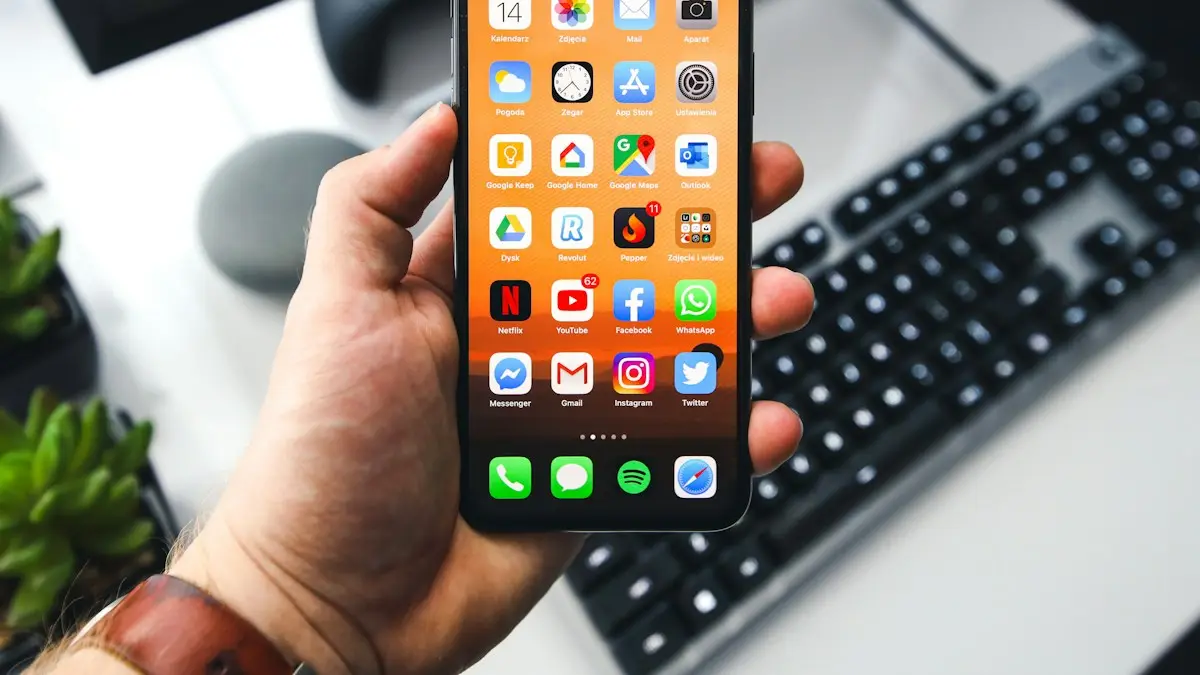
Photo by Sebastian Bednarek on Unsplash
Why the iPhone has no scale setting
When you print from an iPhone, it uses AirPrint. AirPrint asks the printer which options it supports and only shows those, so two people with different printers see different Print menus. Most printers report paper sizes, copies and color, but not a scale percentage. That is why you can pick 4 x 6 or Letter but cannot type 80 percent.
Since iOS 17, many people also noticed that pages print “scaled to fit” with wider borders. The iPhone shrinks the content to fit inside the area the printer says it can print on. The fixes below work around both problems.
The fix
Change paper size in the Print menu
- 1
Open the photo, document or web page you want to print.
- 2
Tap the Share button, then scroll down and tap Print.
- 3
Tap Printer and choose your AirPrint printer.
- 4
Tap Paper Size and pick the size loaded in your printer.
The list depends on your printer. If you only see one size, the printer is not reporting more options.
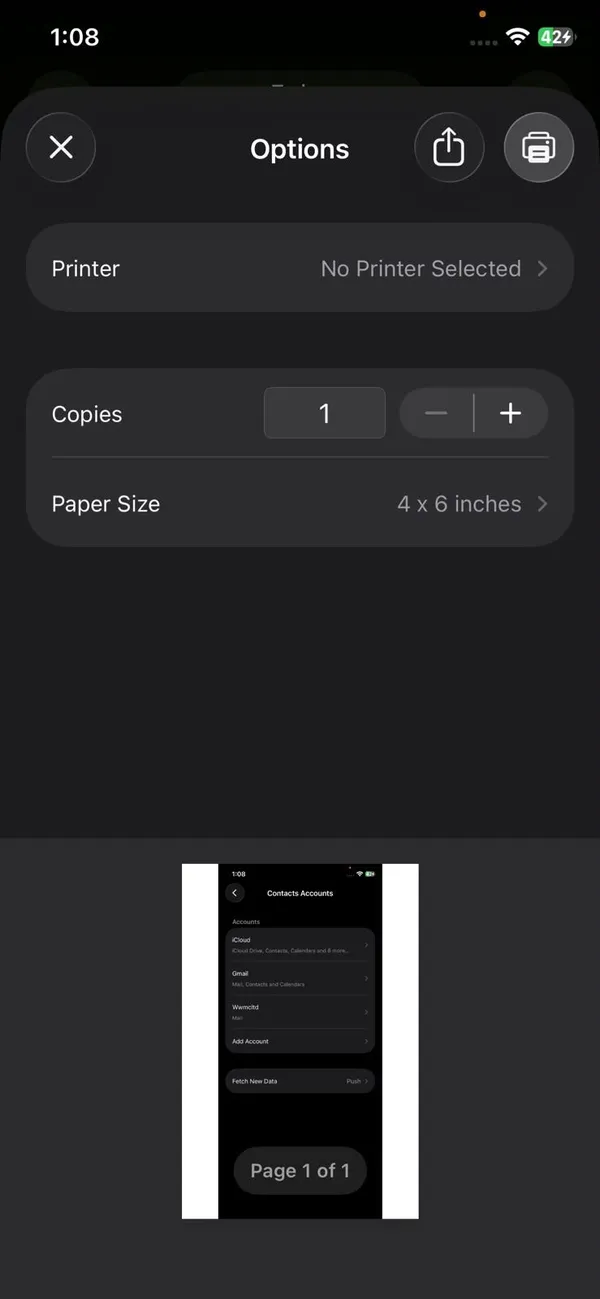
- 5
For photos, check the layout option.
Some printers show Fit or Fill. Fit shows the whole photo with borders; Fill fills the paper and trims the edges.
- 6
Pinch out on the preview to check how it will look, then tap Print.
The fix
Print smaller or at an exact size with your printer’s app
Printer apps have the scaling controls that AirPrint lacks. They are free in the App Store.
- 1
HP: HP Smart.
Tap Print Photos or Print Documents, pick the file, then tap Resize or the settings icon and choose Fit to Page, Fill Page or a custom percentage.
- 2
Canon: Canon PRINT.
Choose Photo Print or Document Print, then open Print Settings to change paper size, borderless and scaling.
- 3
Epson: Epson Smart Panel.
Open Print Photos or Print Documents and use the paper size and layout settings before printing.
- 4
Brother: Brother Mobile Connect.
Tap Print, choose your file and open Print Settings for paper size and fit options.
The fix
Print a photo at a specific size
- 1
Open the photo in Photos and tap Edit.
- 2
Tap Crop, then the aspect ratio button, and pick 4:6, 5:7 or 8:10.
Cropping to the paper’s shape stops the printer adding borders or trimming faces.
- 3
Tap Done, then Share › Print and choose the matching paper size.
Other ways to get the size right
- Documents in Pages. Tap the ••• menu › Document Setup and choose a paper size before printing.
- Web pages. Turn on Reader view first, or save the page as a PDF in Files. Both print larger and cleaner than the full page.
- PDF at actual size. Open the PDF in your printer’s app and choose 100% or Actual size.
- Print from a computer. Send the file to a Mac or PC, where the print dialog has a full scale setting.
Which paper size should you pick?
The Paper Size list can be long and confusing. It should always match the paper sitting in the tray, not the size you want the picture to be. These are the sizes most people in the US need:
- Letter (8.5 x 11 in). Standard US printer paper. Use it for documents, forms, tickets and web pages.
- Legal (8.5 x 14 in). Longer paper used for some contracts and legal forms. Only pick it if legal paper is loaded.
- 4 x 6 in. The standard photo print size. Most home photo printers have a small tray or slot for it.
- 5 x 7 in and 8 x 10 in. Larger photo sizes for frames. Check your printer supports them before buying the paper.
- A4 (210 x 297 mm). The standard size outside the US. It is slightly narrower and taller than Letter. If A4 is selected but Letter paper is loaded, the edges of the page can be cut off or the printer may stop with a paper size error.
If your prints come out cropped or shifted to one side, a size mismatch like A4 vs Letter is the first thing to check, both on the iPhone and on the printer's own screen.
How to change print size from different apps
The Print menu looks the same everywhere, but getting to it and preparing the content differs a little by app. Setting things up before you tap Print gives you more control over the final size.
If that did not work
Photos
Select one or more photos, tap Share, then Print. With several photos selected, some printers offer a choice of how many to place on each sheet. Crop first if you want a set shape, as shown above. Our guide to changing the aspect ratio on iPhone explains the crop shapes.
Safari
Tap Share, then Print. Web pages often print across many pages with ads and menus. Turn on Reader view from the page menu in the address bar first. The text prints larger, cleaner and on fewer sheets.
Open the email, tap the reply arrow and choose Print. Attachments such as PDFs print best when you open them first and print from their own preview.
Files and PDFs
Open the PDF, tap Share, then Print. PDFs keep their own page size, so a Letter PDF on Letter paper prints close to actual size. A PDF made for A4 will be scaled slightly to fit Letter paper.
Notes and Pages
In Notes, open the note, tap Share or the ••• menu and choose Print. In Pages, set the paper size under Document Setup before printing so the layout matches the page.
Print only some pages or in black and white
In the Print Options screen, tap Range to choose which pages to print, so a 20 page web article does not use 20 sheets. If your printer supports it, a Black & White switch also appears here, which saves color ink on documents. Both options come from the printer, so they may not show for every model.
Print a shipping label or 4 x 6 page smaller
Labels fail more often than normal pages. The paper size comes from the printer, and many printers keep using the last size they were set to, such as 4 x 6. If a label prints too big, too small or on the wrong paper:
- Open Print Options and look for a label or 4 x 6 paper size. Pick it before you print.
- Set the paper size on the printer too. Use its control panel or its app (HP Smart, Canon PRINT, Epson Smart Panel). Some printers ignore the iPhone choice until the tray is set.
- Print the label from a PDF in Files or the carrier’s app, not from a screenshot. A PDF keeps the label at its real size.
- Use Fit when the label is cut off, and Fill only if your printer shows that choice.
Make an email, web page or PDF print smaller or larger
The Print screen has no scale slider, so the page size comes from the original. For an email or web page that prints too large, choose a smaller paper size if the printer offers one, or open the page in Safari and use Reader, which prints plain text at a more sensible size. For a PDF, a printer app usually has a scale or Fit to Page choice. Printing fewer pages with Range in Print Options also saves paper.
Did you mean the text size on your screen?
Some people search for print size when they mean that the words on the iPhone screen are too small, or run off the edge. That is a display setting. Open Settings › Display & Brightness › Text Size and drag the slider, or use Larger Text in Accessibility. Our guide to all iPhone display settings shows where each one is.
Can’t change the paper size when printing from iPhone?
The Paper Size choice comes from your printer, not from the iPhone. If it is missing or will not change, the printer is usually the reason. Try these in order:
- 1
Open Print Options first.
In the Print screen, tap the printer name or Options to see Paper Size. Some apps hide it until you tap there.
- 2
Check the paper is loaded and set on the printer.
Many printers only offer the sizes they detect in the tray. Load the paper, then set its size on the printer’s own screen or in its app.
- 3
Print a photo from Photos, not a screenshot or PDF.
Some printers show extra photo sizes only when you print from Photos.
- 4
Update the printer and restart both devices.
Turn the printer off and on, restart the iPhone and install any printer update. Updates often add missing paper sizes.
- 5
Use the printer’s app.
If the Print screen still shows one size, the maker’s app (HP Smart, Canon PRINT, Epson Smart Panel) usually has the full size list.
Printer not showing up in the Print menu?
You cannot change any print settings until the iPhone can see your printer. If “No AirPrint Printers Found” appears, work through these:
- 1
Put both on the same Wi-Fi network.
The iPhone and the printer must be on the same network. A phone on cellular data or a guest network will not find a printer on your home Wi-Fi. If your iPhone keeps dropping Wi-Fi, see fixing an iPhone that will not connect to Wi-Fi.
- 2
Restart the printer, the iPhone and the router.
Turn the printer off and on first. It often loses its network connection after sleeping.
- 3
Check that the printer supports AirPrint.
Most wireless printers sold in the last ten years do. Older or very basic models may not, and they only work through the maker's app.
- 4
Update the printer's firmware.
Use the printer's screen or the maker's app to install updates. Updates often add missing paper sizes and fix AirPrint bugs.
Can you print bigger than the paper?
Not from the iPhone Print menu. The largest a print can be is the largest paper your printer takes, which for most home printers is Letter or Legal. To print an 8 x 10 or a full page photo, choose Letter paper and the Fill option, or crop to 8:10 first so nothing important is trimmed.
For anything larger, such as a poster, a print shop is the easier route. Most US pharmacy and office store photo counters let you upload straight from your iPhone and pick the exact size you want.
Frequently asked questions
How do I print a smaller label from my iPhone?
Open Print Options and choose the label paper size, such as 4 x 6, if your printer offers it. If the printer keeps printing on the wrong size, set the paper size in the printer’s own app or on its control panel.
My print size on iPhone is too small to read. Is that a print setting?
Probably not. If text on the screen is too small, change Text Size in Settings › Display & Brightness. Print size only changes what comes out of the printer.
Why don’t I see a Paper Size option when printing from my iPhone?
The Print menu only shows options your printer reports through AirPrint. Update the printer’s firmware, make sure the correct printer is selected, or use the printer maker’s app, which usually has more settings.
How do I print a photo smaller on iPhone?
Crop the photo to the shape you want, then choose a smaller paper size such as 4 x 6 if your printer supports it. For an exact size or a percentage, use your printer’s app, which has a resize option.
Why does my iPhone print with big white borders?
AirPrint scales to fit the printable area of the page, which adds margins. Choose Fill instead of Fit if your printer shows it, turn on borderless in the printer’s app, or crop the photo to match the paper shape.
How do I print 4 photos on one page from iPhone?
Select the photos in Photos, tap Share, then Print. Many printers then show a layout or several copies per page option. If yours does not, the printer’s app or a free collage app can place them on one page.
Can I print at 100 percent actual size from an iPhone?
Not from the standard Print menu. Save the file as a PDF, open it in your printer’s app and choose 100% or Actual size, or print it from a computer.
How do I print a smaller photo from my iPhone?
Open the photo, tap Share, then Print, and choose a smaller paper size such as 4 x 6 inches under Options. If your printer app has a scale or fit to page setting, use it to shrink or enlarge the print.
How do I change the print size on an HP printer from my iPhone?
Pick the paper size in the iPhone Print Options screen first. Then use the HP Smart app for scaling and quality settings, which vary by printer model.
People also ask
What does No AirPrint Printers Found mean?
Your iPhone searched your Wi-Fi network and found no printer that supports AirPrint. The printer may be off, on another network, or not compatible.
Read the full guide: No AirPrint printers foundIs JPG worse than HEIC?
Quality looks the same, but JPG files are about twice as large, so they use more storage.
Read the full guide: Change HEIC to JPG on iPhoneWhy can’t I change the Favorites cover?
Built in and smart albums like Recents and Favorites always use the newest photo. Only albums you made can be changed.
Read the full guide: Change album coverWhy does my iPhone camera go back to 4:3?
The Camera app resets to its default each time unless Preserve Settings is on. Go to Settings › Camera › Preserve Settings and turn on Creative Controls.
Read the full guide: Change aspect ratio on iPhoneRelated guides
No AirPrint printers found
No AirPrint printers found on your iPhone? Check the Wi-Fi network, printer support and settings. 9 fixes to get your printer to show up and print again.
Change HEIC to JPG on iPhone
Make your iPhone take JPG photos instead of HEIC with one setting, and convert photos you already have to JPG for free with the Files app. No extra app needed.
Change album cover
Change any album cover in the iPhone Photos app with Make Key Photo, plus which albums cannot be changed and what to do if the cover will not update.
Change aspect ratio on iPhone
Change your iPhone camera aspect ratio to 16:9, 4:3 or square, pin the control to the top bar in iOS 27, keep it as default, and reshape photos you took.
More guides you may need
Change your iPhone avatar
Change your iPhone avatar: the Apple Account photo in Settings and the Contact Photo and Poster people see when you call. Use a photo, Memoji or initials.
Clean a SIM card on iPhone
Clean an iPhone SIM card and tray safely with a dry lint free cloth. Learn what to avoid, how to test the SIM, and when to replace it if you see No SIM.