

Safari wrong location on iPhone: why websites think you are somewhere else
Most websites guess your location from your IP address, not from your iPhone’s GPS. A VPN, iCloud Private Relay, a hotspot or your mobile carrier can all make that guess wrong. Here is how to find the cause and fix it.
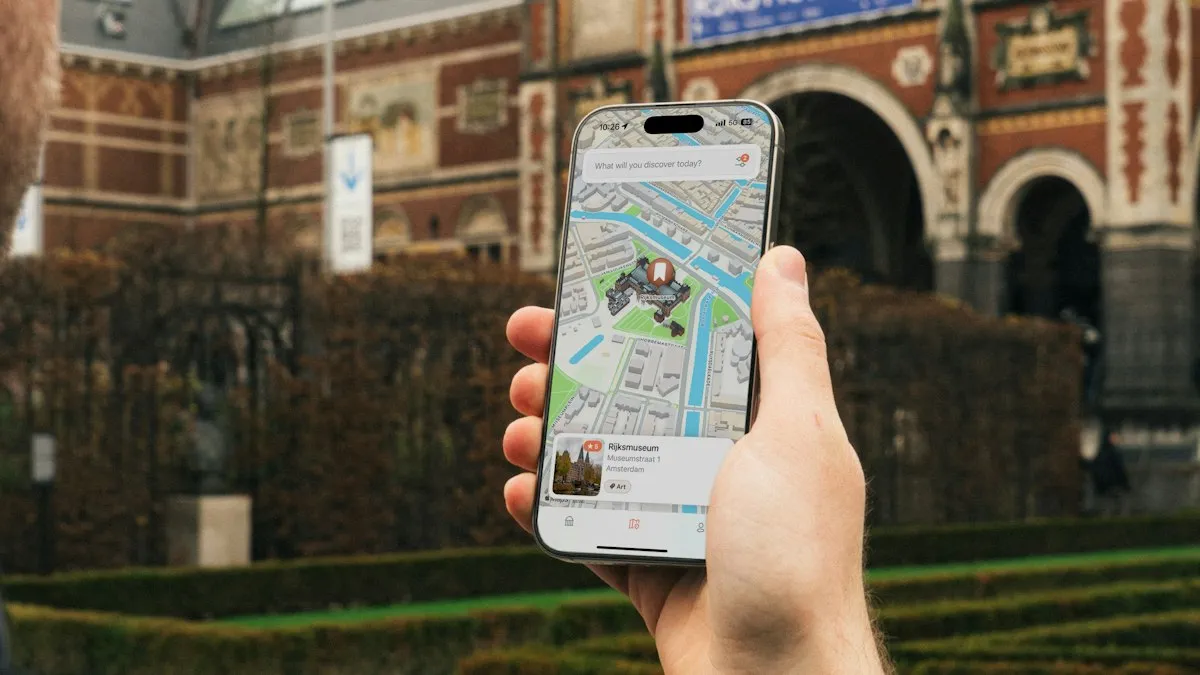
Photo by CardMapr.nl on Unsplash
You search for a coffee shop and Safari shows results from another state. A store locator opens in a city you left years ago. A news site shows weather for a place you have never lived in. Your iPhone knows exactly where you are, so it feels like a bug. It usually is not one. Websites in Safari do not ask your iPhone for its GPS position by default. Most of them make a guess from your internet address, and that guess can be far from the truth. This guide explains why, shows how to tell which cause applies to you, and walks through the settings that fix it.
Why does Safari show the wrong location on iPhone?
A website can learn where you are in two ways. The first is precise: the site asks permission, your iPhone shows a prompt, and if you tap Allow, the site receives a location based on GPS, Wi-Fi and nearby cell towers. The second is a guess: the site looks up your IP address in a database and reads off a city. The second method needs no permission and is what most sites use. It is also less accurate, especially on mobile networks, where the address you use may belong to a data center far from you.
What causes the wrong guess?
- A mobile carrier address: on cellular data, your IP address often maps to a regional hub, not your town.
- A VPN: a VPN shows the location of its server, not yours. This is the most common cause for people who forgot it was on.
- iCloud Private Relay: Apple lets you hide your IP address in Safari, and the location it shows is deliberately general.
- Safari Hide IP Address: the Safari privacy setting can hide your address from trackers and websites.
- A hotspot or shared Wi-Fi: a hotspot or a public network can map to another city.
- Stale saved location in a site: Google and other sites remember a location you used before.
- Location Services off for Safari: if it is set to Never, a site cannot ask for your precise position.
How do you fix the wrong location step by step?
Work from the simplest cause
- 1
Turn off any VPN.
Open Settings and look for a VPN switch near the top, or open the VPN app and disconnect. Then reload the page.
- 2
Switch Wi-Fi and cellular.
If you were on cellular, join a trusted Wi-Fi network and test again. If you were on Wi-Fi, try cellular for a moment.
- 3
Check iCloud Private Relay.
Open Settings › your name › iCloud › Private Relay and turn it off, or open IP Address Location and choose Maintain General Location.
- 4
Check Safari’s IP setting.
Open Settings › Apps › Safari › Hide IP Address (older versions: Settings › Safari) and see whether it is on. Set it to Off to test.
- 5
Reload the site and look for a location prompt.
If Safari asks to use your location, tap Allow.
If the site is correct after one of these steps, you found the cause. You can switch the privacy feature back on afterwards, with the understanding that local results may be less accurate.
How do you let Safari use your precise location?
Allow Safari Websites
- 1
Open Settings and tap Privacy & Security.
- 2
Tap Location Services and make sure it is on at the top.
See where Location Services is on iPhone if you cannot find it.
- 3
Scroll to Safari Websites and tap it.
Choose While Using the App, or Ask Next Time Or When I Share.
- 4
Turn on Precise Location if it appears.
Without it, a site receives only an approximate area.
- 5
Open the site and allow the location prompt.
Tap the aA button in the address bar and open Website Settings to review the Location choice for that site.
What does iCloud Private Relay do to your location?
Private Relay is part of iCloud+ and hides your IP address when you browse in Safari. Apple documents two choices under Settings › your name › iCloud › Private Relay › IP Address Location. Maintain General Location keeps your location at about the city level, so websites can still show local content. Use Country and Time Zone gives a broader region, so sites cannot place you in a city. If your results are in the wrong city, the second option is a likely cause. Apple also says Private Relay turns itself off in countries where it is not available.
How do you fix a wrong location in Google?
Google lists the location it used at the bottom of the results page. Scroll down and tap Update location, then allow precise location. You can also open the Google app or Google Maps, and make sure Location is set to While Using the App under Settings › Privacy & Security › Location Services. If Google still shows an old city, sign in with your account, open the location settings for your activity, and remove an old saved place. If you use another search engine, check its location or region setting.
What if resetting the location settings helps?
A user on Apple’s forums fixed a stubborn case by resetting location and privacy settings. It is safe, but it also clears the permissions you gave to apps, so you will need to approve them again. Use it only after the steps above fail.
Reset Location and Privacy
- 1
Open Settings › General › Transfer or Reset iPhone.
- 2
Tap Reset, then tap Reset Location & Privacy.
Enter your passcode if you are asked.
- 3
Restart the iPhone and open the site again.
Allow location prompts for the apps and sites you trust.
What if only Safari has the problem?
Try the same site in another browser. If Chrome or Edge shows the right place and Safari does not, the cause is in Safari’s settings, such as Hide IP Address, a content blocker, or old website data. Clear the site’s data under Settings › Apps › Safari › Advanced › Website Data, and check that no extension is blocking location. If the problem is wider, such as a slow or unreliable connection, read about Safari and internet settings.
When is the wrong location a privacy feature, not a problem?
Why does the weather or store locator show the wrong place?
Weather sites and store locators often default to a location saved in their own settings or cookies, not to your current position. If you searched for a ZIP code once, the site may keep using it. Look for a change location link and enter your ZIP code, or allow the site to use your location. If a site never asks, it will keep using whatever it guessed from your address, so clearing its data in Safari can reset the guess.
Is the wrong location a security problem?
Usually not. A wrong guess from an IP address does not mean someone has access to your phone or accounts. It does mean the site does not know where you are, and some services use location to spot suspicious sign-ins. If your bank, email or streaming account asks you to confirm a sign-in from an unexpected place, check that it was you and that a VPN is the reason. If you did not sign in from that place, change your password and turn on two-factor authentication.
Does it matter if your time zone and region are set correctly?
It can. Websites also read your language and time zone. Open Settings › General › Date & Time and turn on Set Automatically, and check Settings › General › Language & Region. If your iPhone is set to a region different from where you live, some sites will show the wrong currency or local content. In the United States, set the region to United States, and check that the time zone matches where you are.
A hidden location can be a feature. Banks, streaming sites and shopping sites may use your location to show prices, content or security checks. If you turned on a VPN or Private Relay to hide your address on purpose, a wrong place is the expected result. Balance that choice: when you need local results or you shop online, turn the feature off for that session. Our guide to using a VPN on iPhone explains what a VPN does and does not hide.
Frequently asked questions
Why does Safari think I am in another state?
Websites usually guess your location from your IP address. Mobile carriers, VPNs and Private Relay can give you an address that belongs to another city or state.
Does Safari use GPS to find my location?
Only if a site asks and you allow it, and if Location Services is on for Safari Websites. Many sites never ask and use your IP address instead.
Does iCloud Private Relay change my location in Safari?
Yes. Apple says Private Relay can keep your location general at the city level or show only your country and time zone. Both options hide your exact location.
How do I fix the wrong location in Google on my iPhone?
Turn off any VPN and Private Relay, allow Safari Websites to use your location, then tap Update location at the bottom of Google results.
What to try next
Related guides
FaceTime sensitive content warning
FaceTime paused your call with a sensitive content warning? Learn what triggers it, how it works on your iPhone, and where to turn it off in Settings.
iPhone coverage expired
iPhone says coverage expired in Settings? Learn what it means, how to check the real dates, when you can still renew AppleCare and what to do if it is wrong.
Mail unsent message
Mail on your iPhone shows 1 unsent message and will not clear? Open the Outbox, send or delete the stuck email, then check the server settings and account.
No backups available
Getting no backups available when you restore an iPhone? Check your Apple Account, Wi-Fi, iOS version and iCloud backup list to find the backup that is missing.
More guides you may need
Syncing with iCloud paused
Messages says syncing with iCloud paused on your iPhone? Check power, Wi-Fi, iCloud storage and the Messages in iCloud switch, then restart to resume syncing.
Orange dot on iPhone
The orange dot on iPhone means an app is using your microphone; green means the camera. See which app it is, stop access and know when to worry.