

How to set up voicemail on Android (Samsung and Pixel)
Voicemail on Android runs through your carrier, so setup is a quick phone call to your own mailbox.
Photo by Jay Openiano on Unsplash
The fix
Set up by phone (every Android)
- 1
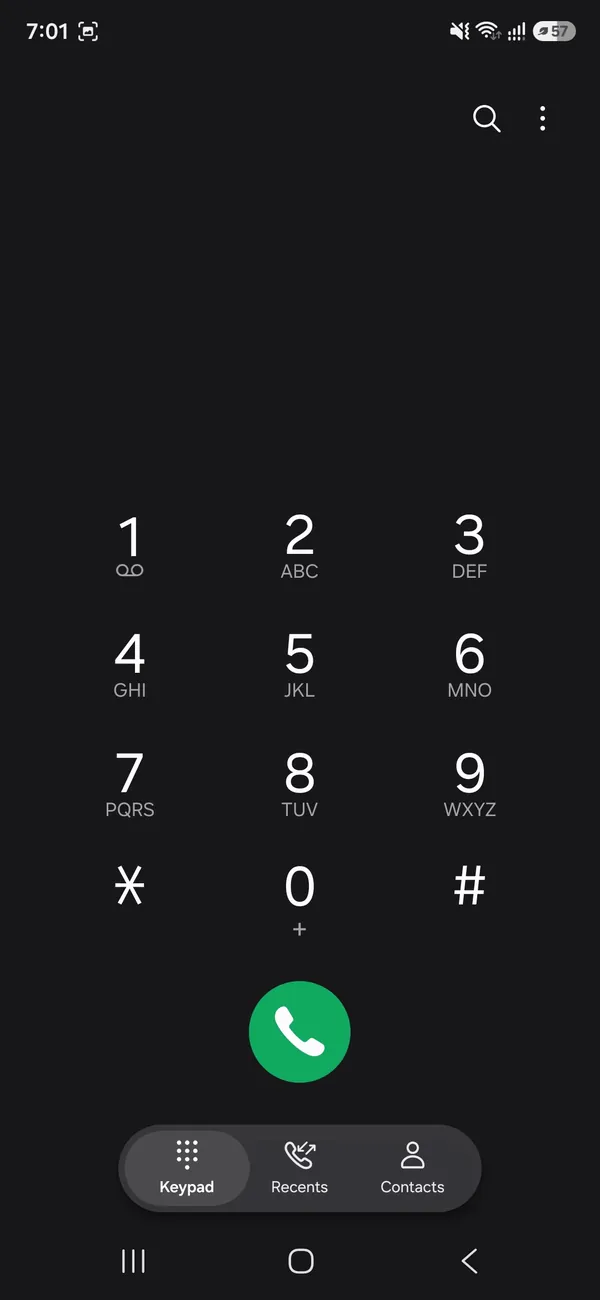
Open the Phone app and tap Keypad.
- 2
Press and hold 1 until it calls voicemail.
The 1 key has a small voicemail icon under it.
- 3
Enter a temporary PIN if asked.
Often the last 4 digits of your number. Your carrier can tell you.
- 4
Choose a new PIN, record your name and a greeting.
The fix
Turn on visual voicemail
- 1
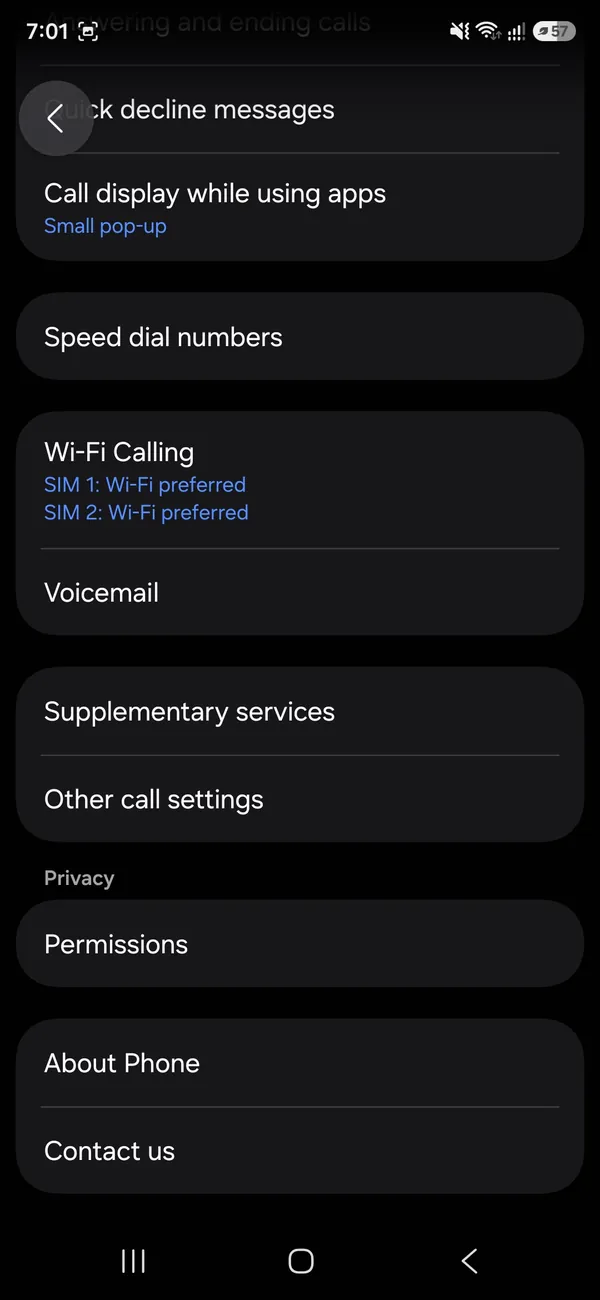
Samsung: open the Phone app, tap ⋮ › Settings › Voicemail and follow the steps, or open the Voicemail app.
- 2
Pixel: open the Phone app › ⋮ › Settings › Voicemail and turn on Visual voicemail.
- 3
Other phones: install your carrier’s voicemail app.
How Android voicemail works
Your messages are stored by your carrier, not on the phone. When someone leaves a message, it sits on a carrier server until you listen to it or delete it. Setup tells the phone how to reach that mailbox and sets a PIN to protect it. Some carriers also send the messages to the phone as a list. This is called visual voicemail. Without it, you call your mailbox and listen by phone. The steps are nearly the same for AT&T, T-Mobile and Verizon, though each has its own app and PIN rules.
Carrier details for AT&T, T-Mobile and Verizon
- AT&T: press and hold 1 or call 1-800-331-0500 from the phone to set the PIN. AT&T Visual Voicemail can be installed if your phone does not show it.
- T-Mobile: hold 1 or dial 123. T-Mobile also offers visual voicemail in its app on supported phones. Dial 611 to reach support.
- Verizon: hold 1 or dial your 10 digit number. Verizon has a Visual Voicemail app for Android and a PIN reset in the My Verizon app.
- Other carriers and prepaid brands: many use the same codes. Check your carrier's website or call customer care.
Codes and apps change, so check your carrier's support page if one does not work.
Record a greeting and set a PIN
The setup call walks you through the steps. You choose a PIN, record your name and select a greeting. Pick a PIN that is not your birthday or the last digits of your phone number. You can change the greeting at any time. Record it in a quiet place and speak clearly. A personal greeting helps callers know they reached the right person, and some carriers require one before the mailbox works.
Where do voicemails show on Samsung and Pixel?
On Samsung, open the Phone app and tap Voicemail, or open the Voicemail app if your carrier uses one. On Pixel, open Phone, then the Voicemail tab. Messages appear in a list. Tap one to play, and the phone can show a transcript on some models. Pixel can also transcribe voicemails on the device, which is handy when you cannot listen. If you do not see the Voicemail tab, the carrier may not support visual voicemail on your plan.
If voicemail does not work after setup
- No voicemail number is saved. Go to Phone app › Settings › Voicemail and enter the number.
- Calls go to a full or busy message. Delete old messages, since a full mailbox rejects new ones.
- You do not get notifications. Check Settings › Notifications and allow the Phone and Voicemail apps.
- You cannot reach the mailbox over Wi-Fi calling. Try on cellular data.
- Your carrier needs to provision voicemail on the line. Call customer care.
Our guide to Android voicemail not working goes through the problems in more detail, and setting up voicemail on iPhone covers the iPhone version.
Forward or turn off voicemail
To stop messages going to voicemail, you can set call forwarding or turn off voicemail through the carrier. Many carriers use codes such as dial ##004# to cancel conditional forwarding, but codes differ by carrier. Check the carrier's help page before you try them. If you turn voicemail off, callers hear a busy tone or a message that the person cannot be reached, so keep it on unless you have a reason.
Reset a forgotten voicemail PIN
Call your carrier or open its app. Most carriers can reset the PIN over text or by app. After the reset, you set a new one the next time you call voicemail. Some carriers send a temporary PIN by text. If you cannot get in, a call to customer care with your account details solves it. Never share the PIN with anyone, since voicemail is a way into account reset codes.
Voicemail transcripts and notifications
Many Android phones can turn a voicemail into text. Pixel does it on the device in the Phone app under Settings › Voicemail › Voicemail transcription. Samsung shows transcripts on phones with certain carriers. Carrier apps from AT&T, T-Mobile and Verizon may offer a paid or free transcript service on some plans. Notifications are separate: make sure the Phone app and the carrier voicemail app are allowed to send notifications, and that battery saver is not blocking them. A silent phone with no alert is the number one reason people miss a voicemail for days.
Check your messages from another phone
You can reach your voicemail from another phone. Call your own number, and when your greeting plays, press the star key or the pound key, depending on your carrier, and enter your PIN. This is useful if your phone is lost, broken or not set up yet. Some carriers also let you check messages on a website or in an app. Keep the PIN in a safe place, since you need it for this.
Save, delete and back up voicemails
Carriers keep messages for a limited time, often 30 days or less, and the mailbox has a size limit. Delete old ones to leave room for new ones. To save an important message, open it in the Phone app, tap the three dots and choose Share or Save, which exports the audio file. Visual voicemail apps usually have a Save option too. Back up the file to Google Drive or to your computer. See backing up an Android phone for the rest of your data.
Block spam voicemails
If voicemail fills with spam, report and block the numbers. Many scam voicemails come from numbers that look local. Do not call back unknown numbers. Our guide to blocking spam calls on Android lists the settings that cut down on spam, such as Caller ID and spam protection in the Phone app.
Set up voicemail on a new phone or after a SIM swap
When you switch phones, your mailbox and PIN stay with the carrier, so your messages are still there. Insert the SIM, open the Phone app and hold 1. If the mailbox does not work, the carrier may need to reprovision the line. This can happen after you move to a new carrier, change from a physical SIM to an eSIM or reset the phone. Call customer care and ask them to reset voicemail on the line. They can also reset the PIN at the same time.
What does a voicemail on Wi-Fi calling look like?
With Wi-Fi calling on, calls and voicemail still work over the internet. If you travel abroad, the carrier may route voicemail through a different number, and you may need to dial an international code. Check your plan's roaming terms to avoid fees.
If you share a phone line with family, each person should have a separate PIN and greeting. Ask your carrier about multi-line plans if messages go to the wrong box.
Voicemail on a dual SIM phone
Dual SIM phones keep a separate mailbox for each line. In the Phone app, open Settings › Voicemail and pick the SIM you want to set up. Hold 1 on the keypad, and the phone calls the voicemail for the default calling SIM. Check which SIM is selected before you call.
Frequently asked questions
Holding 1 does not call voicemail. What now?
The voicemail number is missing. In the Phone app, open Settings › Voicemail › Voicemail number and enter your own number or the one your carrier gives you.
What is visual voicemail?
It shows your messages as a list you can tap, like email. Samsung, Pixel and most carriers offer it in the Phone app or a carrier app.
Does voicemail use my minutes or data?
Calling your voicemail uses minutes on some plans, but most plans include it. Visual voicemail downloads small files using data or Wi-Fi.
Can I check my voicemail from another phone?
Yes. Call your own number from another phone, press the key your carrier uses while the greeting plays, then enter your voicemail PIN. The key to press can differ by carrier.
People also ask
Why do callers not get my voicemail?
Voicemail may not be set up, the mailbox may be full, or call forwarding sends calls elsewhere. Hold 1 to check the mailbox and ask your carrier to reset forwarding.
Read the full guide: Android voicemail not workingWhy is there no Set Up Now button?
Voicemail may already be set up, or your plan does not include visual voicemail. Press and hold 1 on the keypad to call voicemail and set it up by voice.
Read the full guide: Set up voicemail on iPhoneWhich Samsung phones support eSIM?
Most recent Galaxy S, Z Flip, Z Fold and many A phones support eSIM, but support depends on the model and the region. Check Settings › Connections › SIM manager for an Add eSIM option, or ask your carrier.
Read the full guide: Set up eSIM on SamsungWhy does my iPhone say Visual Voicemail is currently unavailable?
The iPhone cannot reach your carrier’s voicemail server, usually because cellular data is off or weak. Turn on cellular data, toggle Airplane Mode and try again.
Read the full guide: iPhone voicemail not workingRelated guides
Android voicemail not working
Android voicemail not working or no voicemail alerts? Test by holding 1, check the voicemail number, clear the visual voicemail app and try 5 more fixes.
Set up voicemail on iPhone
Set up voicemail on your iPhone with Set Up Now in the Phone app, pick a password and record a greeting. Plus what to do when the Set Up Now button is missing.
Set up eSIM on Samsung
How to set up eSIM on Samsung: scan a QR code, use your carrier app or enter details by hand, then pick which SIM handles calls and data. Fixes included.
iPhone voicemail not working
iPhone voicemail not working or Visual Voicemail unavailable? Check cellular data, call forwarding and a full mailbox, update carrier settings and more.
More guides you may need
How to use an iPhone
How to use an iPhone for the first time: buttons, gestures, Home Screen, Control Center, calls, texts, camera, apps and safety. Simple steps for beginners.
iPhone region settings
Change iPhone region settings in one guide: App Store country, phone number, in-app purchases, Maps voice, miles or kilometers and which apps see your location.