

How to share location from Android to iPhone
Google Maps works on both phones, so it is the easiest bridge between Android and iPhone.
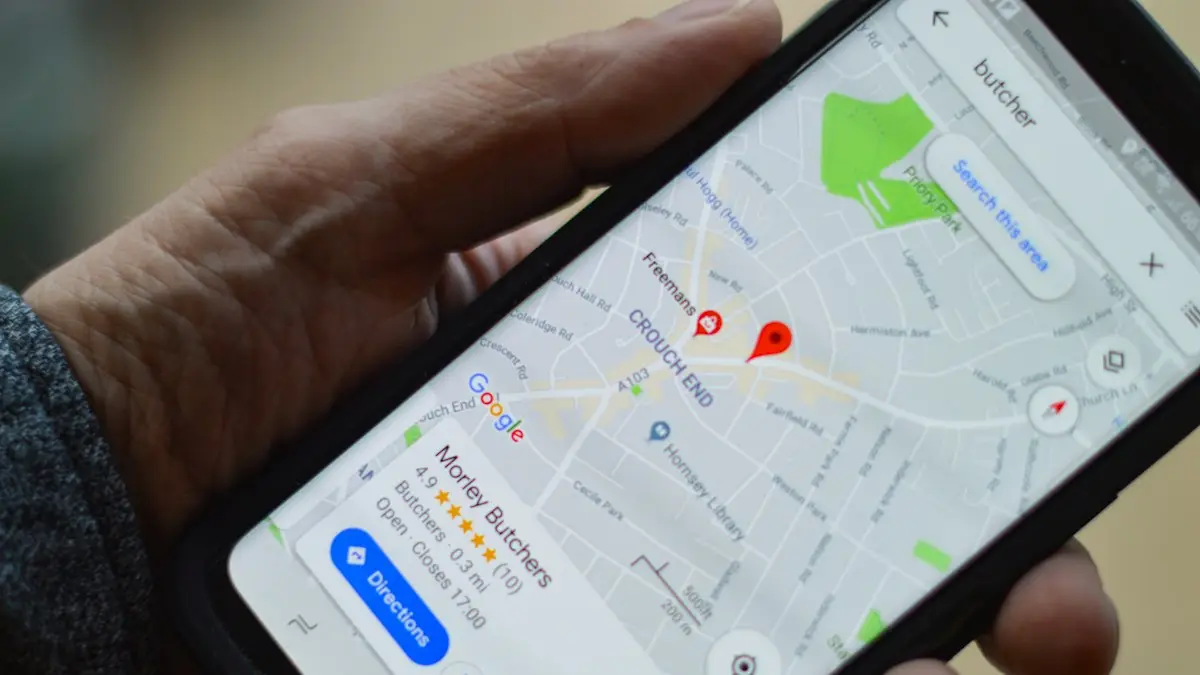
Photo by henry perks on Unsplash
Apple’s Find My only works between Apple devices, so an iPhone user cannot see an Android phone there, and Android’s built-in tools do not show up in Apple Maps either. That catches out a lot of mixed families and couples. The good news is that Google Maps runs on both, it is free, and it takes about a minute to set up. Once it is running, the iPhone user sees you move on a map in real time, just like they would with another iPhone. Below are the main ways to share your location from a Samsung, Pixel or other Android phone with someone on an iPhone, how they view it, and how to fix sharing that stops updating.
Which method should you use?
- Google Maps: best for ongoing sharing with family or a partner, and for set periods like a road trip.
- Find Hub: Google’s device finder, with a People tab that shares location much like Google Maps.
- WhatsApp live location: quick and familiar for a meetup, up to 8 hours.
- A one-time pin: when you only need to show where you are right now.
How to share location from Android to iPhone with Google Maps
The fix
With Google Maps
- 1
Open Google Maps and tap your profile picture.
- 2
Tap Location sharing, then New share.
- 3
Choose a time, or Until you turn this off.
- 4
Pick a contact, or send the link by text.
If you pick a contact who has a Google account, your location appears on their Google Maps app until the time runs out or you stop it. If you send a link by text instead, they can open it in Google Maps or Safari, and it works for the time you chose. For sharing that never expires, the other person needs to be signed in with a Google account.
The fix
With Find Hub
- 1
Open Find Hub and tap People.
- 2
Tap Share location and choose how long.
- 3
Send it to their Google account or as a link.
How the iPhone user sees your location
- 1
Install Google Maps from the App Store and sign in with a Google account.
Use the same Google account you shared with.
- 2
Tap the profile picture, then Location sharing.
Your name and position appear at the bottom of the map.
- 3
Tap your name for directions to you, or to see when your location last updated.
Without Google Maps, they can tap the link in Messages and view your location in Safari. It is less convenient, since they have to reopen the link to check on you, but no account or extra app is needed.
Share with WhatsApp live location
- 1
Open the chat with the person on iPhone.
- 2
Tap the attachment icon, then Location.
- 3
Tap Share live location and choose 15 minutes, 1 hour or 8 hours.
- 4
Tap Send. Stop sharing anytime from the same chat.
WhatsApp needs location permission set to Allow all the time on your Android for live location to keep updating while the app is closed.
Send your location once
In Google Maps, tap the blue dot showing where you are and choose Share location, or long-press any spot to drop a pin and tap Share. Send it by text, and the iPhone user can tap it to open the spot in Apple Maps or Google Maps. It is a snapshot, not live tracking, so it will not move with you.
Share your trip and arrival time
When you are driving somewhere, Google Maps can share your trip instead of your location all day. Start navigation, swipe up on the bottom panel and tap Share trip progress, then pick a contact or send a link. The iPhone user sees your route, where you are and your estimated arrival time. Sharing stops on its own when you arrive, which makes it a good choice for a commute or a late drive home.
How to stop sharing
- 1
Open Google Maps and tap your profile picture, then Location sharing.
- 2
Tap the person’s name at the bottom.
- 3
Tap Stop.
They are not sent a notification, but your location disappears from their map right away. For links, choose the link share and stop it the same way.
In WhatsApp, open the chat and tap Stop sharing under the live location message. In Find Hub, open the People tab and remove the person.
Ask for their location in return
If the iPhone user has shared with you in Google Maps before, you can tap their name in Location sharing and choose Request to ask for an update. They get a notification in Google Maps on their iPhone and can decide whether to share. To share from iPhone to Android they follow the same Google Maps steps, since Apple’s Find My cannot show locations to Android phones.
Share location in an emergency
Android has emergency features that work no matter what phone your contacts use. When you call 911 from an Android phone in the US, Android’s Emergency Location Service can send your location to responders automatically where it is supported. You can also set up Emergency SOS, usually in Settings › Safety & emergency, to text your location to chosen emergency contacts when you press the power button several times. Your iPhone-using contacts receive it as a normal text with a map link. Set it up before you need it and test it with a friend.
Sharing with a group
Google Maps lets you pick several people in one share, and each of them sees you on their own map, whether they use iPhone or Android. For a group trip or a night out, WhatsApp live location in a group chat is simpler, because everyone in the chat sees each other on one map once they share. Everyone can stop their own share at any time.
What about Life360 and other apps?
Family tracking apps such as Life360 work on both Android and iPhone and add extras like place alerts, driving reports and crash detection, often behind a paid plan. They are worth considering for families who want those features. For simply seeing where someone is, Google Maps does the job for free, with no extra account and without another app running in the background.
Location not updating? Fix it on Samsung and other Android phones
- Location permission: Settings › Apps › Google Maps › Permissions › Location › Allow all the time.
- Battery restrictions on Samsung: in Settings › Battery › Background usage limits, make sure Google Maps is not in Sleeping apps or Deep sleeping apps. Set its battery use to Unrestricted in the app’s settings.
- Power saving mode: it can pause background location. Turn it off while sharing matters.
- Location accuracy: turn on Google Location Accuracy in Settings › Location › Location services.
- Signed out: make sure you are still signed in to the same Google account in Google Maps.
Sharing a child’s Android location with an iPhone parent
Google Family Link works for this. The parent installs Family Link on the iPhone, links it to the child’s Google account, and can see the child’s Android phone location on a map, along with screen time and app controls. It is designed for children’s accounts, so for adults use Google Maps sharing instead.
Privacy and battery
- Only share with people you trust, and prefer a time limit over Until you turn this off.
- Check who can see you now and then in Google Maps › Location sharing, and stop any share you no longer need.
- Continuous sharing uses some battery, usually a small amount on a modern phone.
- Location links can be forwarded, so send them only to the person who needs them.
- If you ever feel you are being tracked without agreeing to it, check Location sharing in Google Maps and the People tab in Find Hub, and remove anyone you did not choose. Also look for unfamiliar apps with location permission in Settings › Location › App location permissions.
Frequently asked questions
Does the iPhone user need Google Maps?
No, but it helps. Without it, they can open your link in Safari. With a Google account in Google Maps, they see you on their map.
How do I share from iPhone to Android?
Use Google Maps on the iPhone the same way, since Find My does not work with Android.
Can I share location from Android to iPhone without Google Maps?
Yes. WhatsApp live location works on both phones for 15 minutes, 1 hour or 8 hours. To send where you are once, share a location pin in a text message.
Why is my location not updating on their iPhone?
Usually it is battery saving on your Android is pausing Google Maps in the background. Allow Google Maps location all the time and remove it from sleeping or restricted apps.
How do I send my location from Android to an iPhone?
Open Google Maps on the Android phone, tap your profile picture, choose Location sharing and share with the iPhone user for an hour or until you turn it off. The screens vary slightly by version.
What to try next
People also ask
Can I find my phone if it is off?
Pixel 8, Pixel 9 and Pixel 10 phones can be located for several hours after they power off or the battery dies, through the Find Hub network. Other phones show their last known location.
Read the full guide: Find a lost Android phoneCan I share my location with an Android phone?
Find My only works between Apple devices. For an Android user, open Google Maps on your iPhone, tap your profile picture, then Location sharing, and send them a link.
Read the full guide: Share your location on iPhoneWhy does Find My say No location found for a person?
They may have stopped sharing, their phone may be off or offline, or Location Services is off. People are not notified when you check, and you are not notified when they stop sharing.
Read the full guide: Find My not updating locationShould I erase my stolen phone right away?
Not at once. Mark it as lost first, so you can still track it. Erase it only when you are sure you will not get it back, because erasing stops tracking.
Read the full guide: Phone stolen: what to doRelated guides
Find a lost Android phone
Find a lost Android phone with Google Find Hub at android.com/find, or Samsung SmartThings Find. Ring it, see it on a map, lock it or erase it from any device.
Share your location on iPhone
Share your location on iPhone for an hour, a day or forever using Messages, Find My or Maps. Also how to share with an Android user and how to stop sharing.
Find My not updating location
Find My not updating location or showing No location found? Check the other iPhone is online, Share My Location, Precise Location and try 6 more fixes.
Phone stolen: what to do
What to do if your phone is stolen: lock it, track it, call your carrier, protect your accounts and file a police report. Steps for iPhone and Android.
More guides you may need
Move iCloud backup to Google Drive
You cannot move a full iPhone backup from iCloud to Google Drive, but you can move photos, files, contacts and calendar. See each method and what to expect.
Move to iOS not working
Move to iOS not working, no code or the transfer is stuck? Follow Apple's fixes for Wi-Fi, calls, storage and a reset to get the code. 8 fixes.