

How to cancel subscriptions on Android (Google Play)
Every subscription bought through Google Play is managed in one place in the Play Store.
Photo by Nathana Rebouças on Unsplash
Every subscription you pay for through Google Play is listed in one place in the Play Store, whatever brand of Android phone you have. Canceling takes about a minute. The catch is that not every subscription goes through Google Play, and deleting an app never cancels anything. This guide covers both, plus trials, refunds and cheaper options.
The fix
Cancel in the Play Store
- 1
Open the Play Store and tap your profile picture.
It is in the top-right corner. If you use more than one Google account, check the right one is selected here.
- 2
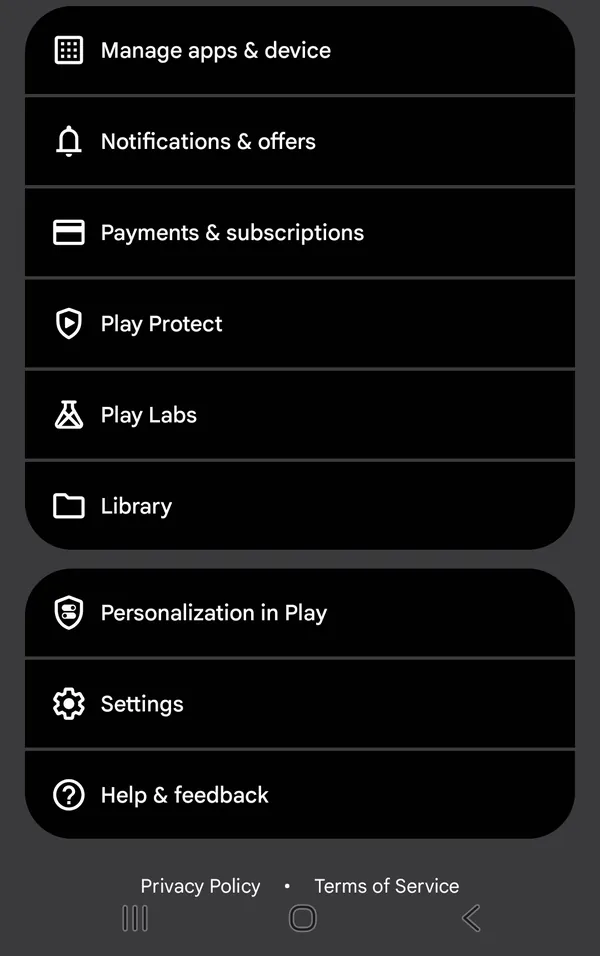
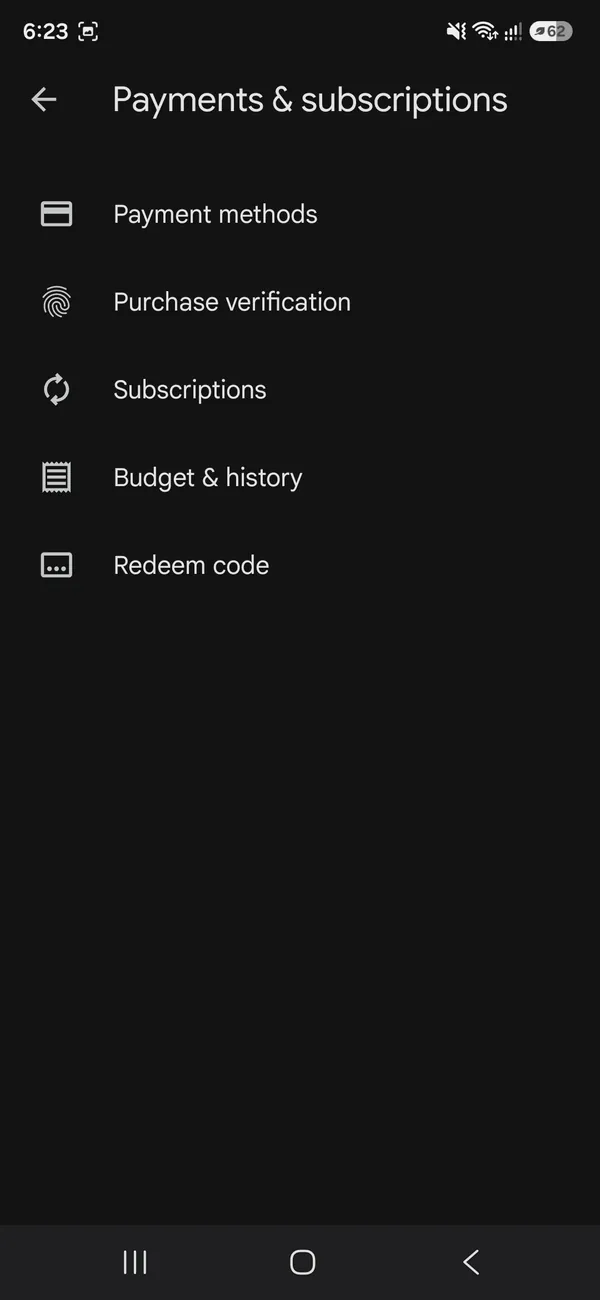
Tap Payments & subscriptions, then Subscriptions.
Active subscriptions are listed with their price and next renewal date. Expired ones appear lower down.
- 3
Choose the subscription and tap Cancel subscription.
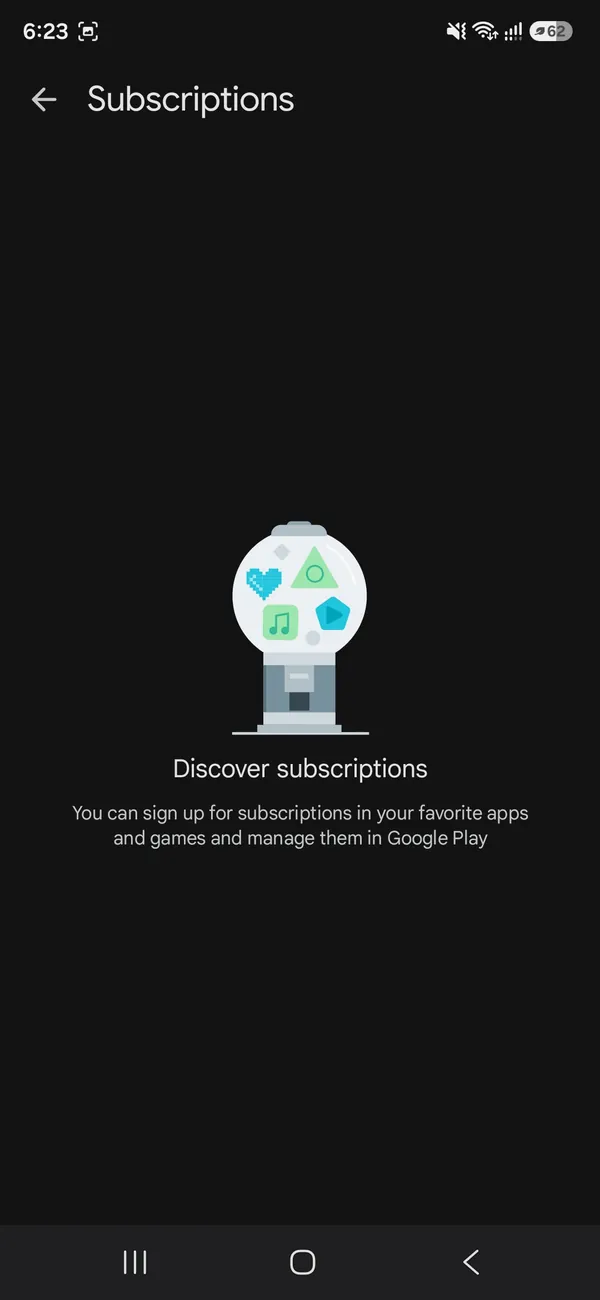
If the list says Discover subscriptions, this Google account has no Play Store subscriptions to cancel.
- 4
Pick a reason and confirm.
The screen then shows the date your access ends. Google also emails a confirmation, so keep it in case you need to prove the date later.
Cancel subscriptions for a family member
You cannot cancel another person’s subscription from your own phone, even as the family manager. Ask them to cancel it on their account, or sign in to their Google account in a browser with their permission. For a child, Family Link shows their purchases and lets you require approval for new ones.
Cancel from a computer
Go to play.google.com, sign in with the Google account you used on the phone, click your profile picture, then Payments & subscriptions and Subscriptions. Choose the subscription and click Cancel subscription. This is handy if your phone is lost, broken or already reset, or if you have moved to a different phone altogether.
Pause instead of canceling
Some apps let you pause payments instead, usually for one week up to three months. Tap the subscription, choose Manage, then Pause payments, and pick how long. The pause starts at the end of your current billing period, and the subscription restarts on its own afterward. Tap Resume in the same place to restart it early. It is useful for a streaming service you only watch in winter or a fitness app during a busy month.
What happens after you cancel
You keep using the service until the end of the period you already paid for, then it stops and no further charges are made. Your account with the app usually stays, along with saved settings or progress. To start again, open Subscriptions in the Play Store and tap Resubscribe or Restore where it is offered; some canceled subscriptions cannot be restored, and you simply subscribe again from the app.
Canceling Google Play Pass
Play Pass is canceled the same way. Afterward, the games and apps stay on your phone, but paid apps ask you to buy them, in-app purchases that were included become paid again, and ads come back.
Payment failed? Fix it before canceling
If a renewal payment fails, Google Play usually gives you a short grace period and then puts the subscription on hold instead of canceling it straight away. You will see a notice in the Play Store and often in the app. If you want to keep the service, update your card in Payments & subscriptions › Payment methods. If you want to stop it, cancel it properly, so it does not restart when a new card is added later.
Set a monthly budget in the Play Store
In the Play Store, tap your profile picture, then Payments & subscriptions › Budget & history. Set a monthly budget and the Play Store reminds you when your purchases reach it. It does not block purchases, but it is a simple way to notice spending creeping up. The history on the same screen lists every charge, which helps you spot a subscription you forgot about.
Uninstalling the app does not cancel it
This is the most common reason people keep getting charged. Removing an app from your phone does nothing to its subscription; Google keeps billing until you cancel. Always cancel in the Play Store first, then uninstall the app if you want.
Subscription not in the Play Store list?
- Another Google account: tap your profile picture in the Play Store and switch accounts, then check Subscriptions again. Many people have an old Gmail account they forgot.
- Paid on the company’s website: services like Netflix, Spotify, Amazon Prime and Hulu often bill you directly. Sign in on their website and cancel in the account settings.
- Google One and YouTube Premium: check them in the Google One app or at youtube.com/paid_memberships if they do not appear in the Play Store list.
- Samsung Galaxy Store: apps bought through Samsung’s own store are billed there. Open the Galaxy Store, tap Menu and look for your subscriptions.
- Carrier billing: some subscriptions are charged to your phone bill. Check your Verizon, AT&T or T-Mobile account or app.
- A family member: in Google Family Library, a child’s purchase can be charged to the family manager’s card. The person who subscribed cancels it on their own account.
Watch for trials that turn into weekly charges. Some photo, VPN and wallpaper apps offer a three-day trial and then bill every week, which can cost far more over a year than a normal monthly plan. The price and billing period are shown when you start the trial and on the Subscriptions screen, so check right after signing up.
Switching to an iPhone? Cancel first
Google Play subscriptions keep charging after you move to an iPhone, because they are tied to your Google account, not the phone. Before you switch, cancel anything you will not use on iPhone. If you already switched, cancel at play.google.com from a computer or the iPhone’s browser. Many services, such as Spotify or Netflix, let you keep your account and subscribe again through the iPhone app or their website. See our guide to canceling subscriptions on iPhone for the Apple side.
Same steps on Samsung, Pixel and Motorola
The Play Store looks the same on every Android phone, so these steps work on Samsung Galaxy, Google Pixel, Motorola, OnePlus and others. The only differences are extra stores: Samsung has the Galaxy Store, and some carriers install their own apps with separate billing. If a charge on your card says Google or Google Play, it is in the Play Store list; if it names another company, check that company.
How to ask for a refund
- 1
Open play.google.com, then Account › Order history, or the Payments & subscriptions screen in the app.
- 2
Find the charge and choose Request a refund or Report a problem, where available.
- 3
Or contact the developer.
Open the app’s page in the Play Store, scroll to App support and email the developer. For their own apps, developers can often refund faster than Google.
- 4
Report charges you did not make.
Google accepts reports of unauthorized charges within 120 days. Change your Google account password too.
Stop surprise charges
- Check Payments & subscriptions every few months, for example when your card statement arrives. Multiply each monthly price by 12 to see the yearly cost.
- Turn on purchase approval for children in Google Family Link, so they cannot start subscriptions on their own.
- In the Play Store settings, turn on Require authentication for purchases, so every purchase needs your fingerprint or password.
- Look for a yearly or family plan before canceling something you still use; it is often much cheaper.
Frequently asked questions
Why is my subscription not listed?
It may be on another Google account, or you paid on the company’s website. Switch accounts in the Play Store, or cancel on the service’s site.
Do I lose access right away?
No. You keep access until the end of the period you paid for, even on a yearly plan.
Does uninstalling the app cancel the subscription?
No. Google is clear that uninstalling does not cancel. You must cancel in the Play Store, or the charges continue.
Can I get a refund for a Google Play subscription?
Sometimes. Request one through your Google Play order history, or contact the app’s developer, who often handles refunds for their own app. Report charges you did not make within 120 days.
What to try next
People also ask
Does deleting an app cancel its subscription?
No. The subscription keeps renewing and charging you even after the app is deleted. Cancel it in Settings › your name › Subscriptions.
Read the full guide: Cancel subscriptions on iPhoneHow long do I have to ask for a Google Play refund?
Google has allowed quick self-service refunds for apps and games within a short window after purchase, and a longer window if you ask through Google Play support. Ask as soon as you can, because the options shrink with time.
Read the full guide: Google Play refundWill clearing Play Store data delete my apps?
No. It only resets the Play Store’s own settings. Your installed apps and purchases stay.
Read the full guide: Google Play Store not workingWhy does it say waiting for Wi-Fi?
Play Store is set to download over Wi-Fi only. Connect to Wi-Fi, or change it in Play Store › Settings › Network preferences › App download preference.
Read the full guide: Play Store download pendingRelated guides
Cancel subscriptions on iPhone
Cancel subscriptions on your iPhone in Settings › your name › Subscriptions. Find ones billed outside Apple, cancel free trials in time and ask for a refund.
Google Play refund
How to get a refund on Google Play for an app, game, in-app purchase or subscription. Use the order page, learn the time limits and what to do if it is missing.
Google Play Store not working
Google Play Store not working, keeps stopping or will not open? Force stop it, clear the cache, update Google Play services and try 6 more fixes on Android.
Play Store download pending
Google Play stuck on Download pending? Cancel other updates in the queue, check the Wi-Fi only setting and storage, clear Play Store cache and try 4 more fixes.
More guides you may need
Find APN settings on iPhone
Find APN settings on your iPhone in Settings › Cellular › Cellular Data Network. Learn why the menu can be missing, what each field means and how to reset it.
Delete hidden apps on iPhone
Delete hidden apps on your iPhone from the Hidden folder in App Library, Search or iPhone Storage. Also how to find apps hidden by Screen Time restrictions.