

How to forward calls on Samsung Galaxy phones
Samsung puts call forwarding in the Phone app’s settings. You can forward all calls or only missed ones.
Photo by Evgeny Opanasenko on Unsplash
The fix
Turn on call forwarding
- 1
Open Phone and tap the three dots › Settings.
Scroll down the Call settings screen to find Supplementary services.
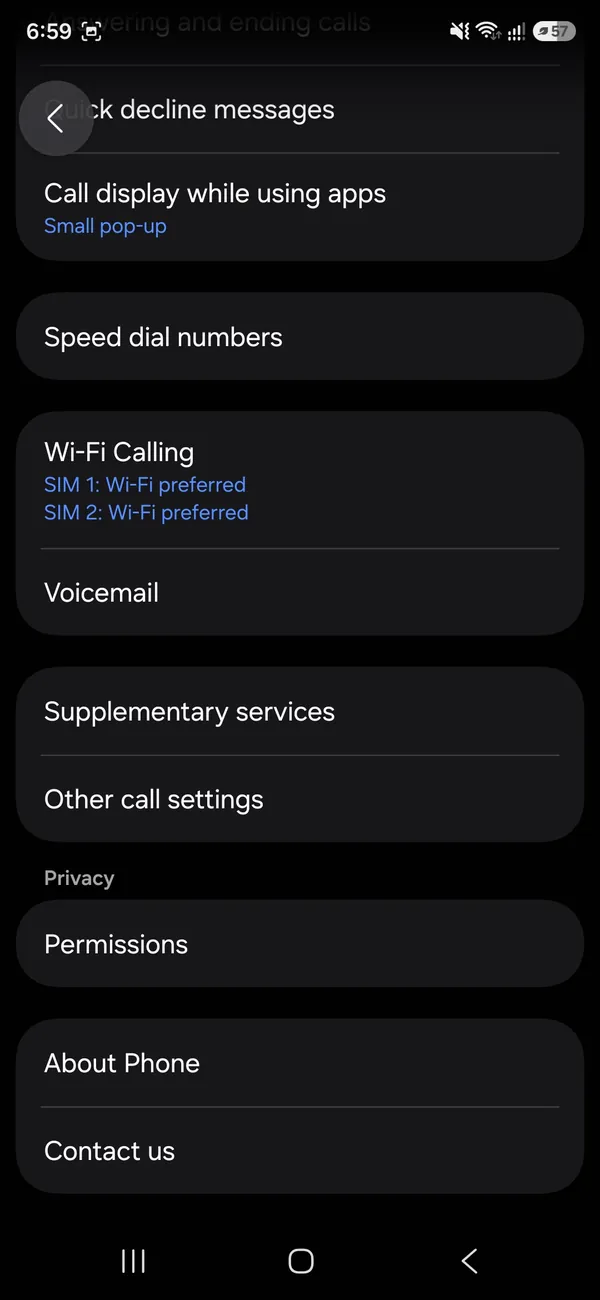
- 2
Tap Supplementary services, then Call forwarding.
With two SIMs, each SIM has its own Call forwarding option.
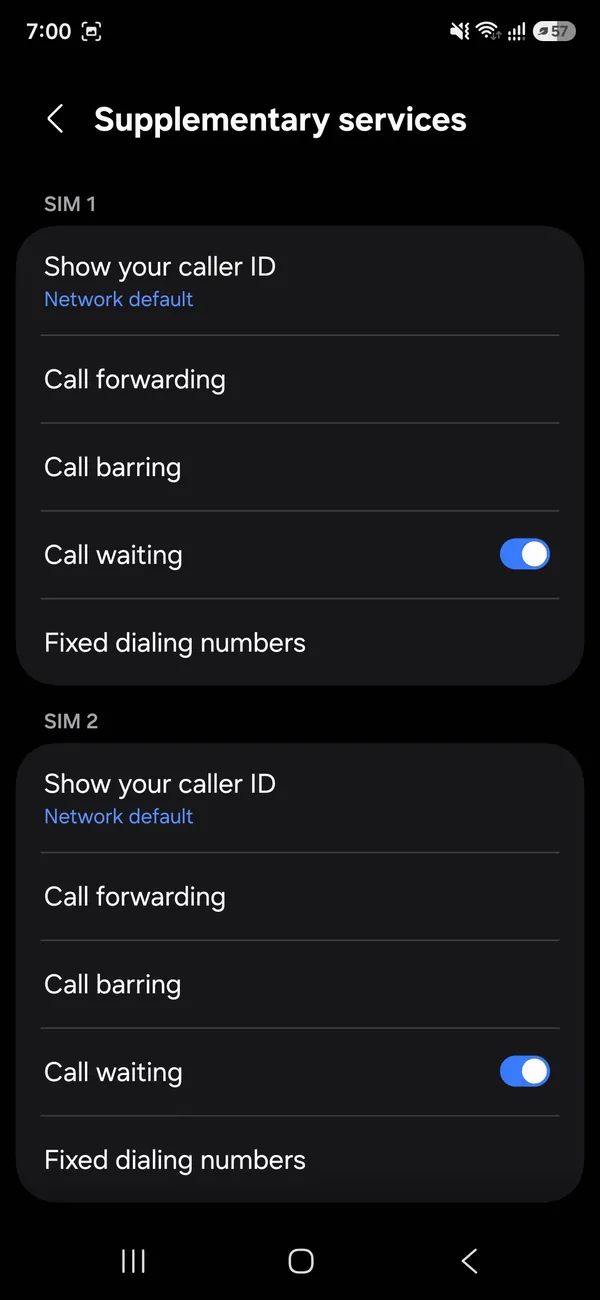
- 3
Tap Voice call and choose when to forward.
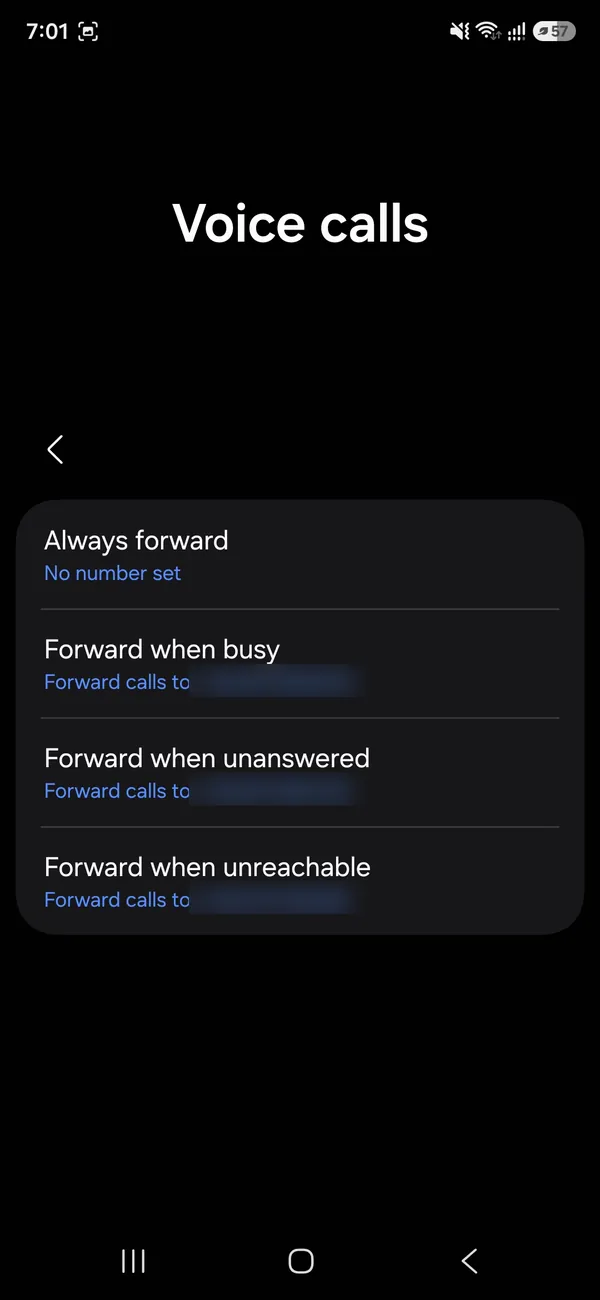
- 4
Enter the number and tap Enable.
The fix
Turn it off
- 1
Go back to Call forwarding › Voice call.
- 2
Tap the option that is on and choose Disable.
What are the four types of call forwarding?
- Always forward: every call goes to the other number. Your Samsung does not ring.
- Forward when busy: calls forward when you are on another call or decline it.
- Forward when unanswered: calls forward after a set number of rings or seconds.
- Forward when unreachable: calls forward when the phone is off, out of signal or in Airplane Mode.
The last three are called conditional forwarding. By default, your carrier points them at your voicemail. Setting your own number replaces voicemail for that case.
Where is call forwarding in each One UI version?
- One UI 6 to 8: Phone › three dots › Settings › Supplementary services › Call forwarding.
- One UI 4 and 5: Phone › three dots › Settings › Supplementary services › Call forwarding, or More call settings on some carrier versions.
- Older Galaxy phones: Phone › More › Settings › More settings › Call forwarding.
Carrier-branded phones sometimes rename menus. If you cannot find it, open the Phone app settings and search for "forwarding".
Forward calls on Samsung with Verizon
Verizon does not support the Samsung menu on many plans, and you may see a network or SIM error. Use dial codes instead. Open the keypad and dial *72 followed by the 10-digit number, then tap Call. Wait for the confirmation and hang up. Dial *73 to stop. Use *71 plus the number for busy and unanswered calls only. You can also manage it in the My Verizon app.
Forward calls on Samsung with AT&T and T-Mobile
The Supplementary services menu works on both. If it shows an error, use GSM codes from the keypad:
- All calls: **21*number#, cancel with ##21#.
- Unanswered: **61*number#, cancel with ##61#.
- Busy: **67*number#, cancel with ##67#.
- Unreachable: **62*number#, cancel with ##62#.
- Cancel everything: ##002#.
- Check status: *#21#.
Mint, Metro, Cricket and other carriers on these networks use the same codes.
How does call forwarding work on dual SIM Galaxy phones?
With two SIMs or a SIM and eSIM, each line has its own Call forwarding entry under Supplementary services. Set them separately. A useful setup is forwarding a work line to your personal line when you are away. If you dial codes, pick the line in the dialer first, since codes apply to the line that places the call. For eSIM setup on Galaxy phones, see adding an eSIM on Samsung.
Why do call forwarding errors happen on Samsung?
- "Network or SIM card error": the carrier does not support the menu. Use codes.
- "Call forwarding settings error" with Wi-Fi Calling on: turn off Wi-Fi Calling and try again, then turn it back on. Some carriers only read forwarding over the cell network.
- Error with Airplane Mode: forwarding needs a signal to set up.
- Options grayed out: the line is not active, or the plan blocks forwarding. Ask the carrier.
Restart the phone after changing settings, and check for a carrier update in Settings › Software update.
How to check that forwarding works
Call your Samsung from another phone. With Always forward on, it should ring the forwarding number and not your phone. A forwarding icon may show in the status bar, and the Call forwarding screen lists the active number. On GSM carriers, dial *#21# to see the status on screen.
How do you change the number of rings before forwarding?
On many carriers, you can set the delay for unanswered calls with a code: **61*number**seconds#, where seconds is 5 to 30 in steps of 5. For example, **61*5551234567**25# forwards after about 25 seconds. Not all carriers accept it, but it is safe to try.
Can you forward to Google Voice or a landline?
You can forward to any US number. Google Voice lets calls ring your computer and other phones, and transcribes voicemail. Forwarding to a landline works for home offices. Avoid forwarding to a number that forwards back to you, since the calls loop and never ring.
Does call forwarding cost money?
On unlimited US plans, forwarded calls are normally free. Prepaid and pay-per-minute plans may count minutes for both the incoming call and the forwarded leg. Forwarding to an international number is billed as an international call. Check your plan or ask your carrier before forwarding for a long trip.
How does forwarding affect your voicemail?
With Always forward on, voicemail on your line gets nothing. If you set conditional forwarding to another number, missed calls go there instead of your mailbox. To get voicemail back, cancel the forwarding rules with ##002#, or set the unanswered rule back to your voicemail number. If voicemail is still not working, see Android voicemail fixes.
How do you forward calls from a lost or broken Samsung?
Use your carrier's website or app on another device to set forwarding. Then lock or locate the phone with Samsung Find or Google Find My Device. Our guide to finding a lost Android phone walks through both.
Forward calls on a Samsung with Wi-Fi Calling
Forwarding still works when you are on Wi-Fi Calling, but some carriers only accept changes over the cell network. Set forwarding while you have a normal signal, then rely on Wi-Fi Calling as usual. If weak signal at home is why you want to forward, Wi-Fi Calling may solve the real problem without forwarding at all.
Can you forward calls for a few hours only?
Neither Samsung nor US carriers offer a built-in timer for forwarding. Set a reminder in the Clock or Reminder app to turn it off. Samsung's Modes and Routines can run actions on a schedule, but forwarding is not one of them on most versions, so a reminder is the practical choice.
Does call forwarding forward texts?
No. Call forwarding only moves voice calls. Text messages still arrive on your Samsung. To see texts elsewhere, use Google Messages for web on a computer, or link your phone to Windows with Phone Link. To pass one message on, forward a text by hand.
Turn off call forwarding on Samsung, all at once
The fastest way is a single code: dial ##002# on AT&T, T-Mobile and similar carriers. It clears every forwarding rule and restores voicemail for missed calls. On Verizon, dial *73. Then call your phone from another number to confirm it rings again.
Can you forward a business line?
If your Samsung is a work phone, your company may manage forwarding through a business phone system or Microsoft Teams. Phone settings may be locked. Ask IT before changing anything, since forwarding a work line to a personal phone can break the company's call records.
Summary
- Phone › Settings › Supplementary services › Call forwarding works on AT&T and T-Mobile.
- Verizon uses *72 and *73.
- ##002# clears everything on GSM carriers.
- Test with a call from another phone every time.
Why forward calls at all?
Common reasons include a broken or lost phone, travel with a second phone, a desk phone at work, a shared family line during a hospital stay, or poor signal at home. Forwarding happens on the carrier's network, so your Galaxy does not need to be on once the rule is set. That makes it useful when the phone is in for repair. If repair is the reason, our guide to Samsung screen repair prices can help you decide between fixing and replacing.
Forwarding is free to set up, takes seconds and is just as easy to undo, so it is worth trying whenever you need calls to reach you somewhere else.
Frequently asked questions
Why does call forwarding show an error?
Some carriers, such as Verizon, do not support the menu. Dial *72 plus the number to forward and *73 to stop.
How do I know forwarding is on?
A forwarding icon shows in the status bar, and the Call forwarding screen shows the number.
What is the code to forward calls on Samsung?
On AT&T and T-Mobile dial **21* plus the number and # to forward all calls, and ##21# to stop. On Verizon dial *72 plus the number and *73 to stop.
Can I forward calls on Samsung to two numbers?
Not at the same time from the phone. Use a conditional forward to a second number, or a service like Google Voice that rings several phones at once.
People also ask
Why is Call Forwarding missing in my iPhone settings?
Some carriers, including Verizon, manage forwarding on their side. Use the dial code or the carrier’s app instead.
Read the full guide: Forward calls on iPhoneWhy is there no Wi-Fi Calling option on my Samsung?
Your carrier may not support it on that plan or phone, the SIM may not be fully activated, or Samsung’s software is out of date. Update the phone first, then ask your carrier to enable Wi-Fi Calling on your line.
Read the full guide: Samsung Wi-Fi calling not workingWhere do Samsung screen recordings go?
In the Gallery app, in the Screen recordings album. The files are stored in Internal storage › DCIM › Screen recordings.
Read the full guide: Screen record on SamsungDoes Samsung show battery health as a percentage?
Some newer Galaxy phones show a battery health or capacity figure in Settings. Many show only a status such as Good, so the exact number depends on your model and One UI version.
Read the full guide: Samsung battery healthRelated guides

Forward calls on iPhone
Forward calls on iPhone in Settings › Apps › Phone › Call Forwarding, or dial *72 on Verizon and other carriers. Also how to forward only missed calls.
Samsung Wi-Fi calling not working
Samsung Wi-Fi calling not working or missing? Turn it on, add your emergency address, check your carrier and reset network settings. 7 fixes for Galaxy phones.
Screen record on Samsung
Screen record on your Samsung Galaxy with the built-in Screen recorder. Record sound or your voice, add a selfie video and find your recording in Gallery.
Samsung battery health
How to check battery health on Samsung with Settings, the Samsung Members app or a dial code. Learn what the results mean and when to replace the battery.
More guides you may need
Change your iPhone avatar
Change your iPhone avatar: the Apple Account photo in Settings and the Contact Photo and Poster people see when you call. Use a photo, Memoji or initials.
Change shutter speed on iPhone
The iPhone Camera app has no shutter speed dial. Learn how to get a longer exposure with Night mode, Live Photo Long Exposure or a manual camera app.