

How do I know if my phone is unlocked? 5 ways to check (iPhone, Samsung, Pixel)
Before you switch carriers, buy a travel eSIM or buy a used phone, you need to know one thing: is it locked to a carrier? Here is how to find out in a minute, on any phone.
Photo by Brett Jordan on Unsplash
A carrier-locked phone only works with the carrier that sold it. That matters the moment you want to switch to a cheaper plan, use a prepaid brand, add a travel eSIM for a trip abroad, or sell the phone. An unlocked phone works with any compatible carrier and usually sells for more.
Checking takes about a minute. Below are five ways, from the fastest to the most certain, plus what the big US carriers require in 2026 and what to check before buying a used phone.
What does “unlocked” actually mean?
“Unlocked” here means carrier unlocked: the phone is not tied to one wireless company. It is easy to confuse with three other kinds of lock that have nothing to do with carriers:
- Screen lock: your passcode, Face ID or fingerprint. It protects your data, not which carrier you use.
- Activation Lock (iPhone) or Factory Reset Protection (Android): ties the phone to the owner's Apple or Google account after a reset. A phone can be carrier unlocked and still be useless if this is on.
- Bootloader lock (Android): about installing other software. Most people never need to touch it.
How do I know if my phone is unlocked? 5 ways
The fix
Way 1: Check an iPhone in Settings
- 1
Open Settings and tap General.
- 2
Tap About.
- 3
Scroll to Carrier Lock.
If it says No SIM restrictions, your iPhone is unlocked. If it says SIM locked or names a carrier, it is locked to that carrier. The full path is Settings › General › About › Carrier Lock. Apple's own support page uses this same check. If your iPhone is set to UK English, the same line is called Network Provider Lock.
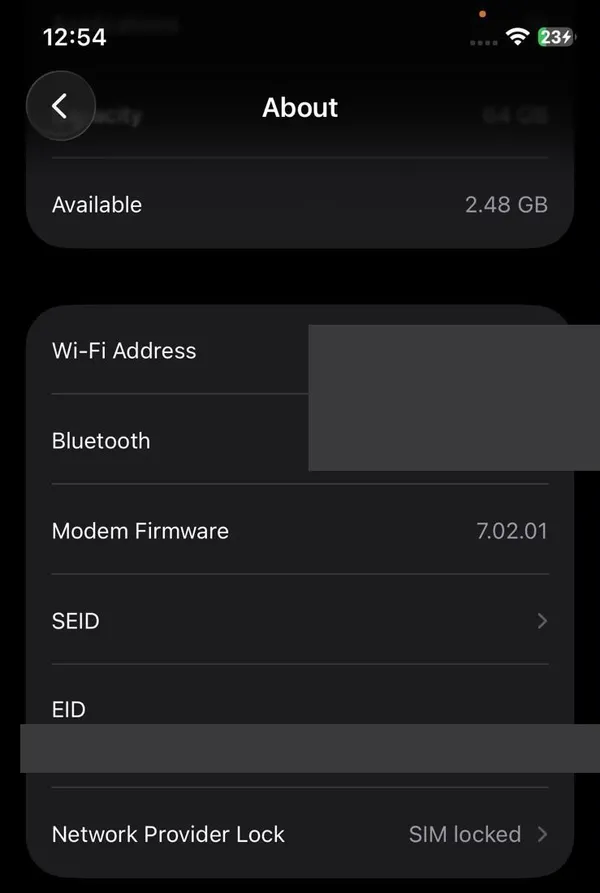
On an iPhone set to UK English, Carrier Lock is called Network Provider Lock. This one is SIM locked.
This is reliable and needs no SIM card. If your iPhone is locked, our guide to unlocking an iPhone through your carrier covers the request step by step.
The fix
Way 2: Check a Samsung Galaxy in Settings
- 1
Look for a Network unlock option.
On some Galaxy phones sold by carriers, go to Settings › Connections › More connection settings and look for Network unlock. If it is there, it shows whether the phone is locked or unlocked.
- 2
If you do not see it, use the SIM or eSIM test.
Many Galaxy phones, especially those bought unlocked from Samsung, do not have this menu. That is normal. Way 4 below gives a definite answer.
- 3
Watch for lock prompts.
If a new SIM makes the phone ask for a SIM network unlock PIN or a network lock control key, the phone is locked. Do not buy codes online. Ask the carrier that sold the phone.
You may see “secret codes” for the dialer that claim to show lock status. They only work on some older models and firmware, so do not rely on them.
The fix
Way 3: Check a Google Pixel
- 1
Think about where it was bought.
Google says all phones sold in the Google Store come unlocked. Pixels bought from a carrier may be locked, and Google notes they can stay locked for up to two years or until the carrier removes the lock.
- 2
Check the SIM settings.
Open Settings › Network & internet › SIMs. Some carrier Pixels show network lock information here, but many do not.
- 3
Use a hint, not proof: OEM unlocking.
If Developer options are turned on, a grayed-out OEM unlocking switch often means a carrier Pixel. Only look at it. Do not turn it on, because it is for changing system software and has nothing to do with carriers. For a definite answer, use Way 4.
The fix
Way 4: Test with another carrier's SIM or eSIM (works on any phone)
This is the most certain check, because it asks the phone to do exactly what you want it to do.
- 1
Get a SIM or eSIM from a different carrier.
Borrow a friend's SIM card from another network, or use a prepaid or travel eSIM. Many prepaid brands let you check your phone with their app before you pay.
- 2
Know if your phone has a SIM tray.
US models of iPhone 14 and later have no SIM tray and only use eSIM. For those, the test has to be an eSIM from another carrier. Many Android phones support both.
- 3
Insert or add it, then restart.
If the phone shows the new carrier's name and you can make a call or load a web page, it is unlocked.
- 4
Read the error if it fails.
Messages such as SIM not supported, SIM not valid or a request for an unlock code mean the phone is locked. No signal at all can also mean the other carrier simply does not work with your model, so try Way 5 to be sure.
The fix
Way 5: Ask the carrier with your IMEI
- 1
Find your IMEI.
Dial *#06# on the phone, or look in Settings under About. It is a 15-digit number unique to your phone.
- 2
Check your carrier account or app.
Verizon, AT&T and T-Mobile show device and unlock details in your online account or app, or can tell you on a support chat. The carrier that sold the phone always knows its lock status.
- 3
Or use the new carrier's bring-your-own-phone check.
Carriers you are switching to let you enter your IMEI to see if the phone will work with them. This is free on their websites. Skip paid “IMEI unlock check” sites.
Unlock rules for Verizon, AT&T and T-Mobile in 2026
If your phone turns out to be locked, whether you can unlock it depends on your carrier's rules. These changed this year, and many websites are out of date. Here is where things stand as of September 2026:
- Verizon: unlocks automatically once the phone is bought at full price or the financing is paid off. Prepaid phones unlock after 365 days of paid, active service. The old rule that unlocked every Verizon phone after 60 days ended for phones activated from January 27, 2026, after the FCC allowed the change.
- AT&T: the phone must be paid off and the account in good standing. Postpaid phones need 60 days of active service; prepaid phones need six months of paid service. Requests go through AT&T's device unlock portal.
- T-Mobile: postpaid phones need 40 days of active use on the line and must be paid off. Prepaid phones need 365 days on the network, or more than $100 in refills in that time.
On all three, a phone reported lost or stolen, or tied to an unpaid account, will not be unlocked. Prepaid brands owned by these carriers set their own rules, which are often stricter, so check their policy page. Always confirm on the carrier's website before you rely on a date, because policies can change again.
Buying a used phone? Check these three things
A used phone that is locked, stolen or still tied to the last owner's account can be worthless to you. Check all three before any money changes hands:
- 1
Unlocked, or locked to your carrier.
Ask the seller to show you Settings › General › About on an iPhone, or test your own SIM or eSIM in the phone in person.
- 2
Not reported lost or stolen.
Put the IMEI (dial *#06#) into the free CTIA Stolen Phone Checker. A phone on the blocked list will not work on major US networks. A clean result is good but not a guarantee, because recent reports can take time to appear.
- 3
Signed out of the previous owner's account.
On an iPhone, Find My must be off and the phone should be erased, showing the Hello screen. On Android, the previous Google account must be removed. Our guide to turning off Find My iPhone shows what the seller needs to do.
Will an unlocked phone work on every carrier?
Almost always, but not guaranteed. Unlocked means the carrier will not block other SIMs. The phone still needs to support the new network's technology and frequencies. Every recent iPhone, Galaxy and Pixel sold in the US works on Verizon, AT&T and T-Mobile. Older phones and phones bought overseas are where problems show up.
The simplest way to be sure is the new carrier's bring-your-own-phone check from Way 5. If you are moving to a plan that uses eSIM, read eSIM explained first, so you know how to switch without losing service.
Selling or switching? Do this next
If your phone is unlocked and you are about to switch carriers, back up first, then move your number to the new carrier before you cancel the old one. Canceling first can release your number. If you are selling or trading in the phone, sign out of your accounts and erase it. See how to factory reset an iPhone safely. An unlocked phone with no account lock is the easiest kind to sell and usually gets the best price.
Frequently asked questions
Is a phone bought from Apple, Samsung or Google unlocked?
Phones bought at full price directly from Apple, Samsung or the Google Store are normally unlocked. A phone bought with a carrier deal or carrier financing is usually locked to that carrier, even if you bought it in an Apple Store.
Does a factory reset unlock a phone?
No. The carrier lock is tied to the phone's IMEI in the carrier's system, so erasing the phone does not change it. Only the carrier that locked it can remove the lock.
Can I use a travel eSIM on a locked phone?
No. A carrier-locked phone only accepts that carrier's SIM or eSIM. You need an unlocked phone to add an eSIM from another company, including travel eSIMs.
Is unlocking a phone free?
Yes. Verizon, AT&T and T-Mobile unlock eligible phones for free. Avoid websites that charge for unlock codes; for iPhones in particular, only the carrier can unlock it.
What to try next
Sources
Official pages these steps are based on. Menus can differ by software version.
People also ask
How do I find my IMEI?
Dial *#06# on any phone. On iPhone it is also in Settings › General › About, and on Android in Settings › About phone. Phones with an eSIM show two IMEIs; the checker usually wants the first.
Read the full guide: Check phone carrier compatibilityHow do I know if my iPhone is unlocked?
Go to Settings › General › About and look at Carrier Lock. If it says No SIM restrictions, the iPhone is unlocked.
Read the full guide: Unlock iPhone from carrierHow do I know what carrier my phone is locked to?
On iPhone, check Settings › General › About for the lock status, then ask the carrier that sold it. On Samsung, the service provider code in Software information shows the original carrier, such as VZW for Verizon.
Read the full guide: What carrier is my phone?Will my phone work in Mexico?
Almost certainly, if you have a recent phone from a major US carrier. Most Verizon, AT&T and T-Mobile unlimited plans include talk, text and data in Mexico at no extra cost. On other plans you may need a daily pass or a travel eSIM.
Read the full guide: Use your phone in MexicoRelated guides
Check phone carrier compatibility
Check if your phone is compatible with a carrier using its free IMEI checker. Learn why phones fail: carrier lock, missing bands or no VoLTE, and what to do.
Unlock iPhone from carrier
Check if your iPhone is carrier locked in Settings, then ask your carrier to unlock it for free. Covers Verizon, AT&T and T-Mobile rules and what to do next.

What carrier is my phone?
What carrier is my phone? Find the carrier your phone uses or is locked to in Settings, with the Samsung CSC code, the IMEI or the box, all free and in minutes.

Use your phone in Mexico
How to use your phone in Mexico without a surprise bill. See what Verizon, AT&T and T-Mobile include, when to buy a pass or eSIM, and settings to check first.
More guides you may need
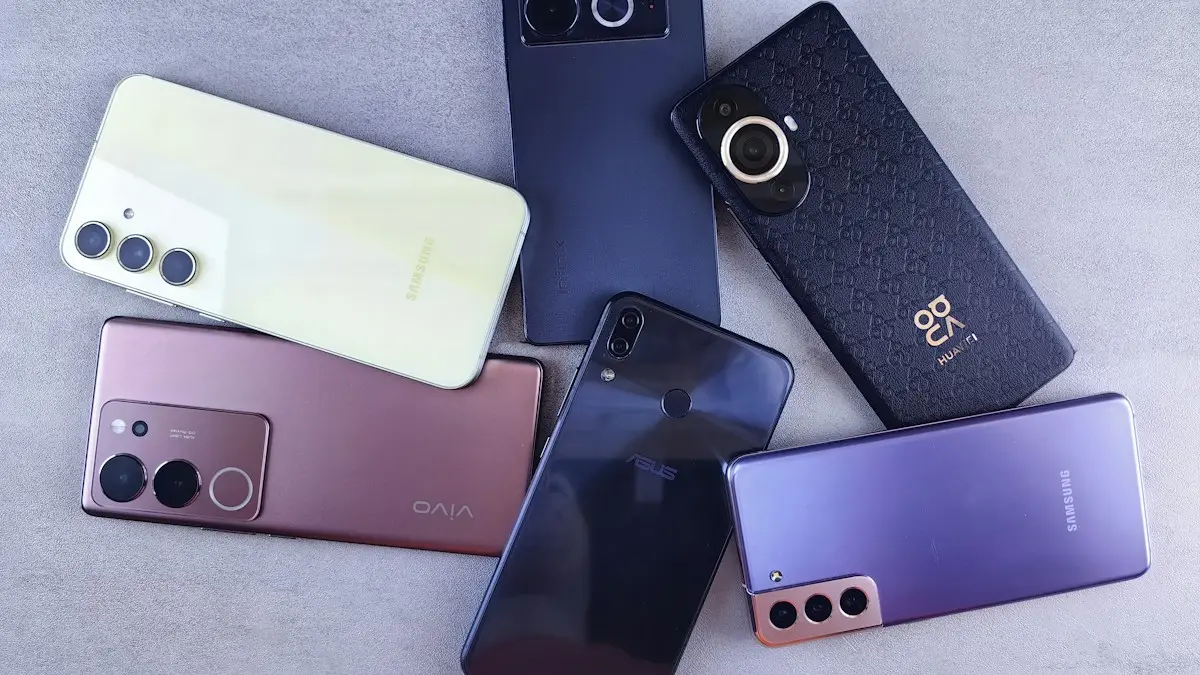
Sell your Android phone
How to sell your Android phone safely: back up, remove your accounts, factory reset, check unlock status and pick a trade-in or private sale.
Set up Android Auto
Set up Android Auto for the first time with a USB cable or wirelessly, grant the right permissions, and customize which apps show on your car’s screen.