

What is Optimized Battery Charging on iPhone? (And the 80% limit)
Keeping a battery at 100% for hours wears it out faster. Optimized Battery Charging avoids that by learning your routine.
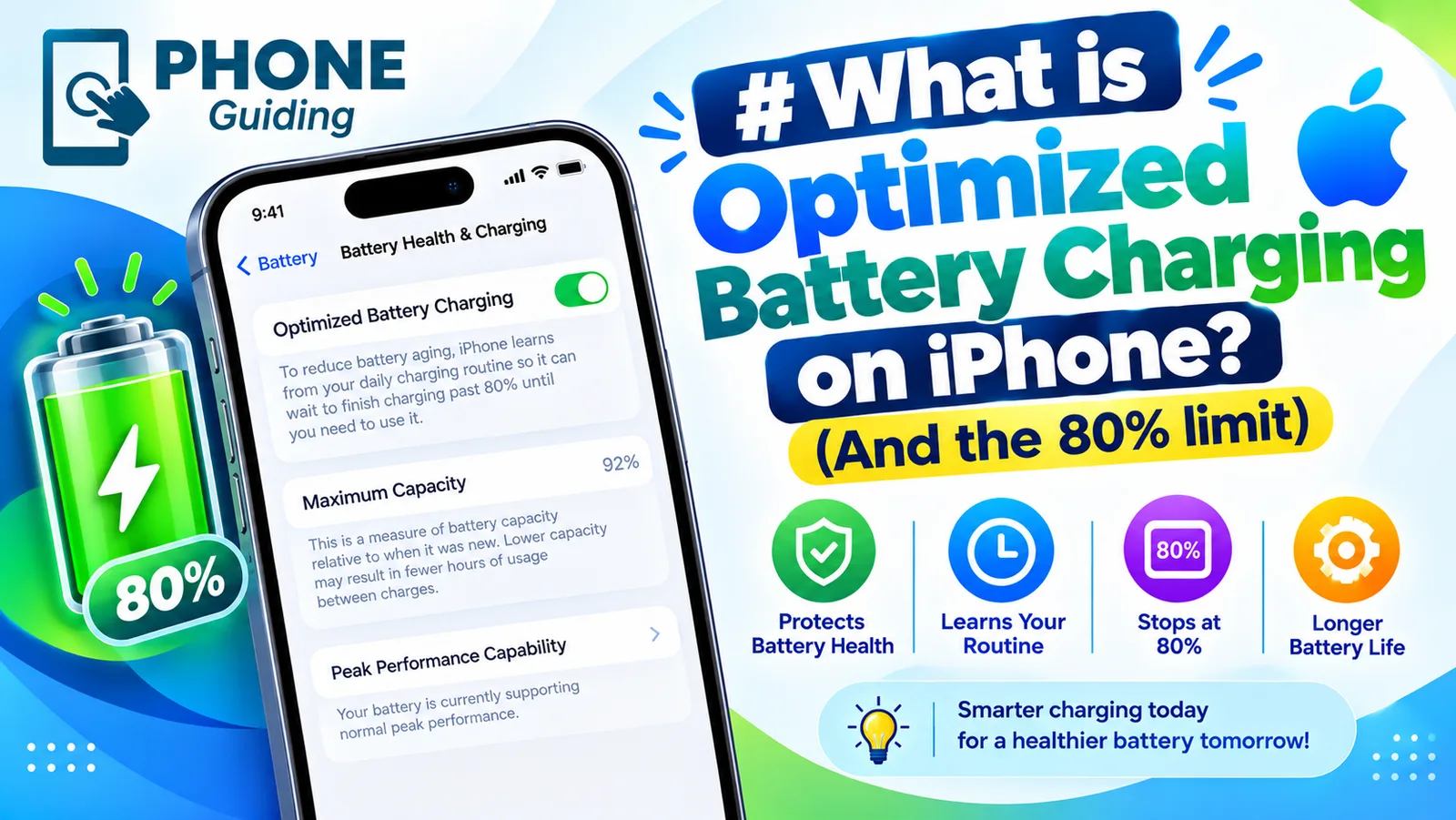
If you have noticed your iPhone sitting at 80% in the morning, or a notice saying charging is on hold, this feature is why. It is one of the simplest ways to keep your battery healthy for longer, and it costs you nothing in daily use once it has learned your routine. Here is how it works, why it sometimes seems not to, and how it compares with the fixed Charge Limit on newer iPhones.
How it works
Lithium-ion batteries age faster when they sit at 100% for hours. Your iPhone learns when you usually charge and unplug, for example overnight, and holds at 80% for most of that time. It only works with a routine; charging at random times charges straight to full.
The feature relies on your location history to know when you are at a place where you charge regularly, like home or work. That is why it needs Location Services, even though Apple says the data never leaves the phone, with Significant Locations and System Customization turned on in Settings › Privacy & Security › Location Services › System Services. The location data is processed and kept on your iPhone. If you travel or charge somewhere new, it simply charges to 100% as normal.
What is optimized battery charging vs the Charge Limit?
- Optimized Battery Charging: flexible. Holds at 80% only during long, predictable charging sessions, then fills to 100% before you unplug. Available on iPhone models that support iOS 13 or later.
- Charge Limit (iPhone 15 and later): fixed. Stops at the level you choose, such as 80%, 85%, 90% or 95%, every time, wherever you charge.
On iPhone 15 and later, you choose between them in the same Charging screen. If you set a limit below 100%, the phone always stops there. If you choose 100%, you can keep Optimized Battery Charging on to handle overnight sessions.
The fix
Turn it on or off, or set a limit
- 1
Open Settings › Battery › Charging (Battery Health & Charging on older iOS).
- 2
Turn Optimized Battery Charging on or off.
- 3
On iPhone 15 and later, choose a Charge Limit between 80% and 100% if you prefer a fixed cap.
Why your iPhone stops at 80%
- Optimized Battery Charging is holding: you will usually see a Charging On Hold notice with the time it will finish. It resumes on its own.
- A Charge Limit is set: on iPhone 15 and later, check Settings › Battery › Charging. If 80% is selected, that is the maximum.
- The battery is warm: iOS pauses charging at 80% when the battery is hot, for example under a pillow, in a thick case or on a wireless charger in the sun. It resumes when it cools. See why an iPhone gets hot.
- Clean Energy Charging: in the US, iOS can delay charging to times when the grid is using cleaner energy. It appears under the same Charging settings and can be turned off.
If none of these apply and your iPhone never goes past a certain level, or stops charging entirely, see what to do when an iPhone will not charge.
Optimized Battery Charging not working?
If your iPhone always charges straight to 100% overnight, check these in order:
- 1
Make sure it is turned on.
Settings › Battery › Charging. On iPhone 15 and later, the Charge Limit must be set to 100% for Optimized Battery Charging to appear.
- 2
Turn on the location services it relies on.
Settings › Privacy & Security › Location Services must be on, and under System Services turn on System Customization and Significant Locations.
- 3
Give it time to learn.
It learns from your routine, so it needs a number of days of fairly regular charging at the same place before it starts holding at 80%. A new iPhone or a fresh restore starts from scratch.
- 4
Charge for long enough.
It only activates when it expects the phone to stay plugged in for hours. Short top-ups always go straight to full.
How to tell it is working
When it kicks in, you see a notification on the Lock Screen saying charging is on hold, with the time it will finish. In Settings › Battery, the battery level graph shows a flat line around 80% for part of the night, followed by a rise to 100% before your usual wake-up time. If you see that pattern, the feature is doing its job.
Should you turn it off?
Most people should simply leave it on and forget about it. It only delays the last 20% when the iPhone is confident you will not need it yet. Consider turning it off if you have an irregular schedule and keep finding your phone at 80% when you leave, or if you often unplug earlier than usual, for example for early flights. On those days, Charge Now is usually enough, without turning the feature off completely.
Which Charge Limit should you choose?
- 80%: you work from home or at a desk, charge often, and rarely end the day below 30%. The best choice for battery life.
- 85% to 90%: a good middle ground for most office days, with a little more headroom.
- 95%: long days out, but you still want a small reduction in wear.
- 100% with Optimized Battery Charging: heavy users, travelers and anyone who needs every percent. The phone still protects itself overnight.
You can change the limit any time, as often as you like, so start at 80% or 85% and raise it if you find yourself running low in the evening. For a trip or a long day, switch to 100% the night before, then set it back.
Early flights and irregular schedules
Because the feature predicts when you usually unplug, it can be caught out when you leave earlier than normal. If you are up at 4 AM for a flight, plug in before bed and tap Charge Now on the on-hold notification, or open the Charging settings and turn the feature off until tomorrow, an option iOS offers when you switch it off. Shift workers with changing hours may find a fixed Charge Limit more predictable than the learned schedule.
MagSafe, wireless and car charging
The feature works the same way with a cable, a MagSafe charger or any Qi wireless pad, since the iPhone controls charging, not the charger. Wireless chargers run warmer, so you may see charging pause at 80% more often on a pad, especially in a thick case. In the car, short drives rarely trigger it because the session is not long or predictable enough, so the phone simply charges as fast as it can.
Does it really make a difference?
Yes, over time. Batteries age faster when they sit full for hours, and overnight charging is exactly that situation. Holding at 80% for most of the night reduces that stress every single night, which adds up over the two to four years most people keep a phone. It will not stop normal aging from charge cycles, and heat still matters more than anything else, so keep the phone cool while it charges too. See how to check iPhone battery health to follow how your battery is doing.
Apple Watch, AirPods and other devices
- Apple Watch: has its own Optimized Battery Charging, found in Settings › Battery › Battery Health on the watch.
- AirPods: support Optimized Battery Charging too. With AirPods connected, find it in their settings on your iPhone.
- Mac: MacBooks have a similar setting in System Settings › Battery.
- Samsung Galaxy: Battery protection in Settings › Battery, with Adaptive and Maximum modes that hold at 80%.
- Pixel: Adaptive Charging in Settings › Battery, and an 80% charging limit on newer models.
Frequently asked questions
Should I leave Optimized Battery Charging on?
Yes, for most people. It only delays the last 20% when your iPhone predicts it will be plugged in for a long time, like overnight.
Is the 80% Charge Limit better?
It reduces wear a little more, but you always have less battery available. It suits people who rarely use more than 80% in a day.
Why is my iPhone stuck at 80%?
Usually Optimized Battery Charging is holding the charge, a Charge Limit is set, or the battery is warm and iOS paused charging. It resumes on its own, or you can tap Charge Now.
Does Optimized Battery Charging work without Location Services?
Not fully. It uses Significant Locations to recognize where you charge regularly, such as home. With location turned off, it may not hold at 80% at all.
What to try next
Sources
Official pages these steps are based on. Menus can differ by software version.
People also ask
Does fast charging reduce battery life?
A little, because faster charging produces more heat and every battery wears with use. Modern phones slow down as they warm up, so the difference over a few years is usually small.
Read the full guide: Is fast charging bad?Can a phone overcharge?
No. The phone stops charging at 100 percent and only tops up small drops.
Read the full guide: Charging overnightDoes Samsung show battery health as a percentage?
Some newer Galaxy phones show a battery health or capacity figure in Settings. Many show only a status such as Good, so the exact number depends on your model and One UI version.
Read the full guide: Samsung battery healthWhy does my iPhone stop charging at 80%?
That is usually deliberate. Optimized Battery Charging, or the charge limit on iPhone 15 and later, holds the charge at 80% to reduce battery wear. The phone also pauses charging when it gets too warm.
Read the full guide: iPhone not chargingRelated guides
Is fast charging bad?
Is fast charging bad for your battery? Mostly no, but heat is. Learn how phones protect themselves, which settings slow charging and when to go slower.
Charging overnight
Charging your phone overnight is safe with a good charger, and built-in features limit battery wear. Heat is the real risk, so here is how to charge safely.
Samsung battery health
How to check battery health on Samsung with Settings, the Samsung Members app or a dial code. Learn what the results mean and when to replace the battery.
iPhone not charging
iPhone not charging, charging slowly or stuck at 80%? Work through 7 fixes, from the cable and a dirty port to charging messages, software and battery health.
More guides you may need
How much data do I need?
How much data do I need on my phone plan? Check your real use, see what streaming and video calls cost in gigabytes and pick limited or unlimited.
Is fast charging bad?
Is fast charging bad for your battery? Mostly no, but heat is. Learn how phones protect themselves, which settings slow charging and when to go slower.