

How to check iPhone battery health (and what the number means)
iOS sums up your battery's condition in a single percentage. Here is where to find it, how to read it, and which signs matter more than the number.
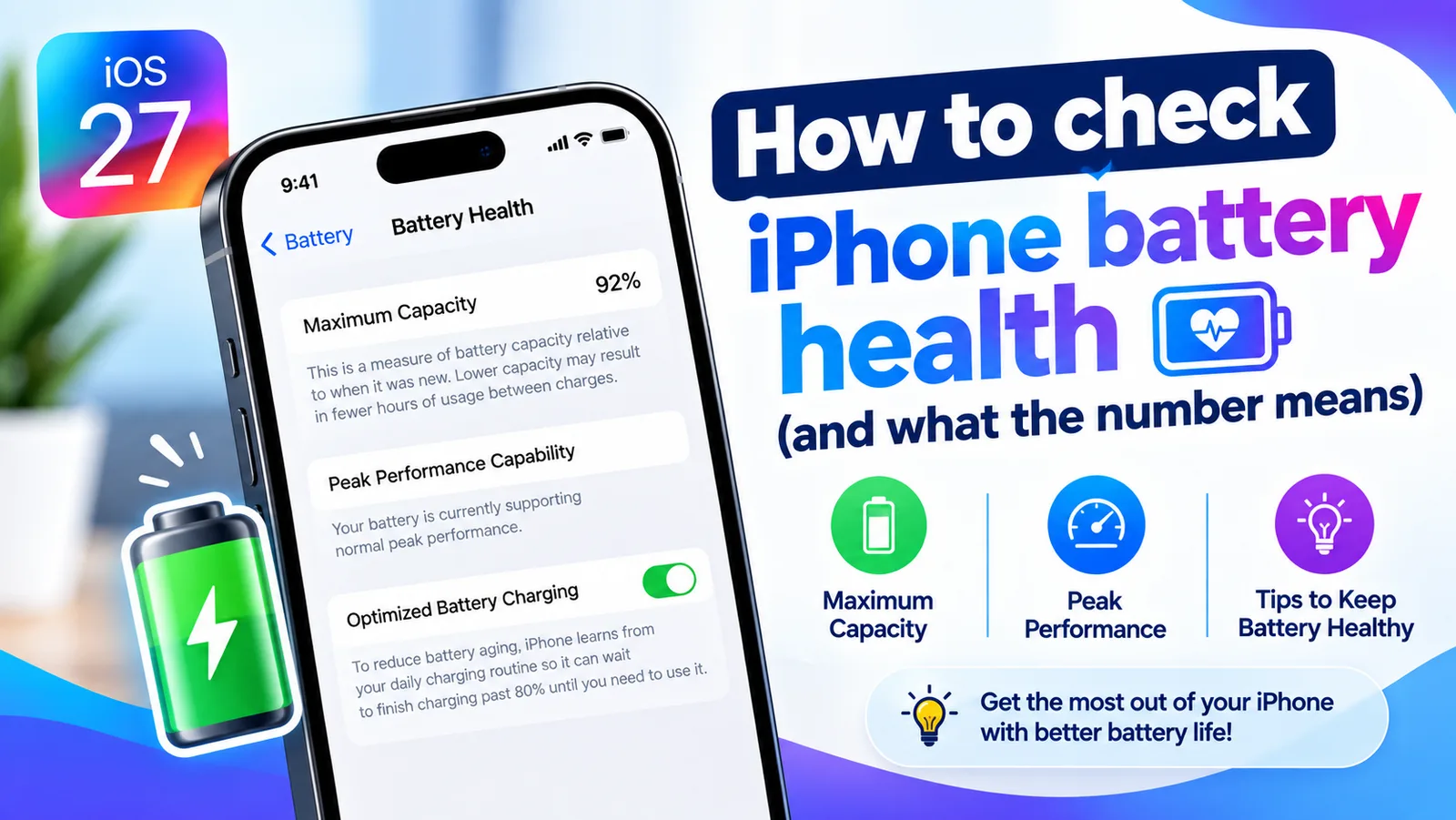
Maximum Capacity compares how much charge your battery can hold today with how much it held when it was new. A phone showing 88% holds roughly 88% of its original charge, so a full battery simply runs out a little sooner than it used to.
Find your battery health
- 1
Open Settings.
- 2
Tap Battery.
- 3
Tap Battery Health & Charging.
On older versions of iOS this is called simply Battery Health.
- 4
Read Maximum Capacity.
Below it, Peak Performance Capability tells you whether iOS has started limiting performance to prevent sudden shutdowns.
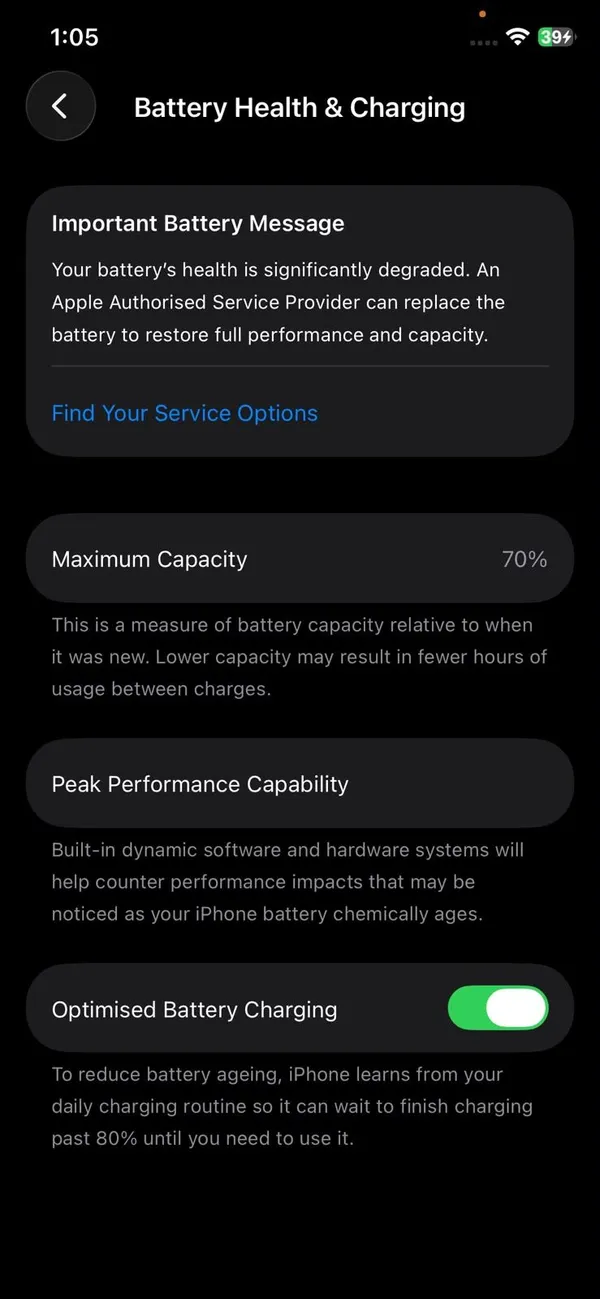
At 70%, iOS shows a service message and recommends a battery replacement.
Check the cycle count on older iPhones
iPhone 14 and earlier do not show the cycle count in Settings › General › About. If you share analytics with Apple, you can often find it in the logs: go to Settings › Privacy & Security › Analytics & Improvements › Analytics Data, open the newest file that starts with “log-aggregated”, and look for BatteryCycleCount. Not every iPhone has this file, so do not worry if it is missing. A Mac or PC app that reads battery data over a cable is another option.
One cycle means using 100% of the battery’s capacity in total, not one charge. Using 50% one day, charging, then using 50% the next adds up to one cycle. A phone used heavily every day can pass 300 cycles a year.
What the percentage means
- 90% to 100%: as good as new. If battery life feels poor, the cause is usually an app or a setting, not the battery.
- 80% to 89%: normal wear for a phone in daily use. You may notice shorter days, especially in cold weather.
- Below 80%: the battery is worn out. A replacement will make a clear difference, especially if the phone shuts down early.
Battery percentage and battery health are not the same
Many people search for what a number like 94% or 35% means. The percentage at the top of the screen is the charge level: how full the battery is right now. Battery health is a separate number in Settings › Battery › Battery Health. It is Maximum Capacity: how much charge the battery can hold compared with when it was new. A phone can be at 20% charge with 100% battery health, or at 100% charge with 78% health.
Is 70%, 74% or 82% battery health OK?
Use 80% as the line. At 82% or 85% you have normal wear and do not need to do anything. At 74% or 70% the battery is worn: the iPhone still works and is safe to use, but it will not last a full day, and it may shut down on its own in cold weather or at low charge. If you are buying a used iPhone, 89% or higher is a good sign, and below 80% is worth a lower price or a battery replacement.
Can low battery health make an iPhone crash?
A worn battery cannot always supply the power the iPhone asks for at a busy moment. When that happens, the iPhone can shut off without warning, even with some charge left. That is the main sign of a weak battery. It is not the same as apps crashing, which is usually a software problem. If your iPhone is shutting off, check Peak Performance Capability below, and see whether a replacement is worth it.
Peak Performance Capability explained
Under Maximum Capacity you will see one of a few messages. “Your battery is currently supporting normal peak performance” is what you want. If the iPhone has shut down unexpectedly because the battery could not deliver enough power, iOS may turn on performance management, which slows the phone slightly at peak moments to prevent more shutdowns. You will see a message saying so, with an option to disable it. Turning it off can bring back speed but also the shutdowns. The real fix is a new battery, which restores full performance.
How many years does an iPhone battery last?
It depends on how many cycles you use. Apple rates batteries by cycles, not years: about 500 cycles to 80% for iPhone 14 and earlier, and about 1,000 for iPhone 15 and later. Someone who drains most of the battery every day uses close to a cycle a day, while a light user might use half that. So a heavy user of an older model may reach 80% in under two years, while a light user of a newer model can go well beyond that. Heat and how often the phone sits at 100% shift these numbers further.
In practice, check Maximum Capacity every few months. A steady, slow decline is normal. A sudden drop of several points in a few weeks usually follows heat exposure or points to a faulty battery worth reporting to Apple.
Why battery health drops fast
Most iPhones lose a few points in the first year and then decline slowly. Faster drops usually come from heat: gaming while charging, keeping the phone in a hot car, or fast charging in a thick case. Heavy daily use adds cycles faster, and a phone often left at 100% on the charger ages a little quicker. If your battery life got worse suddenly but Maximum Capacity is still high, the cause is almost always software, not wear. See why your iPhone battery drains fast.
How to slow down battery wear
- Leave Optimized Battery Charging switched on. It learns your routine and holds the charge at 80% overnight, finishing just before you usually unplug.
- On iPhone 15 and later you can set a charge limit (80% to 95%) under Settings › Battery › Charging. Staying below 100% most of the time reduces wear.
- Avoid heat. Charging in direct sun, in a hot car or under a pillow ages the battery faster than anything else.
- Use a certified cable and adapter. Cheap, uncertified chargers can deliver unstable power.
Messages you might see instead
If that did not work
“Service” or “Service Recommended”
The battery has worn far enough that Apple recommends replacing it. The phone keeps working until you do.
“Unknown Part” or “Important Battery Message”
iOS could not verify the battery as a genuine Apple part, usually after a third-party repair. The phone works normally, but the health figure may be hidden or inaccurate.
Battery health not showing?
- Old iOS: Battery Health arrived in iOS 11.3. Update in Settings › General › Software Update.
- Non-genuine battery: after some third-party repairs, iOS shows an Unknown Part message and may hide the figure.
- Just replaced: a new battery can take a short while to show a reading, and the first figure may be refined over the next few days.
Battery myths to ignore
- “Drain it to 0% to calibrate it.” Deep discharges add wear and do not improve Maximum Capacity.
- “Closing apps saves battery.” Force closing apps from the app switcher usually uses more power when they reopen.
- “Charging overnight ruins it.” Optimized Battery Charging and the charge limit handle this. See whether charging overnight is bad.
- “Only Apple chargers are safe.” Any certified USB-C or MFi charger from a reputable brand is fine.
iPad and Apple Watch battery health
Apple Watch shows it in Settings › Battery › Battery Health on the watch. Recent iPad models show battery information, including the cycle count on newer models, in Settings › Battery or Settings › General › About, depending on the model and iPadOS version. Older iPads do not show a health figure at all, so judge them by how long a charge lasts.
Buying a used iPhone? Check the battery first
- 1
Ask to see Settings › Battery › Battery Health & Charging in person.
Screenshots can be old or edited.
- 2
Check Maximum Capacity and the Peak Performance message.
- 3
On iPhone 15 and later, check the cycle count in Settings › General › About.
- 4
Look for Unknown Part or a Service message.
Settings › General › About › Parts and Service History shows whether the battery was replaced and with what.
A battery under 85% is not a deal breaker, but factor a replacement into the price. When selling, a healthy battery helps your iPhone sell faster on sites like Swappa and eBay. See how much your iPhone is worth.
Replace the battery or upgrade?
If the phone still gets iOS updates and does what you need, a new battery is almost always the cheaper choice and makes it feel close to new again. With AppleCare+, it is free once Maximum Capacity falls below 80%. If the phone is near the end of its update support, or you want a new camera or more storage anyway, putting the money toward an upgrade can make more sense. See whether an iPhone battery replacement is worth it and whether AppleCare+ is worth it.
Frequently asked questions
Is 74% battery health OK on an iPhone?
It works, but it is worn. Apple considers a battery below 80% of its original capacity worn out. At 70% to 79% you will notice shorter days and may see sudden shutdowns in the cold or at low charge. A replacement fixes it.
What is the difference between battery percentage and battery health?
Battery percentage is how full the battery is right now. Battery health, in Settings › Battery › Battery Health, is how much capacity the battery has left compared with when it was new.
Can low battery health make an iPhone crash?
It can make the iPhone shut off suddenly, especially when it is cold or the charge is low. It does not normally make apps crash by itself.
Is 85% battery health bad?
No. Most iPhones fall below 90% within the first couple of years of daily use. What matters more is whether the phone still lasts the day and whether it ever shuts down unexpectedly.
Can battery health go back up?
Not really. The figure can move by a point or so as iOS recalibrates its estimate, but the battery's real capacity only goes down over time.
How many charge cycles does an iPhone battery last?
Apple designs iPhone 15 and later batteries to keep 80% of their original capacity at about 1,000 full charge cycles. Earlier models are rated for about 500 cycles.
How much does it cost to replace an iPhone battery?
It depends on the model; Apple lists the price for yours on its Battery Service page. With AppleCare+, the replacement is free once Maximum Capacity is below 80%.
How do I know if my iPhone battery is bad?
Open Settings › Battery › Battery Health and check Maximum Capacity. Below 80% means the battery is worn, and you may see a service message. A phone that drains fast or shuts down suddenly is another sign.
What to try next
People also ask
Does Samsung show battery health as a percentage?
Some newer Galaxy phones show a battery health or capacity figure in Settings. Many show only a status such as Good, so the exact number depends on your model and One UI version.
Read the full guide: Samsung battery healthWhy does my eSIM say Unknown for the phone number?
Carrier forum answers say the number shows as Unknown when it is not programmed into the SIM, and it can also happen after a number was ported from another network. Calls, texts and data can still work.
Read the full guide: iPhone eSIM unknown numberWhy does my iPhone not ring but still vibrates?
The phone is in Silent mode, or the ringtone volume is at zero. Check the Ring/Silent switch or Action button, then raise Ringtone and Alert Volume in Settings › Sounds & Haptics.
Read the full guide: iPhone not ringingDoes the message mean my battery is damaged?
No. The message reflects higher usage since the update. Battery damage shows in Settings, Battery, Battery Health & Charging as a lower Maximum Capacity or a Service label.
Read the full guide: iPhone used more than usual since upgradingRelated guides

Samsung battery health
How to check battery health on Samsung with Settings, the Samsung Members app or a dial code. Learn what the results mean and when to replace the battery.
iPhone eSIM unknown number
iPhone eSIM shows Unknown or no phone number? Often it is cosmetic. Check that calls and texts work, then set My Number or ask your carrier to fix it.
iPhone not ringing
iPhone not ringing when someone calls? Check Silent mode, Focus, Bluetooth, unknown caller settings and 6 more causes to get your ringtone back fast.
iPhone used more than usual since upgrading
Your iPhone has been used more than usual since upgrading iOS and it may affect battery life? Here is what the message means, how long it lasts and 8 tips.
More guides you may need
Forgot Notes password
Forgot notes password on iPhone? Reset it in Settings, learn why old locked notes stay locked, and see the few ways to get back in or avoid this next time.
Screen black during calls
iPhone screen goes black during calls and will not wake? Clean the sensor, remove the screen protector, update iOS and reset settings. Plus how to hang up.