

iPhone contacts showing numbers instead of names? 9 fixes
Your texts and calls suddenly show bare phone numbers, as if you never saved anyone. Your contacts are almost always still there. Here is how to find out what went wrong and bring the names back.
Photo by Brett Jordan on Unsplash
It is an unsettling thing to see. Your recent calls, texts and group chats suddenly show phone numbers where names used to be. The good news is that the contacts are rarely deleted. Your iPhone has almost always just lost its connection to wherever they are stored, such as iCloud, Gmail or Outlook.
Before you change anything, spend 30 seconds finding out which situation you are in. It decides which fix you need.
First: are your contacts still on the iPhone?
Open the Contacts app (or the Contacts tab in the Phone app) and scroll through it.
- The list is empty or much shorter than usual. Your iPhone has stopped showing an account's contacts. Start with fixes 1 to 3 below.
- The contacts are there, but calls and texts still show numbers. This is a matching problem between the saved number and the caller. Jump to fixes 4 to 7.
- Only one or two people show as numbers. The problem is those contact cards. Go straight to fixes 4 and 5.
Why are my iPhone contacts showing as numbers?
The fix
9 fixes, most common first
- 1
Turn iCloud Contacts back on.
This is the most common cause, especially after an iOS update, a new phone or re-entering your Apple Account password. Go to Settings › [your name] › iCloud, tap See All under Saved to iCloud, and make sure Contacts is on. If it is already on, turn it off, choose Keep on My iPhone, wait 10 seconds and turn it back on. Choose Merge if asked. Connect to Wi-Fi and give it a few minutes to download.
- 2
Turn on contacts for Gmail, Outlook or Yahoo.
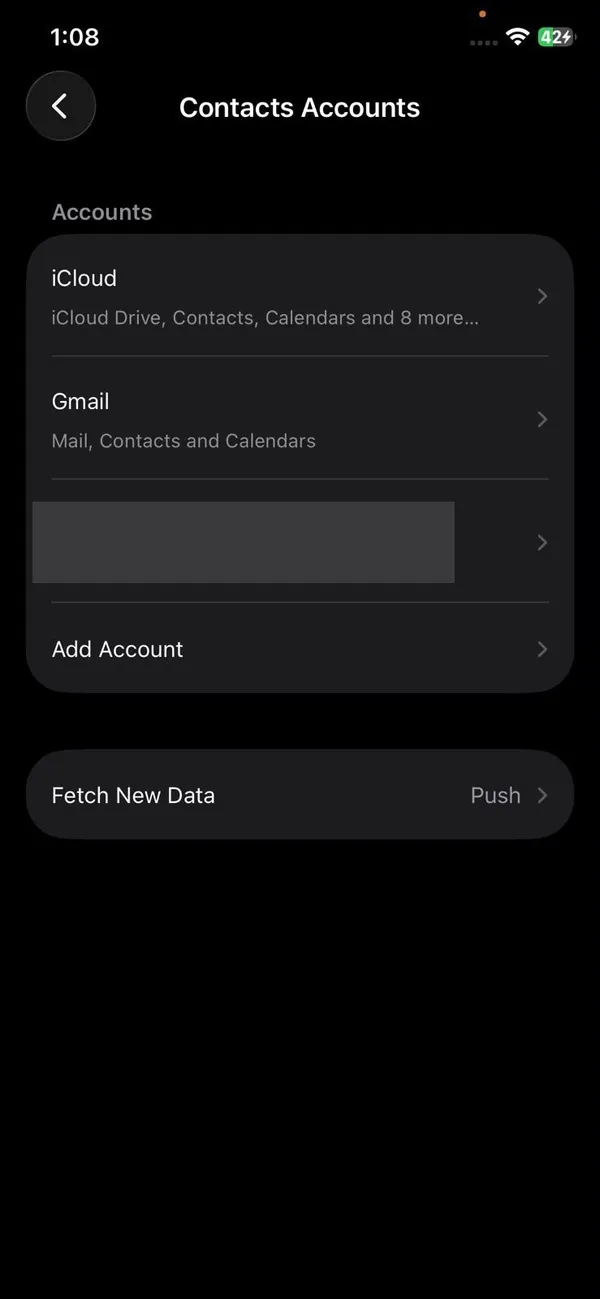
If you moved from Android or use a work account, your contacts may live in Google or Microsoft, not iCloud. Go to Settings › Apps › Contacts › Contacts Accounts, tap each account and make sure Contacts is on. If an account shows a password error, sign in again. Changing your Google password logs the iPhone out of it.
- 3
Show all contact lists in the Contacts app.
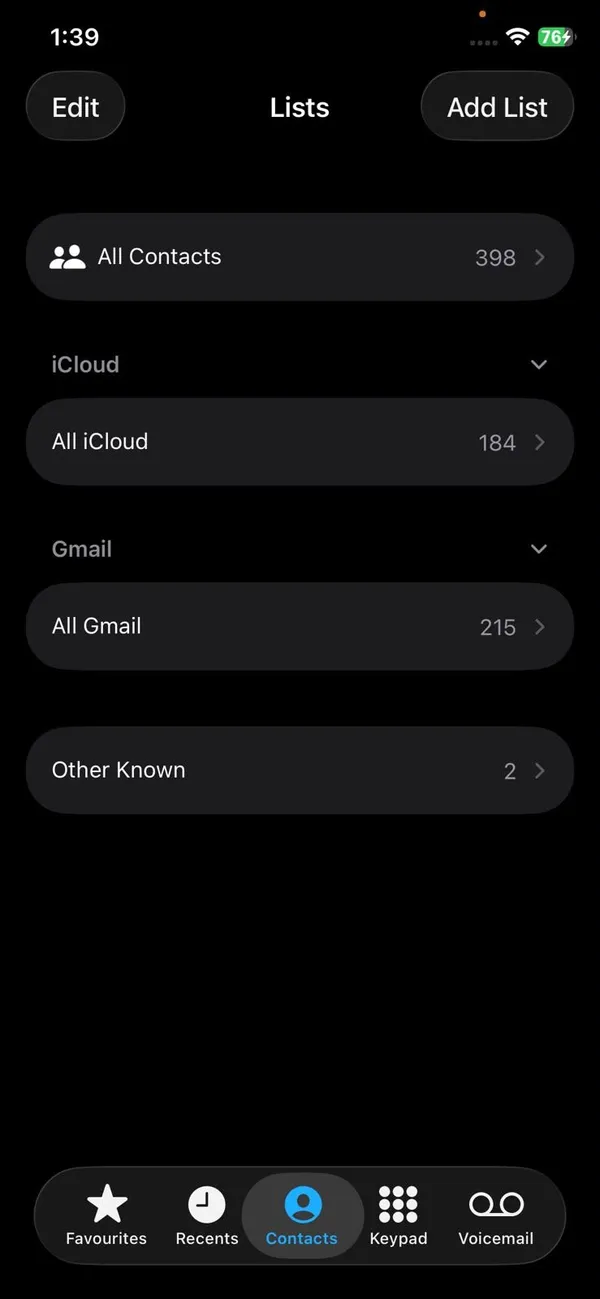
The Contacts app can show one account at a time. Open Contacts, tap Lists in the top left and choose All Contacts. If your people reappear, one list was simply hidden.
- 4
Check the number saved on the contact.
Open the contact who shows as a number and tap Edit. Compare the saved number with the one in your Recents or Messages, digit by digit. People change numbers, and businesses often call from a main line rather than the direct number you saved. Add the new number to the same card.
- 5
Add the country code for international numbers.
For numbers outside the US, save them with a plus sign and country code, for example +44 7700 900123 for the UK. Messages and WhatsApp numbers from abroad often arrive in this format and may not match a local-style number. For US numbers, adding +1 is rarely needed but does no harm.
- 6
Merge duplicate contacts.
When the same number is saved on two different cards, the iPhone can fail to pick either and show the bare number. Open Contacts and look near the top for a Duplicates Found banner. Tap it and tap Merge All. You can also search the number to see if it appears on more than one card.
- 7
Turn off Short Name.
Short Name can show only a first name, a nickname or initials, which can look like missing names in some places. Go to Settings › Apps › Contacts › Short Name and turn it off to see full names.
- 8
Restart the iPhone and install updates.
A restart forces the Phone and Messages apps to reload your contacts. Then check Settings › General › Software Update. Apple has fixed contact display bugs in past updates, so being on the latest version helps. See how to update your iPhone if the update will not install.
- 9
Restore contacts from iCloud.com.
If the contacts are gone from icloud.com too, iCloud keeps older copies. On a computer, sign in at icloud.com, open Data Recovery (you will find it at the bottom of the iCloud home page or in its settings menu) and choose Restore Contacts. Pick a date from before the names disappeared. iCloud saves your current contacts as an archive first, so you can undo it.
Contacts show names in the app but numbers in Messages
This specific pattern has a few extra causes. Messages matches conversations by the exact phone number or email address used. If a friend texts you over iMessage from their email address and you only saved their phone number, you will see the email address instead of their name. Add the email to their contact card and the name appears.
If whole conversations switched to numbers after you changed phones or restored from a backup, turn iMessage off and back on at Settings › Apps › Messages. This makes Messages re-check every conversation against your contacts. Then restart the iPhone.
Moved from Android? Your contacts may still be in Google
This is very common after switching. Your contacts were saved to your Google account on the old phone, and the iPhone never connected to it. Add the account in Settings › Apps › Contacts › Contacts Accounts › Add Account › Google, sign in, and turn on Contacts. Within a few minutes, names should show up in calls and texts.
Contacts saved only to the old phone's SIM card or phone storage will not come across this way. Our guide to moving from Android to iPhone covers how to copy those over.
Which account are new contacts saved to?
If you have iCloud and Gmail (or Outlook) turned on, new contacts go to the default account. Check it at Settings › Apps › Contacts › Default Account. If the default is an account you later remove or switch off, every contact saved there disappears from the phone with it, and those people start showing as numbers.
For most people, iCloud is the safest default. It backs up automatically and follows you to your next iPhone. If you rely on a Google account at work, keep it on but save personal contacts to iCloud.
Names missing in your car or on Apple Watch?
If names show on the iPhone but not on your car screen, the car has not been allowed to read your contacts. Go to Settings › Bluetooth, tap the info button next to your car and turn on Sync Contacts if it is shown. If not, forget the car and pair again, and tap Allow when the iPhone asks to share contacts. Our guide to Bluetooth problems in the car covers pairing in detail. An Apple Watch gets its contacts from the iPhone, so once the names are back on the phone they return on the watch too.
When it is not your iPhone at all
Now and then, iCloud itself has a problem. If names vanished for no reason and nothing above helps, check Apple's System Status page. If iCloud Contacts shows an issue there, wait until it is fixed. Do not delete or re-add contacts in the meantime, because that can create duplicates once sync comes back.
Also check that you are signed in to the right Apple Account. If you recently signed in with a different one, perhaps a family member's or an old account, the iPhone shows that account's contacts instead of yours. Your name at the top of Settings tells you which account is active. If iCloud keeps asking for a password or signing out, fix that first using our guide to iCloud signing out on its own.
Frequently asked questions
Why are my iPhone contacts showing as numbers after an update?
An update or a sign-in prompt can switch off iCloud Contacts, or the iPhone may still be re-syncing. Check that Contacts is on in your iCloud settings, connect to Wi-Fi and give it a few minutes.
Did I lose my contacts if only numbers show?
Usually not. In most cases the contacts are still in iCloud, Gmail or Outlook and your iPhone has simply stopped reading them. Check iCloud.com on a computer: if your contacts are listed there, they are safe.
Why does Messages show a number when the contact is saved?
The number saved on the contact card may not match the one texting you, often because of a missing country code or a second number. Duplicate contacts with the same number can also confuse Messages.
How do I get my contacts back on my iPhone?
Turn iCloud Contacts on, or turn the Contacts switch on for your Gmail or Outlook account. If the contacts are gone from iCloud too, restore an older copy from iCloud.com under Data Recovery.
What to try next
People also ask
Does the person know I blocked them?
They are not notified. Their calls go to voicemail and their iMessages never show Delivered on their side.
Read the full guide: Block a number on iPhoneWhy did my iPhone contacts disappear?
The most common causes are a hidden list or account, iCloud or Gmail Contacts turned off, signing out of your Apple Account, or deleting contacts by mistake. An update or a restore can also change which account is shown.
Read the full guide: iPhone contacts missingCan I transfer my iPhone backup from iCloud to Google Drive?
No. An iCloud device backup is stored in Apple's format and can only restore to an iPhone or iPad. You can move your photos, files, contacts and calendar to Google instead.
Read the full guide: Move iCloud backup to Google DriveWhy can't I name a group chat?
The group is SMS or MMS, usually because someone uses Android without RCS. Only iMessage and RCS groups can be named.
Read the full guide: iPhone keyboard settingsRelated guides
Block a number on iPhone
Block a number on iPhone from Recents, Messages or Settings, see what happens to their calls and texts, and how to find blocked voicemails or unblock later.
iPhone contacts missing
iPhone contacts missing or disappeared? Check your Lists, iCloud and Gmail sync, then restore contacts from iCloud.com or a backup. 7 ways to get them back.
Move iCloud backup to Google Drive
You cannot move a full iPhone backup from iCloud to Google Drive, but you can move photos, files, contacts and calendar. See each method and what to expect.

iPhone keyboard settings
Change iPhone keyboard settings fast: turn off autocorrect, add a keyboard, edit a contact, rename a group chat and hide or change your caller ID on any iOS.
More guides you may need
Notifications silenced
Seeing notifications silenced under a text on iPhone? It means a Focus is on. Learn who sees it, how to stop sharing it, and how to let a message through.
Photos stuck restoring from iCloud
Photos stuck restoring from iCloud on your iPhone? Learn how long it takes, then fix it with Wi-Fi, power, Low Power Mode, cellular and iCloud Photos settings.