

Samsung phone keeps unlocking in pocket? 6 settings that stop it
Pocket unlocks come from wake gestures, sensitive touch and Extend Unlock keeping the phone open. A few switches in Settings stop it.
Photo by Daniel Romero on Unsplash
The fix
6 settings to change
- 1
Turn on Accidental touch protection.
Settings › Display.
- 2
Turn off Touch sensitivity.
Settings › Display. Leave it on only if you have a thick screen protector.
- 3
Turn off Lift to wake.
Settings › Advanced features › Motions and gestures.
- 4
Turn off Double tap to turn on screen.
Same menu.
- 5
Turn off Fingerprint always on.
Settings › Security and privacy › Biometrics › Fingerprints, where available.
- 6
Remove Extend Unlock trusted places and devices.
Settings › Lock screen › Extend Unlock. On older Galaxy phones it is called Smart Lock.
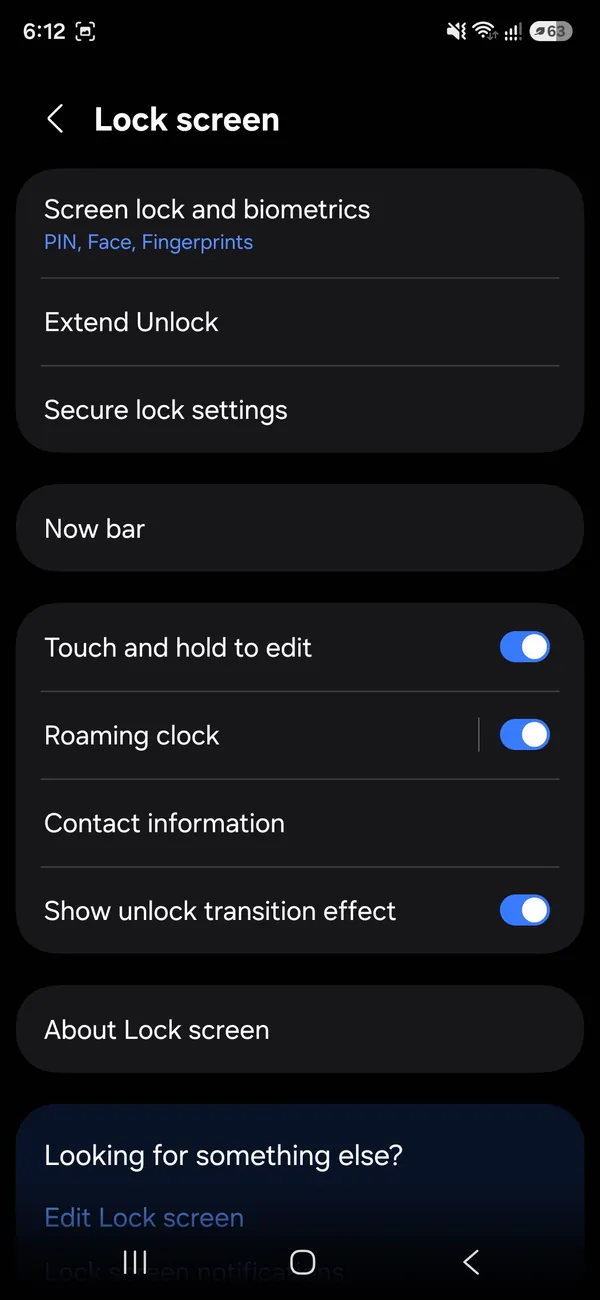
Why does a Samsung unlock itself in a pocket?
A phone has no way to tell your finger from fabric, a key or your leg. It only sees touches and motion. Samsung adds gestures that wake the screen, such as lifting the phone or tapping twice, plus features that keep the phone unlocked in places or near devices you trust. Put those together in a pocket and the screen wakes, a stray touch hits an app, and the phone stays open because it still thinks it is with you. A phone in a tight jeans pocket also bends slightly and presses the screen edges, which causes many random touches.
The common causes at a glance
- Wake gestures: Lift to wake and Double tap to turn on screen bring the screen on by themselves.
- Extend Unlock: the phone stays unlocked at home, near a Bluetooth device or while it detects motion.
- High touch sensitivity: meant for screen protectors, but it makes the screen react to cloth.
- Fingerprint always on: keeps the sensor ready, so a touch can unlock it.
- Side key shortcuts: a double press opens the camera or an app in your pocket.
- Cases and screen protectors: a loose case can press the buttons.
What to do after the six settings
If the phone still unlocks, check the lock screen type. A swipe or no lock at all leaves it open. Go to Settings › Lock screen and Always On Display and choose PIN, pattern, password or biometrics. A strong lock keeps stray touches from reaching your apps even when the screen wakes. Set Secure lock settings to lock the phone as soon as the screen turns off. Under Settings › Lock screen › Secure lock settings you can also turn off Lock instantly with side key only if you prefer the delay.
Stop pocket dialing and random calls
- Turn on Accidental touch protection. It blocks touches when the phone is in a pocket or bag.
- Turn off the shortcut that calls emergency services by pressing the side key several times, if it fires by accident. See Settings › Safety and emergency.
- Remove Edge panels or shortcuts that sit near the screen edge.
- Use a case with raised edges and a screen protector that fits well.
- If you carry the phone in a tight pocket, switch pockets or use a bag.
Calls placed by accident can drain the battery and wake the phone for hours. If the phone gets warm in your pocket, see why an Android phone overheats.
The phone locks you out after pocket touches
Many wrong touches on the lock screen can count as failed PIN or fingerprint attempts. After a few, the phone makes you wait, and after more it can force a longer lock. Accidental touch protection prevents this. If you are already locked out, wait for the timer, then enter the correct PIN. If you forgot the PIN, our guide to getting into an Android phone when you forgot the PIN explains your options.
Check for an app that wakes the screen
Some apps turn on the screen for every notification. In Settings › Notifications › Advanced settings, look at Wake screen on notifications and similar options. Chat apps that send many alerts can light the screen each minute, and a touch then unlocks an app. Turn the option off for noisy apps, or set Do Not Disturb at times when you carry the phone around. A Samsung phone can also show a message after a call when the screen lights up.
Is a pocket unlock a security risk?
It can be. If the phone is unlocked in your pocket and you drop it or someone takes it, they can open it. Use a strong lock, keep Find My Mobile turned on and remove trusted places that you no longer need. Review Extend Unlock regularly, particularly if you added a Bluetooth device such as a car or a headset that others use. A trusted place at home is convenient, but anyone who enters your home can use the phone.
Test which setting is the real cause
Change one thing at a time and carry the phone for a day. Start with Accidental touch protection and Lift to wake, since they fix most cases. If the screen still lights up, turn off Double tap to wake. If the phone still stays unlocked, remove Extend Unlock. Keep notes. When you find the cause, you can turn the others back on if you like them. This is faster than turning everything off and guessing which one mattered.
Fix it on older Galaxy phones and Android versions
On older One UI versions, the options sit in slightly different places. Accidental touch protection may be under Settings › Display, and the wake gestures under Settings › Advanced features › Motions and gestures. Extend Unlock is called Smart Lock on phones before One UI 6, and it sits in Settings › Lock screen › Smart Lock. On the Galaxy S and Note lines, you might also see Easy mute and Palm swipe options in the same menu. If a menu is missing, search for the setting name in the Settings search box.
Screen protectors and cases
- A thick tempered glass protector can make the screen read cloth as touch. Turn off Touch sensitivity only if you do not use one.
- A case that is too tight can press the side keys. Try the phone without the case for a day.
- Cases with a card holder can press the screen. Take the cards out.
- A cracked screen sends random touches. If the glass is broken, replace the screen or the phone. See why an Android touch screen stops working.
Keep the screen from lighting up for no reason
Turn on Settings › Display › Screen timeout and choose a short time such as 30 seconds. Check Always On Display, which can show the clock when you pick the phone up or tap the screen. Set it to Tap to show or to Show for 10 seconds. If the Always On Display is on all the time, a wrong touch in a pocket can wake it. Samsung also has a Pocket detection option in some versions that keeps the screen off when the phone is covered, which is worth turning on if you see it.
When to see a repair shop
If the screen keeps reacting even with a protector removed and all settings changed, the touch panel may be damaged, particularly after a drop or water exposure. A repair at Samsung or an authorized shop costs less than a new phone, but get a quote first. Back up your data before you hand the phone over. See backing up an Android phone.
Check these before you decide the phone is faulty
- Is the phone updated? Samsung fixes touch bugs in updates. See Settings › Software update.
- Did the problem start after you installed a new app? Restart in Safe mode to test. Our guide to Android Safe mode shows how.
- Is the battery swollen or the case bent? Stop using the phone and see a shop.
Frequently asked questions
Why does my Samsung stay unlocked at home?
Smart Lock is probably set to trust your home or a Bluetooth device. Remove those in Settings › Lock screen › Extend Unlock (Smart Lock on older phones).
Why does my phone lock me out after being in my pocket?
The screen registered many wrong PIN or fingerprint attempts. Accidental touch protection prevents that.
Why does my Samsung stay unlocked when I walk around?
Extend Unlock may be keeping it open because it detects motion, a trusted place or a Bluetooth device. Remove those in Settings › Lock screen › Extend Unlock.
Is a pocket unlock a security risk?
It can be. Smart Lock features such as On-body detection and trusted places keep the phone unlocked when you are not touching it, so someone else could use it. If that worries you, turn those off and rely on your fingerprint or PIN.
People also ask
Why does my iPhone flashlight turn on by itself?
It is almost always the Flashlight button at the bottom left of the Lock Screen being pressed by accident, often in a pocket or bag. Turning off Tap to Wake or locking the phone before you pocket it usually stops it.
Read the full guide: iPhone flashlight turns on by itselfWhy does my Samsung restart at night?
That is almost certainly Auto restart, a Samsung feature that restarts the phone on a schedule to keep it running smoothly. You can turn it off in Settings › Device care › Auto optimization.
Read the full guide: Samsung phone keeps restartingHow do I unfreeze my phone right now?
Hold the Power and Volume Down buttons together for 10 to 20 seconds until the phone restarts. On some Samsung models, keep holding past the power menu.
Read the full guide: Android phone keeps freezingWhy does my Samsung turn off at 20 percent?
A worn battery cannot deliver enough power under load, so the phone shuts down early. Check the battery in Samsung Members and replace it if it is weak.
Read the full guide: Samsung keeps turning offRelated guides
iPhone flashlight turns on by itself
iPhone flashlight turns on by itself in your pocket or when you wake the screen? Why it happens and 7 ways to stop it, from Tap to Wake to the Action button.

Samsung phone keeps restarting
Samsung Galaxy keeps restarting on its own? Check Auto restart, test in Safe mode, run Samsung Members diagnostics and try 6 more fixes before a reset.

Android phone keeps freezing
Android phone keeps freezing or not responding? Force restart it, free up storage, find the bad app in safe mode, update and try 5 more fixes, step by step.
Samsung keeps turning off
Samsung phone keeps turning off by itself, even with battery left? Check the battery in Samsung Members, remove the case, test safe mode and try 6 more fixes.
More guides you may need
Samsung moisture detected
Samsung moisture detected warning won't go away? Dry the port, clean it safely, charge wirelessly, restart and fix a false alarm. Know when to get it repaired.

Samsung My FanCam
Samsung My FanCam uses Galaxy AI to follow one person in a video and crop around them. See the steps, which phones Samsung lists, the limits and why it fails.