

Is it worth replacing an iPhone battery? Cost, timing and when to upgrade
A new battery costs a fraction of a new iPhone and can make an older phone feel new again. But not always. Here is how to decide, what Apple charges in 2026, and the cheaper options to weigh.
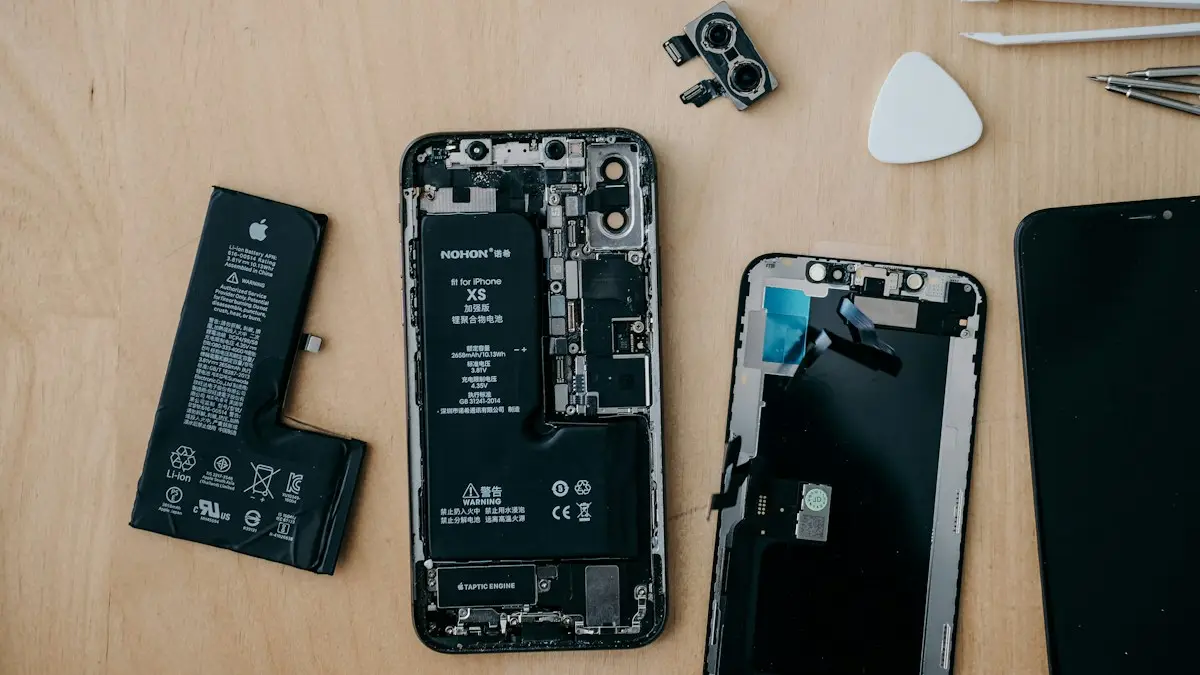
Photo by insung yoon on Unsplash
Every lithium-ion battery wears out. After a few years, an iPhone that used to last all day needs a charger by mid-afternoon, and older phones may start switching off in the cold or at 20%. The rest of the phone is often fine. That is why a new battery is one of the best-value repairs you can make, but only on the right phone at the right time.
Do you actually need a new battery? Check first
- 1
Open Settings › Battery › Battery Health & Charging.
Look at Maximum Capacity. It compares today's battery with a new one. Our guide to iPhone battery health explains the number in detail.
- 2
Look for a Service message.
If you see “Service” next to battery health, or an Important Battery Message, iOS has decided the battery is significantly worn. That is Apple's own signal to replace it.
- 3
Check Peak Performance Capability.
If it mentions an unexpected shutdown and performance management, iOS is slowing the phone to keep it from switching off. A new battery fixes this.
- 4
Rule out settings first.
If capacity is still 85% or higher but the battery drains fast, the problem is usually an app or setting, not the battery. Try the fixes in iPhone battery draining fast before paying for a repair.
When replacing the battery is worth it
- Capacity below 80%, or a Service message. This is the clearest case. A new battery brings back most of your original battery life.
- Unexpected shutdowns. A phone that turns off at 15% or in cold weather is unreliable, and a new battery almost always fixes it.
- The phone still gets iOS updates. iOS 27 supports iPhone 11 and newer. On a supported phone, a new battery can add two or more useful years.
- Everything else works well. The screen, cameras and storage are fine and you are happy with the phone. Then a battery is by far the cheapest way to keep using it.
- You plan to sell or trade it in. A fresh battery can raise what buyers will pay, since battery health is one of the first things they check.
When a new iPhone makes more sense
- It no longer gets updates. Phones older than iPhone 11 do not get iOS 27. Security fixes will end, and more apps will stop supporting them. Spending money on the battery only makes sense if you accept that.
- Other repairs are needed too. A cracked screen plus a worn battery can cost as much as a good used or refurbished phone.
- Storage is always full. A new battery will not fix a 64 GB phone that is out of space every week.
- A carrier or trade-in deal is on the table. Around new iPhone launches every September, carriers often give big trade-in credits even for older phones. Compare that offer before paying for a repair.
How much does an iPhone battery replacement cost in 2026?
These are Apple's US out-of-warranty prices as of September 2026, before tax. Apple adjusts them from time to time, so confirm yours with Apple's repair estimate before you book.
- iPhone 18 Pro and 18 Pro Max: $129
- iPhone 16 Pro, 16 Pro Max, 17 Pro and 17 Pro Max: $119
- iPhone 14 series, iPhone 15 series, iPhone 16, 16 Plus and 17: $99
- iPhone X through iPhone 13 series: $89
- iPhone SE and iPhone 8 or older: $69
For models not listed, such as iPhone Air, check Apple's estimate. With AppleCare+, Apple replaces the battery at no extra charge once capacity drops below 80%. Apple's one-year limited warranty, on the other hand, does not cover normal battery wear.
Where to get it done: Apple, authorized or independent
If that did not work
Apple Store or mail-in
Genuine battery, Apple's tools, and your battery health keeps working normally. Book at an Apple Store or use mail-in service. Many appointments finish the same day. Apple guarantees the repair for 90 days or the rest of your warranty, whichever is longer.
Apple Authorized Service Provider
Shops such as Best Buy use genuine parts and Apple's process, at similar prices. Handy if there is no Apple Store near you.
Independent repair shop
Often cheaper and faster. The catch: unless they use genuine parts through Apple's program, your iPhone will list the battery as an Unknown Part and may not show battery health properly. Pick a shop with good reviews and a written warranty.
Do it yourself
Apple's Self Service Repair program sells genuine parts and rents tools for supported models, and kits from iFixit are available too. It is fiddly work with adhesive and a battery that can be damaged if punctured, so it only makes sense if you are comfortable with small repairs.
What happens during an Apple battery replacement
- 1
Book it.
Use the Apple Support app, Apple's website or the Genius Bar. You can also choose mail-in, where Apple sends you a prepaid box. Booking ahead matters in September and December, when stores are busiest.
- 2
Prepare the phone.
Back up, make sure you know your Apple Account password, and turn off Find My when asked. You do not need to erase the iPhone for a battery replacement.
- 3
Hand it over and wait.
In a store, a battery swap is often done the same day, sometimes within a couple of hours if the part is in stock. Mail-in takes longer because of shipping.
- 4
Check the result.
Afterward, Battery Health should show 100% or very close to it, and Settings › General › About › Parts and Service History lists the battery as a Genuine Apple Part. Keep your receipt, since the repair has its own guarantee.
What about a battery case or power bank instead?
A MagSafe battery pack or a small power bank can get a tired phone through the day, and it costs less than a replacement. It is a fine stopgap. It does not fix unexpected shutdowns or the slowdown iOS applies to a worn battery, though, and it makes the phone heavier. If the battery is below 80%, a replacement is the real fix. A power bank is best as a backup for travel days. Look for one with MagSafe or USB-C output that matches your iPhone, and avoid no-name packs with no safety certification, since a cheap battery pack can overheat or charge unevenly.
Make the new battery last longer
A few habits slow down wear so you do not face this again in two years:
- Keep Optimized Battery Charging on, or use the 80% charging limit on iPhone 15 and later.
- Avoid heat. Do not leave the phone in a hot car or charge it under a pillow. Heat ages batteries faster than anything else.
- Use a good charger and cable. Cheap, uncertified chargers can charge unevenly.
- Do not worry about topping up. Modern batteries do not need to be fully drained, and short charges are fine. Running the phone down to 0% often actually adds wear, so plug it in when it is convenient.
The short answer
If your iPhone is iPhone 11 or newer, everything else works, and battery health is below 80% or the phone shuts down unexpectedly, replacing the battery is almost always worth it. It costs $69 to $129 at Apple, or nothing with AppleCare+, and can keep a good phone going for years. If the phone is older than that, needs other repairs or you are getting a strong trade-in offer, put the money toward a new or refurbished iPhone instead.
Frequently asked questions
At what battery health should I replace my iPhone battery?
Apple's own threshold is 80% Maximum Capacity. Below that, iPhone shows a Service message and AppleCare+ covers a replacement. Replace sooner if the phone shuts down unexpectedly or will not last a day.
How much does Apple charge to replace an iPhone battery?
In the US, Apple charges $69 to $129 out of warranty depending on the model, as of September 2026. With AppleCare+ it is free if the battery is below 80% capacity.
Does a new battery make an iPhone faster?
It can. When a worn battery causes unexpected shutdowns, iOS may limit peak performance to prevent them. A new battery removes that limit, so an older phone often feels quicker again.
Is it bad to use a third-party battery?
It works, but your iPhone will show the battery as an Unknown Part and may not show battery health normally. Quality varies, so use a reputable shop that offers a warranty.
What to try next
Related guides

FaceTime sensitive content warning
FaceTime paused your call with a sensitive content warning? Learn what triggers it, how it works on your iPhone, and where to turn it off in Settings.
iPhone coverage expired
iPhone says coverage expired in Settings? Learn what it means, how to check the real dates, when you can still renew AppleCare and what to do if it is wrong.
Mail unsent message
Mail on your iPhone shows 1 unsent message and will not clear? Open the Outbox, send or delete the stuck email, then check the server settings and account.
No backups available
Getting no backups available when you restore an iPhone? Check your Apple Account, Wi-Fi, iOS version and iCloud backup list to find the backup that is missing.
More guides you may need
Face ID move iPhone lower
Face ID keeps saying move iPhone lower or higher? Clean the camera area, remove the screen protector, restart and reset Face ID, then know when it is hardware.
FaceTime sensitive content warning
FaceTime paused your call with a sensitive content warning? Learn what triggers it, how it works on your iPhone, and where to turn it off in Settings.